Spring MVC
简介 什么是MVC MVC 是一种软件架构的思想,将软件按照模型、视图、控制器来划分 M:Model,模型层,指工程中的JavaBean,作用是处理数据 JavaBean 分为两类: 一类称为实体类 Bean:专门存储业务数据的,如 Student、User 等 一类称为业务处理 Bean:指 Service 或 Da
简介
什么是MVC
MVC 是一种软件架构的思想,将软件按照模型、视图、控制器来划分
M:Model,模型层,指工程中的JavaBean,作用是处理数据
JavaBean 分为两类:
-
一类称为实体类 Bean:专门存储业务数据的,如 Student、User 等
-
一类称为业务处理 Bean:指 Service 或 Dao 对象,专门用于处理业务逻辑和数据访问。
V:View,视图层,指工程中的html或jsp等页面,作用是与用户进行交互,展示数据
C:Controller,控制层,指工程中的 servlet,作用是接收请求和响应浏览器
MVC的工作流程: 用户通过视图层发送请求到服务器,在服务器中请求被 Controller 接收,Controller
调用相应的 Model 层处理请求,处理完毕将结果返回到 Controller,Controller再根据请求处理的结果
找到相应的View视图,渲染数据后最终响应给浏览器
入门案例
创建Maven工程
1、添加 Web 模块
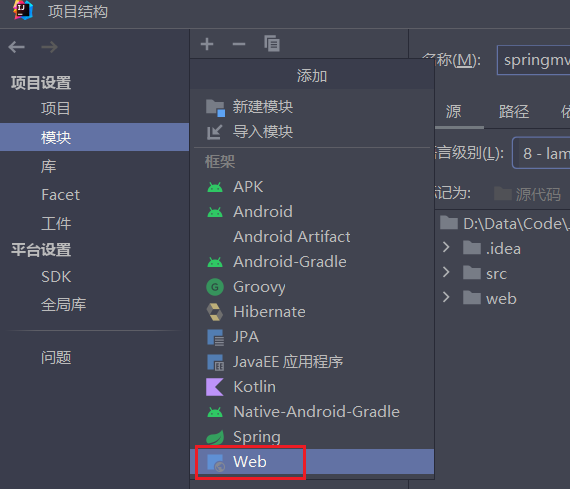
2、打包方式为 War 包
3、引入依赖
<dependencies>
    <!-- SpringMVC -->
    <dependency>
        <groupId>org.springframework</groupId>
        <artifactId>spring-webmvc</artifactId>
        <version>5.3.1</version>
    </dependency>
    <!-- 日志 -->
    <dependency>
        <groupId>ch.qos.logback</groupId>
        <artifactId>logback-classic</artifactId>
        <version>1.2.3</version>
    </dependency>
    <!-- ServletAPI -->
    <dependency>
        <groupId>javax.servlet</groupId>
        <artifactId>javax.servlet-api</artifactId>
        <version>3.1.0</version>
        <scope>provided</scope>
    </dependency>
    <!-- Spring5和Thymeleaf整合包 -->
    <dependency>
        <groupId>org.thymeleaf</groupId>
        <artifactId>thymeleaf-spring5</artifactId>
        <version>3.0.12.RELEASE</version>
    </dependency>
</dependencies>注:由于 Maven 的传递性,我们不必将所有需要的包全部配置依赖,而是配置最顶端的依赖,其他靠
传递性导入
配置web.xml
注册 SpringMVC 的前端控制器 DispatcherServlet
默认配置方式
此配置作用下,SpringMVC 的配置文件默认位于 WEB-INF 下,默认名为web.xml
<!-- 配置SpringMVC的前端控制器,对浏览器发送的请求统一进行处理 -->
<servlet>
    <servlet-name>springMVC</servlet-name>
    <servlet-class>org.springframework.web.servlet.DispatcherServlet</servletclass>
</servlet>
<servlet-mapping>
    <servlet-name>springMVC</servlet-name>
    <!--
        设置springMVC的核心控制器所能处理的请求的请求路径
        /所匹配的请求可以是/login或.html或.js或.css方式的请求路径
        但是/不能匹配.jsp请求路径的请求
        -->
    <url-pattern>/</url-pattern>
</servlet-mapping>扩展配置方式
可通过 init-param 标签设置 SpringMVC 配置文件的位置和名称,通过 load-on-startup 标签设置 SpringMVC 前端控制器 DispatcherServlet 的初始化时间
<!-- 配置SpringMVC的前端控制器,对浏览器发送的请求统一进行处理 -->
<servlet>
    <servlet-name>springMVC</servlet-name>
    <servlet-class>org.springframework.web.servlet.DispatcherServlet</servletclass>
    <!-- 通过初始化参数指定SpringMVC配置文件的位置和名称 -->
    <init-param>
        <!-- contextConfigLocation为固定值 -->
        <param-name>contextConfigLocation</param-name>
        <!-- 使用classpath:表示从类路径查找配置文件,例如maven工程中的src/main/resources -->
        <param-value>classpath:springMVC.xml</param-value>
    </init-param>
    <!--
        作为框架的核心组件,在启动过程中有大量的初始化操作要做
        而这些操作放在第一次请求时才执行会严重影响访问速度
        因此需要通过此标签将启动控制DispatcherServlet的初始化时间提前到服务器启动时
        -->
    <load-on-startup>1</load-on-startup>
</servlet>
<servlet-mapping>
    <servlet-name>springMVC</servlet-name>
    <!--
        设置springMVC的核心控制器所能处理的请求的请求路径
        /所匹配的请求可以是/login或.html或.js或.css方式的请求路径
        但是/不能匹配.jsp请求路径的请求
    -->
    <url-pattern>/</url-pattern>
</servlet-mapping>注:
<url-pattern>标签中使用/和/*的区别:
/所匹配的请求可以是/login或.html或.js或css方式的请求路径,但是不能匹配.jsp请求路径的请求,因此就可以避免在访问 JSP 页面时,该请求被 DispatcherServlet 处理,从而找不到相应的页面
/*能够匹配所有的请求,例如,在使用过滤器时,需要对所有的请求进行过滤,就需要这样的写法
创建请求控制器
由于前端控制器对浏览器发送的请求进行了统一的处理,但是具体的请求有不同的处理过程,因此需要创建处理具体请求的类,即请求控制器
请求控制器中每一个处理请求的方法成为控制器方法
因为 SpringMVC 的控制器由一个 POJO(普通的 Java 类)担任,因此需要通过 @Controller 注解将其标识为一个控制层组件,交给 Spring 的 IOC 容器管理,此时 SpringMVC 才能够识别控制器
@Controller
public class HelloController {
}创建SpringMVC的配置文件
<?xml version="1.0" encoding="UTF-8"?>
<beans xmlns="http://www.springframework.org/schema/beans"
       xmlns:xsi="http://www.w3.org/2001/XMLSchema-instance"
       xmlns:context="http://www.springframework.org/schema/context"
       xmlns:mvc="http://www.springframework.org/schema/mvc"
       xmlns:jpa="http://www.springframework.org/schema/data/jpa"
       xmlns:tx="http://www.springframework.org/schema/tx"
       xsi:schemaLocation="http://www.springframework.org/schema/beans http://www.springframework.org/schema/beans/spring-beans.xsd
       http://www.springframework.org/schema/context http://www.springframework.org/schema/context/spring-context.xsd
       http://www.springframework.org/schema/mvc http://www.springframework.org/schema/mvc/spring-mvc.xsd
       http://www.springframework.org/schema/data/jpa http://www.springframework.org/schema/data/jpa/spring-jpa.xsd
       http://www.springframework.org/schema/tx http://www.springframework.org/schema/tx/spring-tx.xsd">

    <!-- 自动扫描包 -->
    <context:component-scan base-package="xyz.kbws.controller"/>
    <!-- 配置Thymeleaf视图解析器 -->
    <bean id="viewResolver" class="org.thymeleaf.spring5.view.ThymeleafViewResolver">
        <property name="order" value="1"/>
        <property name="characterEncoding" value="UTF-8"/>
        <property name="templateEngine">
            <bean class="org.thymeleaf.spring5.SpringTemplateEngine">
                <property name="templateResolver">
                    <bean
                            class="org.thymeleaf.spring5.templateresolver.SpringResourceTemplateResolver">
                        <!-- 视图前缀 -->
                        <property name="prefix" value="/WEB-INF/templates/"/>
                        <!-- 视图后缀 -->
                        <property name="suffix" value=".html"/>
                        <property name="templateMode" value="HTML5"/>
                        <property name="characterEncoding" value="UTF-8" />
                    </bean>
                </property>
            </bean>
        </property>
    </bean>
    <!--
        处理静态资源,例如html、js、css、jpg
        若只设置该标签,则只能访问静态资源,其他请求则无法访问
        此时必须设置<mvc:annotation-driven/>解决问题
    -->
    <mvc:default-servlet-handler/>
    <!-- 开启mvc注解驱动 -->
    <mvc:annotation-driven>
        <mvc:message-converters>
            <!-- 处理响应中文内容乱码 -->
            <bean
                    class="org.springframework.http.converter.StringHttpMessageConverter">
                <property name="defaultCharset" value="UTF-8" />
                <property name="supportedMediaTypes">
                    <list>
                        <value>text/html</value>
                        <value>application/json</value>
                    </list>
                </property>
            </bean>
        </mvc:message-converters>
    </mvc:annotation-driven>

</beans>测试
1、访问首页
在请求控制器中创建处理请求的方法
// @RequestMapping注解:处理请求和控制器方法之间的映射关系
// @RequestMapping注解的value属性可以通过请求地址匹配请求,/表示的当前工程的上下文路径
// localhost:8080/springMVC/
@RequestMapping("/")
public String index() {
    //设置视图名称
    return "index";
}2、通过超链接跳转到指定页面
在主页 index.html 中设置超链接
<!DOCTYPE html>
<html lang="en" xmlns:th="http://www.thymeleaf.org">
  <head>
    <meta charset="UTF-8">
    <title>首页</title>
  </head>
  <body>
    <h1>首页</h1>
    <a th:href="@{/hello}">HelloWorld</a><br/>
  </body>
</html>在请求控制器中创建处理请求的方法
@RequestMapping("/hello")
public String HelloWorld() {
        return "target";
}总结
浏览器发送请求,若请求地址符合前端控制器的 url-pattern,该请求就会被前端控制器 DispatcherServlet 处理。前端控制器会读取 SpringMVC 的核心配置文件,通过扫描组件找到控制器
将请求地址和控制器中 @RequestMapping 注解的 value 属性值进行匹配,若匹配成功,该注解所标识的控制器方法就是处理请求的方法。处理请求的方法需要返回一个字符串类型的视图名称,该视图名称会被视图解析器解析,加上前缀和后缀组成视图的路径,通过 Thymeleaf 对视图进行渲染,最终转发到视图所对应页面
@RequestMapping注解
作用
@RequestMapping 注解将请求和处理请求的控制器方法关联起来,建立映射关系
SpringMVC 接收到指定的请求,就会来找到在映射关系中对应的控制器方法来处理这个请求
位置
@RequestMapping 标识一个类:设置映射请求的请求路径的初始信息
@RequestMapping 标识一个方法:设置映射请求请求路径的具体信息
@Controller
@RequestMapping("/test")
public class RequestMappingController {
    //此时请求映射所映射的请求的请求路径为:/test/testRequestMapping
    @RequestMapping("/testRequestMapping")
    public String testRequestMapping(){
        return "success";
    }
}Value属性
@RequestMapping 注解的 value 属性通过请求的请求地址匹配请求映射;是一个字符串类型的数组,表示该请求映射能够匹配多个请求地址所对应的请求;该属性必须设置,至少通过请求地址匹配请求映射
<a th:href="@{/testRequestMapping}">测试@RequestMapping的value属性--
>/testRequestMapping</a><br>
<a th:href="@{/test}">测试@RequestMapping的value属性-->/test</a><br>@RequestMapping(
value = {"/testRequestMapping", "/test"}
)
public String testRequestMapping(){
return "success";
}Method属性
该属性是通过请求方式(GET 或 POST)来匹配请求映射
是一个RequestMethod类型的数组,表示该请求映射能够匹配多种请求方式的请求
若当前请求的请求地址满足请求映射的value属性,但是请求方式不满足method属性,则浏览器报错
405:Request method 'POST' not supported
<a th:href="@{/test}">测试@RequestMapping的value属性-->/test</a><br>
<form th:action="@{/test}" method="post">
  <input type="submit">
</form>@RequestMapping(
value = {"/testRequestMapping", "/test"},
method = {RequestMethod.GET, RequestMethod.POST}
)
public String testRequestMapping(){
return "success";
}注:
对于处理指定请求方式的控制器方法,SpringMVC 中提供了 @RequestMapping 的派生注解
-
处理 GET 请求:@GetMapping
-
处理 POST 请求:@PostMapping
-
处理 PUT 请求:@PutMapping
-
处理 DELETE 请求:@DeleteMapping
Params属性
@RequestMapping 注解的 params 属性通过请求的请求参数匹配请求映射
@RequestMapping注解的params属性是一个字符串类型的数组,可以通过四种表达式设置请求参数
和请求映射的匹配关系
param:要求请求映射所匹配的请求必须携带 param 请求参数
!param:要求请求映射所匹配的请求必须不能携带 param 请求参数
param=value:要求请求映射所匹配的请求必须携带 param 请求参数且 param=value
param!=value:要求请求映射所匹配的请求必须携带 param 请求参数但是 param!=value
<a th:href="@{/test(username='admin',password=123456)">测试@RequestMapping的
params属性-->/test</a><br>@RequestMapping(
value = {"/testRequestMapping", "/test"}
,method = {RequestMethod.GET, RequestMethod.POST}
,params = {"username","password!=123456"}
)
public String testRequestMapping(){
return "success";
}注:
若当前请求满足注解的 value 属性和 method 属性,但是不满足 params 属性,此时页面会报错:
Parameter conditions "username, password!=123456" not met for actual
request parameters: username={admin}, password={123456}
Headers属性
@RequestMapping 注解的 headers 属性通过请求的请求头信息匹配请求映射
@RequestMapping 注解的 headers 属性是一个字符串类型的数组,可以通过四种表达式设置请求头信
息和请求映射的匹配关系
header:要求请求映射所匹配的请求必须携带 header 请求头信息
!header:要求请求映射所匹配的请求必须不能携带 header 请求头信息
header=value:要求请求映射所匹配的请求必须携带 header 请求头信息且 header=value
header!=value:要求请求映射所匹配的请求必须携带 header 请求头信息且 header!=value
若当前请求满足 @RequestMapping 注解的 value 和 method 属性,但是不满足 headers 属性,此时页面显示404错误,即资源未找到
Ant风格的路径
?:表示任意的单个字符
*:表示任意的0个或多个字符
**:表示任意层数的任意目录
注意:在使用**时,只能使用/**/xxx的方式
路径中的占位符
原始方式:/deleteUser?id=1
Rest 方式:/user/delete/1
SpringMVC 路径中的占位符常用于 RESTful 风格中,当请求路径中将某些数据通过路径的方式传输到服
务器中,就可以在相应的 @RequestMapping 注解的 value 属性中通过占位符 {xxx} 表示传输的数据,在
通过 @PathVariable 注解,将占位符所表示的数据赋值给控制器方法的形参
<a th:href="@{/testRest/1/admin}">测试路径中的占位符-->/testRest</a><br>@RequestMapping("/testRest/{id}/{username}")
public String testRest(@PathVariable("id") String id, @PathVariable("username")
String username){
System.out.println("id:"+id+",username:"+username);
return "success";
}
//最终输出的内容为-->id:1,username:adminSpringMVC获取参数
ServletAPI
将 HttpServletRequest 作为控制器方法的形参,此时 HttpServletRequest 类型的参数表示封装了当前请求的请求报文的对象
@RequestMapping("/testParam")
public String testParam(HttpServletRequest request){
    String username = request.getParameter("username");
    String password = request.getParameter("password");
    System.out.println("username:"+username+",password:"+password);
    return "success";
}控制器方法的形参
在控制器方法的形参位置,设置和请求参数同名的形参,当浏览器发送请求,匹配到请求映射时,在
DispatcherServlet 中就会将请求参数赋值给相应的形参
<a th:href="@{/testParam(username='admin',password=123456)}">测试获取请求参数--
>/testParam</a><br>@RequestMapping("/testParam")
public String testParam(String username, String password){
System.out.println("username:"+username+",password:"+password);
return "success";
}注:
-
若请求所传输的请求参数中有多个同名的请求参数,此时可以在控制器方法的形参中设置字符串数组或者字符串类型的形参接收此请求参数
-
若使用字符串数组类型的形参,此参数的数组中包含了每一个数据
-
若使用字符串类型的形参,此参数的值为每个数据中间使用逗号拼接的结果
@ReuqestParam
@RequestParam 是将请求参数和控制器方法的形参创建映射关系
@RequestParam 注解一共有三个属性:
-
value:指定为形参赋值的请求参数的参数名 -
required:设置是否必须传输此请求参数,默认值为 true,若设置为 true 时,则当前请求必须传输 value 所指定的请求参数,若没有传输该请求参数,且没有设置 defaultValue 属性,则页面报错400:Required String parameter 'xxx' is not present;若设置为 false,则当前请求不是必须传输 value 所指定的请求参数,若没有传输,则注解所标识的形参的值为 null -
defaultValue:不管 required 属性值为 true 或 false,当 value 所指定的请求参数没有传输或传输的值为""时,则使用默认值为形参赋值
@RequestHeader
@RequestHeader 是将请求头信息和控制器方法的形参创建映射关系
@RequestHeader 注解一共有三个属性:value、required、defaultValue,用法同 @RequestParam
@CookieValue
@CookieValue 是将 cookie 数据和控制器方法的形参创建映射关系
@CookieValue 注解一共有三个属性:value、required、defaultValue,用法同 @RequestParam
通过POJO获取请求参数
可以在控制器方法的形参位置设置一个实体类类型的形参,此时若浏览器传输的请求参数的参数名和实体类中的属性名一致,那么请求参数就会为此属性赋值
<form th:action="@{/testpojo}" method="post">
    用户名:<input type="text" name="username"><br>
    密码:<input type="password" name="password"><br>
    性别:<input type="radio" name="sex" value="男">男<input type="radio"name="sex" value="女">女<br>
    年龄:<input type="text" name="age"><br>
    邮箱:<input type="text" name="email"><br>
    <input type="submit">
</form>@RequestMapping("/testpojo")
public String testPOJO(User user){
System.out.println(user);
return "success";
}
//最终结果-->User{id=null, username='张三', password='123', age=23, sex='男',
email='123@qq.com'}请求参数乱码问题
解决获取请求参数的乱码问题,可以使用 SpringMVC 提供的编码过滤器 CharacterEncodingFilter,但是必须在 web.xml 中进行注册
<!--配置springMVC的编码过滤器-->
<filter>
    <filter-name>CharacterEncodingFilter</filter-name>
    <filter-class>org.springframework.web.filter.CharacterEncodingFilter</filter-class>
    <init-param>
        <param-name>encoding</param-name>
        <param-value>UTF-8</param-value>
    </init-param>
    <init-param>
        <param-name>forceEncoding</param-name>
        <param-value>true</param-value>
    </init-param>
</filter>
<filter-mapping>
    <filter-name>CharacterEncodingFilter</filter-name>
    <url-pattern>/*</url-pattern>
</filter-mapping>注意:SpringMVC 中处理编码的过滤器一定要配置到其他过滤器之前,否则无效!!!
域对象共享数据
ServletAPI
使用 ServletAPI 向 Request 域对象共享数据
@RequestMapping("/testServletAPI")
public String testServletAPI(HttpServletRequest request){
    request.setAttribute("testScope", "hello,servletAPI");
    return "success";
}ModelAndView
@RequestMapping("/testModelAndView")
public ModelAndView testModelAndView(){
    /**
     * ModelAndView有Model和View的功能
     * Model主要用于向请求域共享数据
     * View主要用于设置视图,实现页面跳转
     */
    ModelAndView mav = new ModelAndView();
    //向请求域共享数据
    mav.addObject("testScope", "hello,ModelAndView");
    //设置视图,实现页面跳转
    mav.setViewName("success");
    return mav;
}Model
@RequestMapping("/testModel")
public String testModel(Model model){
    model.addAttribute("testScope", "hello,Model");
    return "success";
}Map
@RequestMapping("/testMap")
public String testMap(Map<String, Object> map){
    map.put("testScope", "hello,Map");
    return "success";
}ModelMap
@RequestMapping("/testModelMap")
public String testModelMap(ModelMap modelMap){
    modelMap.addAttribute("testScope", "hello,ModelMap");
    return "success";
}Model、ModelMap、Map的关系
Model、ModelMap、Map 类型的参数其实本质上都是 BindingAwareModelMap 类型的
public interface Model{}
public class ModelMap extends LinkedHashMap<String, Object> {}
public class ExtendedModelMap extends ModelMap implements Model {}
public class BindingAwareModelMap extends ExtendedModelMap {}向Session域共享数据
@RequestMapping("/testSession")
public String testSession(HttpSession session){
    session.setAttribute("testSessionScope", "hello,session");
    return "success";
}向Application域共享数据
@RequestMapping("/testApplication")
public String testApplication(HttpSession session){
    ServletContext application = session.getServletContext();
    application.setAttribute("testApplicationScope", "hello,application");
    return "success";
}SpringMVC的视图
SpringMVC 中的视图是 View 接口,视图的作用渲染数据,将模型Model中的数据展示给用户
SpringMVC 视图的种类很多,默认有转发视图和重定向视图
当工程引入 jstl 的依赖,转发视图会自动转换为 JstlView
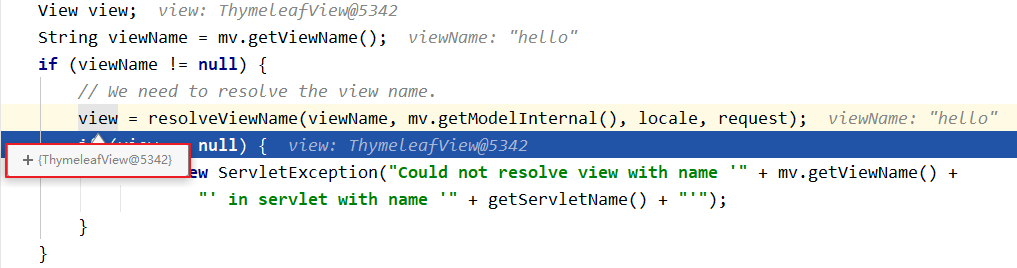
若使用的视图技术为 Thymeleaf,在 SpringMVC 的配置文件中配置了 Thymeleaf 的视图解析器,由此视图解析器解析之后所得到的是 ThymeleafView
ThymeleafView
当控制器方法中所设置的视图名称没有任何前缀时,此时的视图名称会被 SpringMVC 配置文件中所配置的视图解析器解析,视图名称拼接视图前缀和视图
后缀所得到的最终路径,会通过转发的方式实现跳转
@RequestMapping("/testHello")
public String testHello(){
        return "hello";
}
转发视图
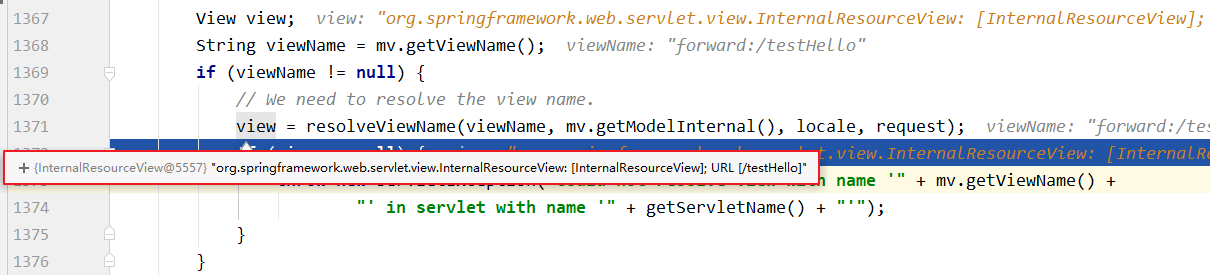
SpringMVC 中默认的转发视图是 InternalResourceView
SpringMVC 中创建转发视图的情况:
当控制器方法中所设置的视图名称以"forward:"为前缀时,创建 InternalResourceView 视图,此时的视图名称不会被 SpringMVC 配置文件中所配置的视图解析器解析,而是会将前缀"forward:"去掉,剩余部分作为最终路径通过转发的方式实现跳转
例如"forward:/","forward:/employee"
@RequestMapping("/testForward")
public String testForward(){
        return "forward:/testHello";
}
重定向视图
SpringMVC 中默认的重定向视图是 RedirectView
当控制器方法中所设置的视图名称以"redirect:"为前缀时,创建 RedirectView 视图,此时的视图名称不
会被 SpringMVC 配置文件中所配置的视图解析器解析,而是会将前缀"redirect:"去掉,剩余部分作为最终路径通过重定向的方式实现跳转
例如"redirect:/","redirect:/employee"
@RequestMapping("/testRedirect")
public String testRedirect(){
        return "redirect:/testHello";
}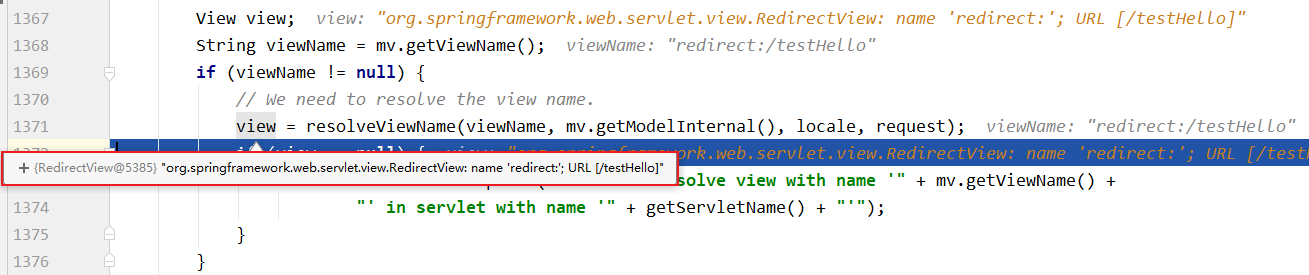
注:重定向视图在解析时,会先将redirect:前缀去掉,然后去判断剩余部分是否以/开头,若是则会自动拼接上下文路径
视图控制器view-controller
当控制器方法中,仅仅用来实现页面跳转,即只需要设置视图名称时,可以将控制器方法使用view-controller标签进行表示
<!--
    path:设置处理的请求地址
    view-name:设置请求地址所对应的视图名称
-->
<mvc:view-controller path="/testView" view-name="success"></mvc:view-controller>注:
当 SpringMVC 中设置任何一个view-controller时,其他控制器中的请求映射将全部失效,此时需
要在 SpringMVC 的核心配置文件中设置开启 mvc 注解驱动的标签:<mvc:annotation-driven />
RESTful
具体说,就是 HTTP 协议里面,四个表示操作方式的动词:GET、POST、PUT、DELETE
它们分别对应四种基本操作:GET 用来获取资源,POST 用来新建资源,PUT 用来更新资源,DELETE
用来删除资源
REST 风格提倡 URL 地址使用统一的风格设计,从前到后各个单词使用斜杠分开,不使用问号键值对方式携带请求参数,而是将要发送给服务器的数据作为 URL 地址的一部分,以保证整体风格的一致性
HiddenHttpMethodFilter
由于浏览器只支持发送 get 和 post 方式的请求,那么该如何发送put和delete请求呢?
SpringMVC 提供了 HiddenHttpMethodFilter将POST请求转换为DELETE或PUT请求
HiddenHttpMethodFilter 处理 put 和 delete 请求的条件:
-
当前请求的请求方式必须为 post
-
当前请求必须传输请求参数
_method
满足以上条件,HiddenHttpMethodFilter 过滤器就会将当前请求的请求方式转换为请求参数
_method的值,因此请求参数_method的值才是最终的请求方式
在web.xml中注册HiddenHttpMethodFilter
<filter>
    <filter-name>HiddenHttpMethodFilter</filter-name>
    <filter-class>org.springframework.web.filter.HiddenHttpMethodFilter</filterclass>
</filter>
<filter-mapping>
    <filter-name>HiddenHttpMethodFilter</filter-name>
    <url-pattern>/*</url-pattern>
</filter-mapping>注意:
在 web.xml 中注册过滤器时,必须先注册 CharaterEncodingFilter,再注册 HiddenHttpMethodFilter
原因:
-
在 CharaterEncodingFilter 中通过
request.setCharacterEncoding(encoding)方法设置字符集 -
request.setCharacterEncoding(encoding)方法要求前面不能有任何获取参数的操作 -
而 HiddenHttpMethodFilter 中有获取参数的方法:
String paramValue = request.getParameter(this.methodParam);
SpringMVC处理Ajax请求
@RequestBody
@RequestBody 可以获取请求体信息,使用 @RequestBody 注解标识控制器方法的形参,当前请求的请求体就会为当前注解所标识的形参赋值
<!--此时必须使用post请求方式,因为get请求没有请求体-->
<form th:action="@{/test/RequestBody}" method="post">
    用户名:<input type="text" name="username"><br>
    密码:<input type="password" name="password"><br>
    <input type="submit">
</form>@RequestMapping("/test/RequestBody")
public String testRequestBody(@RequestBody String requestBody){
System.out.println("requestBody:"+requestBody);
return "success";
}输出结果:
requestBody:username=admin&password=123456
获取JSON格式的请求参数
使用 Ajax 发送请求,浏览器发送到服务器的请求参数有两种格式:
-
name=value&name=value...,此时的请求参数可以通过request.getParameter()获取,对应 SpringMVC 中,可以通过控制器方法的形参获取此类请求参数 -
{key:value,key:value,...},此时无法通过request.getParameter()获取;对此,有两种方法获取参数 -
使用操作 JSON 相关的 jar 包:Gson 或者 Jackson,处理这种请求参数
-
在 SpringMVC 中,直接使用 @RequestBody 注解标识控制器方法的形参即可将此类请求参数转换为 Java 对象
使用 @RequestBody 获取 JSON 格式的请求参数的条件:
1、导入 Jackson 的依赖
<dependency>
    <groupId>com.fasterxml.jackson.core</groupId>
    <artifactId>jackson-databind</artifactId>
    <version>2.12.1</version>
</dependency>2、SpringMVC 的配置文件中设置开启 mvc 的注解驱动
<!--开启mvc的注解驱动-->
<mvc:annotation-driven />3、在控制器方法的形参位置,设置 JSON 格式的请求参数要转换成的 Java 类型(实体类或 map)的参
数,并使用 @RequestBody 注解标识
<input type="button" value="测试@RequestBody获取json格式的请求参数"@click="testRequestBody()"><br>
<script type="text/javascript" th:src="@{/js/vue.js}"></script>
<script type="text/javascript" th:src="@{/js/axios.min.js}"></script>
<script type="text/javascript">
    var vue = new Vue({
        el:"#app",
        methods:{
            testRequestBody(){
                axios.post(
                    "/SpringMVC/test/RequestBody/json",
                    {username:"admin",password:"123456"}
                ).then(response=>{
                    console.log(response.data);
                });
            }
        }
    });
</script>//将json格式的数据转换为map集合
@RequestMapping("/test/RequestBody/json")
public void testRequestBody(@RequestBody Map<String, Object> map,HttpServletResponse response) throws IOException {
System.out.println(map);
//{username=admin, password=123456}
response.getWriter().print("hello,axios");
}
//将json格式的数据转换为实体类对象
@RequestMapping("/test/RequestBody/json")
public void testRequestBody(@RequestBody User user, HttpServletResponseresponse) throws IOException {
System.out.println(user);
//User{id=null, username='admin', password='123456', age=null,gender='null'}
response.getWriter().print("hello,axios");
}@ResponseBody
@ResponseBody 用于标识一个控制器方法,可以将该方法的返回值直接作为响应报文的响应体响应到浏览器
@RequestMapping("/testResponseBody")
public String testResponseBody(){
    //此时会跳转到逻辑视图success所对应的页面
    return "success";
}
@RequestMapping("/testResponseBody")
@ResponseBody
public String testResponseBody(){
    //此时响应浏览器数据success
    return "success";
}返回JSON数据到浏览器
服务器处理 Ajax 请求之后,大多数情况都需要向浏览器响应一个 Java 对象,此时必须将java对象转换为
JSON 字符串才可以响应到浏览器,之前我们使用操作 JSON 数据的 jar 包 Gson 或 Jackson 将 Java 对象转换为 JSON 字符串。在 SpringMVC 中,我们可以直接使用 @ResponseBody 注解实现此功能
@ResponseBody 响应浏览器 JSON 数据的条件:
1、导入 Jackson 依赖
<dependency>
    <groupId>com.fasterxml.jackson.core</groupId>
    <artifactId>jackson-databind</artifactId>
    <version>2.12.1</version>
</dependency>2、SpringMVC 是配置文件中设置开启 mvc 注解驱动
<!--开启mvc的注解驱动-->
<mvc:annotation-driven />3、使用 @ResponseBody 注解标识控制器方法,在方法中,将需要转换为 JSON 字符串并响应到浏览器
的 Java 对象作为控制器方法的返回值,此时 SpringMVC 就可以将此对象直接转换为 JSON 字符串并响应到浏览器
<input type="button" value="测试@ResponseBody响应浏览器json格式的数据"@click="testResponseBody()"><br>
<script type="text/javascript" th:src="@{/js/vue.js}"></script>
<script type="text/javascript" th:src="@{/js/axios.min.js}"></script>
<script type="text/javascript">
    var vue = new Vue({
        el:"#app",
        methods:{
            testResponseBody(){
                axios.post("/SpringMVC/test/ResponseBody/json").then(response=>{
                    console.log(response.data);
                });
            }
        }
    });
</script>//响应浏览器list集合
@RequestMapping("/test/ResponseBody/json")
@ResponseBody
public List<User> testResponseBody(){
User user1 = new User(1001,"admin1","123456",23,"男");
User user2 = new User(1002,"admin2","123456",23,"男");
User user3 = new User(1003,"admin3","123456",23,"男");
List<User> list = Arrays.asList(user1, user2, user3);
return list;
}
//响应浏览器map集合
@RequestMapping("/test/ResponseBody/json")
@ResponseBody
public Map<String, Object> testResponseBody(){
User user1 = new User(1001,"admin1","123456",23,"男");
User user2 = new User(1002,"admin2","123456",23,"男");
User user3 = new User(1003,"admin3","123456",23,"男");
Map<String, Object> map = new HashMap<>();
map.put("1001", user1);
map.put("1002", user2);
map.put("1003", user3);
return map;
}
//响应浏览器实体类对象
@RequestMapping("/test/ResponseBody/json")
@ResponseBody
public User testResponseBody(){
return user;
}@RestController
@RestController 注解是 SpringMVC 提供的一个复合注解,标识在控制器的类上,就相当于为类添加了
@Controller 注解,并且为其中的每个方法添加了 @ResponseBody 注解
文件上传和下载
文件下载
ResponseEntity 用于控制器方法的返回值类型,该控制器方法的返回值就是响应到浏览器的响应报文
使用 ResponseEntity 实现下载文件的功能
@RequestMapping("/testDown")
public ResponseEntity<byte[]> testResponseEntity(HttpSession session) throws
    IOException {
    //获取ServletContext对象
    ServletContext servletContext = session.getServletContext();
    //获取服务器中文件的真实路径
    String realPath = servletContext.getRealPath("/static/img/1.jpg");
    //创建输入流
    InputStream is = new FileInputStream(realPath);
    //创建字节数组
    byte[] bytes = new byte[is.available()];
    //将流读到字节数组中
    is.read(bytes);
    //创建HttpHeaders对象设置响应头信息
    MultiValueMap<String, String> headers = new HttpHeaders();
    //设置要下载方式以及下载文件的名字
    headers.add("Content-Disposition", "attachment;filename=1.jpg");
    //设置响应状态码
    HttpStatus statusCode = HttpStatus.OK;
    //创建ResponseEntity对象
    ResponseEntity<byte[]> responseEntity = new ResponseEntity<>(bytes, headers,statusCode);
    //关闭输入流
    is.close();
    return responseEntity;
}文件上传
文件上传要求 form 表单的请求方式必须为 POST,并且添加属性enctype="multipart/form-data"
SpringMVC 中将上传的文件封装到 MultipartFile 对象中,通过此对象可以获取文件相关信息
上传步骤:
1、添加依赖
<!-- https://mvnrepository.com/artifact/commons-fileupload/commons-fileupload -->
<dependency>
    <groupId>commons-fileupload</groupId>
    <artifactId>commons-fileupload</artifactId>
    <version>1.3.1</version>
</dependency>2、在配置文件中添加配置
<!--必须通过文件解析器的解析才能将文件转换为MultipartFile对象-->
<bean id="multipartResolver"
class="org.springframework.web.multipart.commons.CommonsMultipartResolver">
</bean>3、控制层方法
@RequestMapping("/testUp")
public String testUp(MultipartFile photo, HttpSession session) throws IOException {
    //获取上传的文件的文件名
    String fileName = photo.getOriginalFilename();
    //处理文件重名问题
    String hzName = fileName.substring(fileName.lastIndexOf("."));
    fileName = UUID.randomUUID().toString() + hzName;
    //获取服务器中photo目录的路径
    ServletContext servletContext = session.getServletContext();
    String photoPath = servletContext.getRealPath("photo");
    File file = new File(photoPath);
    if(!file.exists()){
        file.mkdir();
    }
    String finalPath = photoPath + File.separator + fileName;
    //实现上传功能
    photo.transferTo(new File(finalPath));
    return "success";
}拦截器
配置
SpringMVC 中的拦截器用于拦截控制器方法的执行,需要实现 HandlerInterceptor
SpringMVC的拦截器必须在SpringMVC的配置文件中进行配置:
<bean class="com.atguigu.interceptor.FirstInterceptor"></bean>
<ref bean="firstInterceptor"></ref>
<!-- 以上两种配置方式都是对DispatcherServlet所处理的所有的请求进行拦截 -->
<mvc:interceptor>
    <mvc:mapping path="/**"/>
    <mvc:exclude-mapping path="/testRequestEntity"/>
    <ref bean="firstInterceptor"></ref>
</mvc:interceptor>
<!--
    以上配置方式可以通过ref或bean标签设置拦截器,通过mvc:mapping设置需要拦截的请求,
    通过mvc:exclude-mapping设置需要排除的请求,即不需要拦截的请求
-->拦截器的方法
SpringMVC 中的拦截器有三个抽象方法:
preHandle:控制器方法执行之前执行preHandle(),其 boolean 类型的返回值表示是否拦截或放行,返回 true 为放行,即调用控制器方法;返回 false 表示拦截,即不调用控制器方法
postHandle:控制器方法执行之后执行postHandle()
afterCompletion:处理完视图和模型数据,渲染视图完毕之后执行afterCompletion()
多个拦截器的执行顺序
①若每个拦截器的preHandle()都返回 true
此时多个拦截器的执行顺序和拦截器在 SpringMVC 的配置文件的配置顺序有关:
preHandle()会按照配置的顺序执行,而postHandle()和afterCompletion()会按照配置的反序执行
②若某个拦截器的preHandle()返回了 false
preHandle()返回 false 和它之前的拦截器的preHandle()都会执行,postHandle()都不执行,返回 false 的拦截器之前的拦截器的afterCompletion()会执行
异常处理器
基于配置的异常处理
SpringMVC 提供了一个处理控制器方法执行过程中所出现的异常的接口:HandlerExceptionResolver
HandlerExceptionResolver 接口的实现类有:DefaultHandlerExceptionResolver 和
SimpleMappingExceptionResolver
SpringMVC 提供了自定义的异常处理器 SimpleMappingExceptionResolver,使用方式:
<bean
      class="org.springframework.web.servlet.handler.SimpleMappingExceptionResolver">
    <property name="exceptionMappings">
        <props>
            <!--
                properties的键表示处理器方法执行过程中出现的异常
                properties的值表示若出现指定异常时,设置一个新的视图名称,跳转到指定页面
                        -->
            <prop key="java.lang.ArithmeticException">error</prop>
        </props>
    </property>
    <!--
                exceptionAttribute属性设置一个属性名,将出现的异常信息在请求域中进行共享
        -->
    <property name="exceptionAttribute" value="ex"></property>
</bean>基于注解的异常处理
//@ControllerAdvice将当前类标识为异常处理的组件
@ControllerAdvice
public class ExceptionController {
    //@ExceptionHandler用于设置所标识方法处理的异常
    @ExceptionHandler(ArithmeticException.class)
    //ex表示当前请求处理中出现的异常对象
    public String handleArithmeticException(Exception ex, Model model){
        model.addAttribute("ex", ex);
        return "error";
    }
}注解配置SpringMVC
使用配置类和注解代替 web.xml 和 SpringMVC 配置文件的功能
创建初始化类
该类的作用是代替 web.xml
在 Servlet3.0 环境中,容器会在类路径中查找实现javax.servlet.ServletContainerInitializer接口的类,如果找到的话就用它来配置 Servlet 容器。 Spring 提供了这个接口的实现,名为
SpringServletContainerInitializer,这个类反过来又会查找实现 WebApplicationInitializer 的类并将配置的任务交给它们来完成。Spring3.2 引入了一个便利的 WebApplicationInitializer 基础实现,名为AbstractAnnotationConfigDispatcherServletInitializer,当我们的类扩展了
AbstractAnnotationConfigDispatcherServletInitializer并将其部署到 Servlet3.0 容器的时候,容器会自动发现它,并用它来配置 Servlet 上下文
public class WebInit extends
    AbstractAnnotationConfigDispatcherServletInitializer {
    /**
     * 指定spring的配置类
     * @return
         */
    @Override
    protected Class<?>[] getRootConfigClasses() {
        return new Class[]{SpringConfig.class};
    }
    /**
     * 指定SpringMVC的配置类
     * @return
     */
    @Override
    protected Class<?>[] getServletConfigClasses() {
        return new Class[]{WebConfig.class};
    }
    /**
     * 指定DispatcherServlet的映射规则,即url-pattern
     * @return
     */
    @Override
    protected String[] getServletMappings() {
        return new String[]{"/"};
    }
    /**
     * 添加过滤器
     * @return
     */
    @Override
    protected Filter[] getServletFilters() {
        CharacterEncodingFilter encodingFilter = new CharacterEncodingFilter();
        encodingFilter.setEncoding("UTF-8");
        encodingFilter.setForceRequestEncoding(true);
        HiddenHttpMethodFilter hiddenHttpMethodFilter = newHiddenHttpMethodFilter();
        return new Filter[]{encodingFilter, hiddenHttpMethodFilter};
    }
}创建SpringConfig配置类
该类用于替代 Spring 的配置文件
@Configuration
public class SpringConfig {
    //ssm整合之后,spring的配置信息写在此类中
}创建WebConfig配置类
该类用于替代 SpringMVC 的配置文件
@Configuration
//扫描组件
@ComponentScan("com.atguigu.mvc.controller")
//开启MVC注解驱动
@EnableWebMvc
public class WebConfig implements WebMvcConfigurer {
    //使用默认的servlet处理静态资源
    @Override
    public void configureDefaultServletHandling(DefaultServletHandlerConfigurer configurer) {
        configurer.enable();
    }
    //配置文件上传解析器
    @Bean
    public CommonsMultipartResolver multipartResolver(){
        return new CommonsMultipartResolver();
    }
    //配置拦截器
    @Override
    public void addInterceptors(InterceptorRegistry registry) {
        FirstInterceptor firstInterceptor = new FirstInterceptor();
        registry.addInterceptor(firstInterceptor).addPathPatterns("/**");
    }
    //配置视图控制
    /*@Override
        public void addViewControllers(ViewControllerRegistry registry) {
                registry.addViewController("/").setViewName("index");
        }*/
    //配置异常映射
    /*@Override
        public void configureHandlerExceptionResolvers(List<HandlerExceptionResolver> resolvers) {
                SimpleMappingExceptionResolver exceptionResolver = new SimpleMappingExceptionResolver();
                Properties prop = new Properties();
                prop.setProperty("java.lang.ArithmeticException", "error");
                //设置异常映射
                exceptionResolver.setExceptionMappings(prop);
                //设置共享异常信息的键
                exceptionResolver.setExceptionAttribute("ex");
                resolvers.add(exceptionResolver);
        }*/
    //配置生成模板解析器
    @Bean
    public ITemplateResolver templateResolver() {
        WebApplicationContext webApplicationContext =ContextLoader.getCurrentWebApplicationContext();
            // ServletContextTemplateResolver需要一个ServletContext作为构造参数,可通过WebApplicationContext 的方法获得
            ServletContextTemplateResolver templateResolver = new
                ServletContextTemplateResolver(webApplicationContext.getServletContext());
        templateResolver.setPrefix("/WEB-INF/templates/");
        templateResolver.setSuffix(".html");
        templateResolver.setCharacterEncoding("UTF-8");
        templateResolver.setTemplateMode(TemplateMode.HTML);
        return templateResolver;
    }
    //生成模板引擎并为模板引擎注入模板解析器
    @Bean
    public SpringTemplateEngine templateEngine(ITemplateResolver templateResolver) {
        SpringTemplateEngine templateEngine = new SpringTemplateEngine();
        templateEngine.setTemplateResolver(templateResolver);
        return templateEngine;
    }
    //生成视图解析器并未解析器注入模板引擎
    @Bean
    public ViewResolver viewResolver(SpringTemplateEngine templateEngine) {
        ThymeleafViewResolver viewResolver = new ThymeleafViewResolver();
        viewResolver.setCharacterEncoding("UTF-8");
        viewResolver.setTemplateEngine(templateEngine);
        return viewResolver;
    }
}SpringMVC执行流程
常用组件
-
DispatcherServlet:前端控制器,不需要工程师开发,由框架提供 -
作用:统一处理请求和响应,整个流程控制的中心,由它调用其它组件处理用户的请求
-
HandlerMapping:处理器映射器,不需要工程师开发,由框架提供 -
作用:根据请求的 url、method 等信息查找 Handler,即控制器方法
-
Handler:处理器,需要工程师开发 -
作用:在 DispatcherServlet 的控制下 Handler 对具体的用户请求进行处理
-
HandlerAdapter:处理器适配器,不需要工程师开发,由框架提供 -
作用:通过 HandlerAdapter 对处理器(控制器方法)进行执行
-
ViewResolver:视图解析器,不需要工程师开发,由框架提供 -
作用:进行视图解析,得到相应的视图,例如:ThymeleafView、InternalResourceView、RedirectView
-
View:视图 -
作用:将模型数据通过页面展示给用户
DispatcherServlet初始化过程
DispatcherServlet 本质上是一个 Servlet,所以天然的遵循 Servlet 的生命周期。所以宏观上是 Servlet 生命周期来进行调度
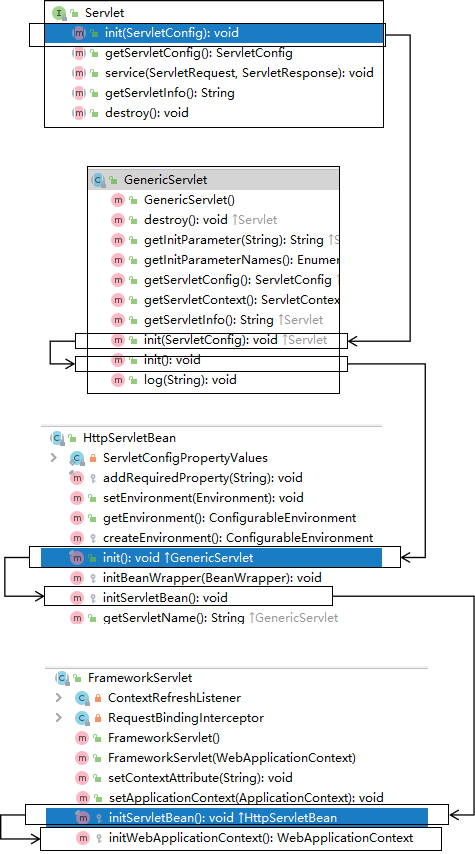
初始化WebApplicationContext
所在类:org.springframework.web.servlet.FrameworkServlet
protected WebApplicationContext initWebApplicationContext() {
    WebApplicationContext rootContext = WebApplicationContextUtils.getWebApplicationContext(getServletContext());
    WebApplicationContext wac = null;
    if (this.webApplicationContext != null) {
        // A context instance was injected at construction time -> use it
        wac = this.webApplicationContext;
        if (wac instanceof ConfigurableWebApplicationContext) {
            ConfigurableWebApplicationContext cwac =(ConfigurableWebApplicationContext) wac;
            if (!cwac.isActive()) {
                // The context has not yet been refreshed -> provide services such as
                    // setting the parent context, setting the application context id, etc
                    if (cwac.getParent() == null) {
                        // The context instance was injected without an explicit parent -> set
                            // the root application context (if any; may be null) as the parent
                            cwac.setParent(rootContext);
                    }
                configureAndRefreshWebApplicationContext(cwac);
            }
        }
    }
    if (wac == null) {
        // No context instance was injected at construction time -> see if one
        // has been registered in the servlet context. If one exists, it is assumed
            // that the parent context (if any) has already been set and that the
            // user has performed any initialization such as setting the context id
            wac = findWebApplicationContext();
    }
    if (wac == null) {
        // No context instance is defined for this servlet -> create a local one
        // 创建WebApplicationContext
        wac = createWebApplicationContext(rootContext);
    }
    if (!this.refreshEventReceived) {
        // Either the context is not a ConfigurableApplicationContext with refresh
            // support or the context injected at construction time had already been
            // refreshed -> trigger initial onRefresh manually here.
            synchronized (this.onRefreshMonitor) {
            // 刷新WebApplicationContext
            onRefresh(wac);
        }
    }
    if (this.publishContext) {
        // Publish the context as a servlet context attribute.
        // 将IOC容器在应用域共享
        String attrName = getServletContextAttributeName();
        getServletContext().setAttribute(attrName, wac);
    }
    return wac;
}创建WebApplicationContext
所在类:org.springframework.web.servlet.FrameworkServlet
protected WebApplicationContext createWebApplicationContext(@Nullable ApplicationContext parent) {
    Class<?> contextClass = getContextClass();
    if (!ConfigurableWebApplicationContext.class.isAssignableFrom(contextClass))
    {
        throw new ApplicationContextException("Fatal initialization error in servlet with name '" +getServletName() +
                                              "': custom WebApplicationContext class [" + contextClass.getName() +
                                              "] is not of type ConfigurableWebApplicationContext");
    }
    // 通过反射创建 IOC 容器对象
    ConfigurableWebApplicationContext wac = (ConfigurableWebApplicationContext)BeanUtils.instantiateClass(contextClass);
    wac.setEnvironment(getEnvironment());
    // 设置父容器
    wac.setParent(parent);
    String configLocation = getContextConfigLocation();
    if (configLocation != null) {
        wac.setConfigLocation(configLocation);
    }
    configureAndRefreshWebApplicationContext(wac);
    return wac;
}DispatcherServlet初始化策略
FrameworkServlet 创建 WebApplicationContext 后,刷新容器,调用onRefresh(wac),此方法在
DispatcherServlet 中进行了重写,调用了initStrategies(context)方法,初始化策略,即初始化
DispatcherServlet 的各个组件
所在类:org.springframework.web.servlet.DispatcherServlet
protected void initStrategies(ApplicationContext context) {
    initMultipartResolver(context);
    initLocaleResolver(context);
    initThemeResolver(context);
    initHandlerMappings(context);
    initHandlerAdapters(context);
    initHandlerExceptionResolvers(context);
    initRequestToViewNameTranslator(context);
    initViewResolvers(context);
    initFlashMapManager(context);
}DispatcherServlet调用组件处理请求
processRequest
FrameworkServlet 重写 HttpServlet 中的 service() 和 doXxx(),这些方法中调用了
processRequest(request, response)
所在类:org.springframework.web.servlet.FrameworkServlet
protected final void processRequest(HttpServletRequest request,HttpServletResponse response)throws ServletException, IOException
{
    long startTime = System.currentTimeMillis();
    Throwable failureCause = null;
    LocaleContext previousLocaleContext = LocaleContextHolder.getLocaleContext();
    LocaleContext localeContext = buildLocaleContext(request);
    RequestAttributes previousAttributes = RequestContextHolder.getRequestAttributes();
    ServletRequestAttributes requestAttributes = buildRequestAttributes(request,response, previousAttributes);
    WebAsyncManager asyncManager = WebAsyncUtils.getAsyncManager(request);
    asyncManager.registerCallableInterceptor(FrameworkServlet.class.getName(),new RequestBindingInterceptor());
    initContextHolders(request, localeContext, requestAttributes);
    try {
        // 执行服务,doService()是一个抽象方法,在DispatcherServlet中进行了重写
        doService(request, response);
    }
    catch (ServletException | IOException ex) {
        failureCause = ex;
        throw ex;
    }
    catch (Throwable ex) {
        failureCause = ex;
        throw new NestedServletException("Request processing failed", ex);
    }
    finally {
        resetContextHolders(request, previousLocaleContext, previousAttributes);
        if (requestAttributes != null) {
            requestAttributes.requestCompleted();
        }
        logResult(request, response, failureCause, asyncManager);
        publishRequestHandledEvent(request, response, startTime, failureCause);
    }
}doService
所在类:org.springframework.web.servlet.DispatcherServlet
@Override
protected void doService(HttpServletRequest request, HttpServletResponse response) throws Exception {
        logRequest(request);
    // Keep a snapshot of the request attributes in case of an include,
    // to be able to restore the original attributes after the include.
    Map<String, Object> attributesSnapshot = null;
    if (WebUtils.isIncludeRequest(request)) {
        attributesSnapshot = new HashMap<>();
        Enumeration<?> attrNames = request.getAttributeNames();
        while (attrNames.hasMoreElements()) {
            String attrName = (String) attrNames.nextElement();
            if (this.cleanupAfterInclude || attrName.startsWith(DEFAULT_STRATEGIES_PREFIX)) {
                attributesSnapshot.put(attrName,request.getAttribute(attrName));
            }
        }
    }
    // Make framework objects available to handlers and view objects.
    request.setAttribute(WEB_APPLICATION_CONTEXT_ATTRIBUTE,getWebApplicationContext());
    request.setAttribute(LOCALE_RESOLVER_ATTRIBUTE, this.localeResolver);
    request.setAttribute(THEME_RESOLVER_ATTRIBUTE, this.themeResolver);
    request.setAttribute(THEME_SOURCE_ATTRIBUTE, getThemeSource());
    if (this.flashMapManager != null) {
        FlashMap inputFlashMap = this.flashMapManager.retrieveAndUpdate(request,response);
        if (inputFlashMap != null) {
            request.setAttribute(INPUT_FLASH_MAP_ATTRIBUTE,Collections.unmodifiableMap(inputFlashMap));
        }
        request.setAttribute(OUTPUT_FLASH_MAP_ATTRIBUTE, new FlashMap());
        request.setAttribute(FLASH_MAP_MANAGER_ATTRIBUTE, this.flashMapManager);
    }
    RequestPath requestPath = null;
    if (this.parseRequestPath && !ServletRequestPathUtils.hasParsedRequestPath(request)) {
        requestPath = ServletRequestPathUtils.parseAndCache(request);
    }
    try {
        // 处理请求和响应
        doDispatch(request, response);
    }
    finally {
        if
            (!WebAsyncUtils.getAsyncManager(request).isConcurrentHandlingStarted()) {
            // Restore the original attribute snapshot, in case of an include.
            if (attributesSnapshot != null) {
                restoreAttributesAfterInclude(request, attributesSnapshot);
            }
        }
        if (requestPath != null) {
            ServletRequestPathUtils.clearParsedRequestPath(request);
        }
    }
}doDispatch
所在类:org.springframework.web.servlet.DispatcherServlet
protected void doDispatch(HttpServletRequest request, HttpServletResponse response) throws Exception {
    HttpServletRequest processedRequest = request;
    HandlerExecutionChain mappedHandler = null;
    boolean multipartRequestParsed = false;
    WebAsyncManager asyncManager = WebAsyncUtils.getAsyncManager(request);
    try {
        ModelAndView mv = null;
        Exception dispatchException = null;
        try {
            processedRequest = checkMultipart(request);
            multipartRequestParsed = (processedRequest != request);
            // Determine handler for the current request.
            /*
                mappedHandler:调用链
                包含handler、interceptorList、interceptorIndex
                handler:浏览器发送的请求所匹配的控制器方法
                interceptorList:处理控制器方法的所有拦截器集合
                interceptorIndex:拦截器索引,控制拦截器afterCompletion()的执行
             */
            mappedHandler = getHandler(processedRequest);
            if (mappedHandler == null) {
                noHandlerFound(processedRequest, response);
                return;
            }
            // Determine handler adapter for the current request.
            // 通过控制器方法创建相应的处理器适配器,调用所对应的控制器方法
            HandlerAdapter ha = getHandlerAdapter(mappedHandler.getHandler());
            // Process last-modified header, if supported by the handler.
            String method = request.getMethod();
            boolean isGet = "GET".equals(method);
            if (isGet || "HEAD".equals(method)) {
                long lastModified = ha.getLastModified(request,mappedHandler.getHandler());
                if (new ServletWebRequest(request,response).checkNotModified(lastModified) && isGet) {
                    return;
                }
            }
            // 调用拦截器的preHandle()
            if (!mappedHandler.applyPreHandle(processedRequest, response)) {
                return;
            }
            // Actually invoke the handler.
            // 由处理器适配器调用具体的控制器方法,最终获得ModelAndView对象
            mv = ha.handle(processedRequest, response,mappedHandler.getHandler());
            if (asyncManager.isConcurrentHandlingStarted()) {
                return;
            }
            applyDefaultViewName(processedRequest, mv);
            // 调用拦截器的postHandle()
            mappedHandler.applyPostHandle(processedRequest, response, mv);
        }
        catch (Exception ex) {
            dispatchException = ex;
        }
        catch (Throwable err) {
            // As of 4.3, we're processing Errors thrown from handler methods as well,
            // making them available for @ExceptionHandler methods and otherscenarios.
            dispatchException = new NestedServletException("Handler dispatchfailed", err);
         }
         // 后续处理:处理模型数据和渲染视图
         processDispatchResult(processedRequest, response, mappedHandler, mv,dispatchException);
    }
    catch (Exception ex) {
        triggerAfterCompletion(processedRequest, response, mappedHandler, ex);
    }
    catch (Throwable err) {
        triggerAfterCompletion(processedRequest, response, mappedHandler,new NestedServletException("Handler processingfailed",
                                                                                                    err));
    }
    finally {
        if (asyncManager.isConcurrentHandlingStarted()) {
            // Instead of postHandle and afterCompletion
            if (mappedHandler != null) {
                mappedHandler.applyAfterConcurrentHandlingStarted(processedRequest, response);
             }
         }
        else {
            // Clean up any resources used by a multipart request.
            if (multipartRequestParsed) {
                cleanupMultipart(processedRequest);
            }
        }
    }
} processDispatchResult
private void processDispatchResult(HttpServletRequest request,HttpServletResponse response,@Nullable HandlerExecutionChain
                                   mappedHandler, @Nullable ModelAndView mv,@Nullable Exception exception) throws Exception {
    boolean errorView = false;
    if (exception != null) {
        if (exception instanceof ModelAndViewDefiningException) {
            logger.debug("ModelAndViewDefiningException encountered",exception);
            mv = ((ModelAndViewDefiningException) exception).getModelAndView();
        }
        else {
            Object handler = (mappedHandler != null ? mappedHandler.getHandler(): null);
            mv = processHandlerException(request, response, handler, exception);
            errorView = (mv != null);
        }
    }
    // Did the handler return a view to render?
    if (mv != null && !mv.wasCleared()) {
        // 处理模型数据和渲染视图
        render(mv, request, response);
        if (errorView) {
            WebUtils.clearErrorRequestAttributes(request);
        }
    }
    else {
        if (logger.isTraceEnabled()) {
            logger.trace("No view rendering, null ModelAndView returned.");
        }
    }
    if (WebAsyncUtils.getAsyncManager(request).isConcurrentHandlingStarted()) {
        // Concurrent handling started during a forward
        return;
    }
    if (mappedHandler != null) {
        // Exception (if any) is already handled..
        // 调用拦截器的afterCompletion()
        mappedHandler.triggerAfterCompletion(request, response, null);
    }
} SpringMVC的执行流程
-
用户向服务器发送请求,请求被 SpringMVC 前端控制器 DispatcherServlet 捕获
-
DispatcherServlet 对请求URL进行解析,得到请求资源标识符(URI),判断请求URI对应的映射:
-
不存在
-
再判断是否配置了
mvc:default-servlet-handler -
如果没配置,则控制台报映射查找不到,客户端展示 404 错误
-
如果有配置,则访问目标资源(一般为静态资源,如:JS,CSS,HTML),找不到客户端也会展示 404 错误
-
存在则执行下面的流程
-
根据该 URI,调用 HandlerMapping 获得该 Handler 配置的所有相关的对象(包括 Handler 对象以及 Handler 对象对应的拦截器),最后以 HandlerExecutionChain 执行链对象的形式返回
-
DispatcherServlet 根据获得的 Handler,选择一个合适的 HandlerAdapter
-
如果成功获得 HandlerAdapter,此时将开始执行拦截器的
preHandler(…)方法【正向】 -
提取 Request 中的模型数据,填充 Handler 入参,开始执行
Handler(Controller)方法,处理请求。在填充 Handler 的入参过程中,根据你的配置,Spring 将帮你做一些额外的工作: -
HttpMessageConveter: 将请求消息(如 JSON、xml 等数据)转换成一个对象,将对象转换为指定的响应信息 -
数据转换:对请求消息进行数据转换。如 String 转换成 Integer、Double 等
-
数据格式化:对请求消息进行数据格式化。 如将字符串转换成格式化数字或格式化日期等
-
数据验证: 验证数据的有效性(长度、格式等),验证结果存储到 BindingResult 或 Error 中
-
Handler 执行完成后,向 DispatcherServlet 返回一个 ModelAndView 对象
-
此时将开始执行拦截器的
postHandle(...)方法【逆向】 -
根据返回的 ModelAndView(此时会判断是否存在异常:如果存在异常,则执行 HandlerExceptionResolver 进行异常处理)选择一个适合的 ViewResolver 进行视图解析,根据 Model 和 View,来渲染视图
-
渲染视图完毕执行拦截器的
afterCompletion(…)方法【逆向】 -
将渲染结果返回给客户端
整合SSM
ContextLoaderListener
Spring 提供了监听器 ContextLoaderListener,实现 ServletContextListener 接口,可监听
ServletContext 的状态,在 web 服务器的启动,读取 Spring 的配置文件,创建 Spring 的 IOC 容器。 web 应用中必须在 web.xml 中配置
<listener>
    <!--
        配置Spring的监听器,在服务器启动时加载Spring的配置文件
        Spring配置文件默认位置和名称:/WEB-INF/applicationContext.xml
        可通过上下文参数自定义Spring配置文件的位置和名称
    -->
    <listener-class>org.springframework.web.context.ContextLoaderListener</listener-class>
</listener>
<!--自定义Spring配置文件的位置和名称-->
<context-param>
    <param-name>contextConfigLocation</param-name>
    <param-value>classpath:spring.xml</param-value>
</context-param>准备工作
1、创建 Maven Module
2、导入依赖
<packaging>war</packaging>
<properties>
    <spring.version>5.3.1</spring.version>
</properties>
<dependencies>
    <dependency>
        <groupId>org.springframework</groupId>
        <artifactId>spring-context</artifactId>
        <version>${spring.version}</version>
    </dependency>
    <dependency>
        <groupId>org.springframework</groupId>
        <artifactId>spring-beans</artifactId>
        <version>${spring.version}</version>
    </dependency>
    <!--springmvc-->
    <dependency>
        <groupId>org.springframework</groupId>
        <artifactId>spring-web</artifactId>
        <version>${spring.version}</version>
    </dependency>
    <dependency>
        <groupId>org.springframework</groupId>
        <artifactId>spring-webmvc</artifactId>
        <version>${spring.version}</version>
    </dependency>
    <dependency>
        <groupId>org.springframework</groupId>
        <artifactId>spring-jdbc</artifactId>
        <version>${spring.version}</version>
    </dependency>
    <dependency>
        <groupId>org.springframework</groupId>
        <artifactId>spring-aspects</artifactId>
        <version>${spring.version}</version>
    </dependency>
    <dependency>
        <groupId>org.springframework</groupId>
        <artifactId>spring-test</artifactId>
        <version>${spring.version}</version>
    </dependency>
    <!-- Mybatis核心 -->
    <dependency>
        <groupId>org.mybatis</groupId>
        <artifactId>mybatis</artifactId>
        <version>3.5.7</version>
    </dependency>
    <!--mybatis和spring的整合包-->
    <dependency>
        <groupId>org.mybatis</groupId>
        <artifactId>mybatis-spring</artifactId>
        <version>2.0.6</version>
    </dependency>
    <!-- 连接池 -->
    <dependency>
        <groupId>com.alibaba</groupId>
        <artifactId>druid</artifactId>
        <version>1.0.9</version>
    </dependency>
    <!-- junit测试 -->
    <dependency>
        <groupId>junit</groupId>
        <artifactId>junit</artifactId>
        <version>4.12</version>
        <scope>test</scope>
    </dependency>
    <!-- MySQL驱动 -->
    <dependency>
        <groupId>mysql</groupId>
        <artifactId>mysql-connector-java</artifactId>
        <version>8.0.16</version>
    </dependency>
    <!-- log4j日志 -->
    <dependency>
        <groupId>log4j</groupId>
        <artifactId>log4j</artifactId>
        <version>1.2.17</version>
    </dependency>
    <!-- https://mvnrepository.com/artifact/com.github.pagehelper/pagehelper -->
    <dependency>
    <groupId>com.github.pagehelper</groupId>
    <artifactId>pagehelper</artifactId>
    <version>5.2.0</version>
    </dependency>
    <!-- 日志 -->
    <dependency>
        <groupId>ch.qos.logback</groupId>
        <artifactId>logback-classic</artifactId>
        <version>1.2.3</version>
    </dependency>
    <!-- ServletAPI -->
    <dependency>
        <groupId>javax.servlet</groupId>
        <artifactId>javax.servlet-api</artifactId>
        <version>3.1.0</version>
        <scope>provided</scope>
    </dependency>
    <dependency>
        <groupId>com.fasterxml.jackson.core</groupId>
        <artifactId>jackson-databind</artifactId>
        <version>2.12.1</version>
    </dependency>
    <dependency>
        <groupId>commons-fileupload</groupId>
        <artifactId>commons-fileupload</artifactId>
        <version>1.3.1</version>
    </dependency>
    <!-- Spring5和Thymeleaf整合包 -->
    <dependency>
        <groupId>org.thymeleaf</groupId>
        <artifactId>thymeleaf-spring5</artifactId>
        <version>3.0.12.RELEASE</version>
    </dependency>
</dependencies> 3、创建表
CREATE TABLE `t_emp` (
    `emp_id` int(11) NOT NULL AUTO_INCREMENT,
    `emp_name` varchar(20) DEFAULT NULL,
    `age` int(11) DEFAULT NULL,
    `sex` char(1) DEFAULT NULL,
    `email` varchar(50) DEFAULT NULL,
    PRIMARY KEY (`emp_id`)
) ENGINE=InnoDB DEFAULT CHARSET=utf8配置web.xml
<!-- 配置Spring的编码过滤器 -->
<filter>
    <filter-name>CharacterEncodingFilter</filter-name>
    <filter-class>org.springframework.web.filter.CharacterEncodingFilter</filter-class>
    <init-param>
        <param-name>encoding</param-name>
        <param-value>UTF-8</param-value>
    </init-param>
    <init-param>
        <param-name>forceEncoding</param-name>
        <param-value>true</param-value>
    </init-param>
</filter>
<filter-mapping>
    <filter-name>CharacterEncodingFilter</filter-name>
    <url-pattern>/*</url-pattern>
</filter-mapping>
<!-- 配置处理请求方式PUT和DELETE的过滤器 -->
<filter>
    <filter-name>HiddenHttpMethodFilter</filter-name>
    <filter-class>org.springframework.web.filter.HiddenHttpMethodFilter</filterclass>
</filter>
<filter-mapping>
    <filter-name>HiddenHttpMethodFilter</filter-name>
    <url-pattern>/*</url-pattern>
</filter-mapping>
<!-- 配置SpringMVC的前端控制器 -->
<servlet>
    <servlet-name>DispatcherServlet</servlet-name>
    <servlet-class>org.springframework.web.servlet.DispatcherServlet</servletclass>
    <!-- 设置SpringMVC的配置文件的位置和名称 -->
    <init-param>
        <param-name>contextConfigLocation</param-name>
        <param-value>classpath:SpringMVC.xml</param-value>
    </init-param>
    <load-on-startup>1</load-on-startup>
</servlet>
<servlet-mapping>
    <servlet-name>DispatcherServlet</servlet-name>
    <url-pattern>/</url-pattern>
</servlet-mapping>
<!-- 设置Spring的配置文件的位置和名称 -->
<context-param>
    <param-name>contextConfigLocation</param-name>
    <param-value>classpath:Spring.xml</param-value>
</context-param>
<!-- 配置Spring的监听器 -->
<listener>
    <listener-class>org.springframework.web.context.ContextLoaderListener</listener-class>
</listener>创建SpringMVC的配置文件并配置
<!--扫描组件-->
<context:component-scan base-package="com.atguigu.ssm.controller">
</context:component-scan>
<!--配置视图解析器-->
<bean id="viewResolver"
      class="org.thymeleaf.spring5.view.ThymeleafViewResolver">
    <property name="order" value="1"/>
    <property name="characterEncoding" value="UTF-8"/>
    <property name="templateEngine">
        <bean class="org.thymeleaf.spring5.SpringTemplateEngine">
            <property name="templateResolver">
                <bean
                      class="org.thymeleaf.spring5.templateresolver.SpringResourceTemplateResolver">
                    <!-- 视图前缀 -->
                    <property name="prefix" value="/WEB-INF/templates/"/>
                    <!-- 视图后缀 -->
                    <property name="suffix" value=".html"/>
                    <property name="templateMode" value="HTML5"/>
                    <property name="characterEncoding" value="UTF-8" />
                </bean>
            </property>
        </bean>
    </property>
</bean>
<!-- 配置访问首页的视图控制 -->
<mvc:view-controller path="/" view-name="index"></mvc:view-controller>
<!-- 配置默认的servlet处理静态资源 -->
<mvc:default-servlet-handler />
<!-- 开启MVC的注解驱动 -->
<mvc:annotation-driven />搭建Mybatis环境
1、创建属性文件 jdbc.properties
jdbc.user=root
jdbc.password=atguigu
jdbc.url=jdbc:mysql://localhost:3306/ssm?serverTimezone=UTC
jdbc.driver=com.mysql.cj.jdbc.Driver2、创建 Mybatis 的核心配置文件 mybatis-config.xml
<?xml version="1.0" encoding="UTF-8" ?>
<!DOCTYPE configuration
PUBLIC "-//mybatis.org//DTD Config 3.0//EN"
"http://mybatis.org/dtd/mybatis-3-config.dtd">
<configuration>
    <settings>
        <!--将下划线映射为驼峰-->
        <setting name="mapUnderscoreToCamelCase" value="true"/>
    </settings>
    <plugins>
        <!--配置分页插件-->
        <plugin interceptor="com.github.pagehelper.PageInterceptor"></plugin>
    </plugins>
</configuration>3、创建 Mapper 接口和映射文件
public interface EmployeeMapper {
List<Employee> getEmployeeList();
}<?xml version="1.0" encoding="UTF-8" ?>
<!DOCTYPE mapper
PUBLIC "-//mybatis.org//DTD Mapper 3.0//EN"
"http://mybatis.org/dtd/mybatis-3-mapper.dtd">
<mapper namespace="com.atguigu.ssm.mapper.EmployeeMapper">
<select id="getEmployeeList" resultType="Employee">
select * from t_emp
</select>
</mapper>4、创建日志文件 log4j.xml
<?xml version="1.0" encoding="UTF-8" ?>
<!DOCTYPE log4j:configuration SYSTEM "log4j.dtd">
<log4j:configuration xmlns:log4j="http://jakarta.apache.org/log4j/">
    <appender name="STDOUT" class="org.apache.log4j.ConsoleAppender">
        <param name="Encoding" value="UTF-8" />
        <layout class="org.apache.log4j.PatternLayout">
            <param name="ConversionPattern" value="%-5p %d{MM-dd HH:mm:ss,SSS} %m (%F:%L) \n" />
        </layout>
    </appender>
    <logger name="java.sql">
        <level value="debug" />
    </logger>
    <logger name="org.apache.ibatis">
        <level value="info" />
    </logger>
    <root>
        <level value="debug" />
        <appender-ref ref="STDOUT" />
    </root>
</log4j:configuration>创建Spring配置文件并配置
<?xml version="1.0" encoding="UTF-8"?>
<beans xmlns="http://www.springframework.org/schema/beans"
       xmlns:xsi="http://www.w3.org/2001/XMLSchema-instance"
       xmlns:context="http://www.springframework.org/schema/context"
       xsi:schemaLocation="http://www.springframework.org/schema/beans
                           http://www.springframework.org/schema/beans/spring-beans.xsd
                           http://www.springframework.org/schema/context
                           https://www.springframework.org/schema/context/spring-context.xsd">
    <!--扫描组件-->
    <context:component-scan base-package="com.atguigu.ssm">
        <context:exclude-filter type="annotation"expression="org.springframework.stereotype.Controller"/>
    </context:component-scan>
    <!-- 引入jdbc.properties -->
    <context:property-placeholder location="classpath:jdbc.properties">
    </context:property-placeholder>
    <!-- 配置Druid数据源 -->
    <bean id="dataSource" class="com.alibaba.druid.pool.DruidDataSource">
        <property name="driverClassName" value="${jdbc.driver}"></property>
        <property name="url" value="${jdbc.url}"></property>
        <property name="username" value="${jdbc.username}"></property>
        <property name="password" value="${jdbc.password}"></property>
    </bean>
    <!-- 配置用于创建SqlSessionFactory的工厂bean -->
    <bean class="org.mybatis.spring.SqlSessionFactoryBean">
        <!-- 设置MyBatis配置文件的路径(可以不设置) -->
        <property name="configLocation" value="classpath:mybatis-config.xml">
        </property>
        <!-- 设置数据源 -->
        <property name="dataSource" ref="dataSource"></property>
        <!-- 设置类型别名所对应的包 -->
        <property name="typeAliasesPackage" value="com.atguigu.ssm.pojo">
        </property>
        <!--
            设置映射文件的路径
            若映射文件所在路径和mapper接口所在路径一致,则不需要设置
        -->
        <!--
            <property name="mapperLocations" value="classpath:mapper/*.xml">
            </property>
        -->
    </bean>
    <!--
        配置mapper接口的扫描配置
        由mybatis-spring提供,可以将指定包下所有的mapper接口创建动态代理
        并将这些动态代理作为IOC容器的bean管理
    -->
    <bean class="org.mybatis.spring.mapper.MapperScannerConfigurer">
        <property name="basePackage" value="com.atguigu.ssm.mapper"></property>
    </bean>
</beans>测试
1、创建组件
实体类 Employee
public class Employee {
    private Integer empId;
    private String empName;
    private Integer age;
    private String sex;
    private String email;
    public Employee() {
    }
    public Employee(Integer empId, String empName, Integer age, String sex,
                    String email) {
        this.empId = empId;
        this.empName = empName;
        this.age = age;
        this.sex = sex;
        this.email = email;
    }
    public Integer getEmpId() {
        return empId;
    }
    public void setEmpId(Integer empId) {
        this.empId = empId;
    }
    public String getEmpName() {
        return empName;
    }
    public void setEmpName(String empName) {
        this.empName = empName;
    }
    public Integer getAge() {
        return age;
    }
    public void setAge(Integer age) {
        this.age = age;
    }
    public String getSex() {
        return sex;
    }
    public void setSex(String sex) {
        this.sex = sex;
    }
    public String getEmail() {
        return email;
    }
    public void setEmail(String email) {
        this.email = email;
    }
}创建控制层组件 EmployeeController
@Controller
public class EmployeeController {
    @Autowired
    private EmployeeService employeeService;
    @RequestMapping(value = "/employee/page/{pageNum}", method = RequestMethod.GET)
    public String getEmployeeList(Model model, @PathVariable("pageNum") Integer pageNum){
        PageInfo<Employee> page = employeeService.getEmployeeList(pageNum);
        model.addAttribute("page", page);
        return "employee_list";
    }
}创建接口 EmployeeService
public interface EmployeeService {
        PageInfo<Employee> getEmployeeList(Integer pageNum);
}创建实现类EmployeeServiceImpl
@Service
public class EmployeeServiceImpl implements EmployeeService {
    @Autowired
    private EmployeeMapper employeeMapper;
    @Override
    public PageInfo<Employee> getEmployeeList(Integer pageNum) {
        PageHelper.startPage(pageNum, 4);
        List<Employee> list = employeeMapper.getEmployeeList();
        PageInfo<Employee> page = new PageInfo<>(list, 5);
        return page;
    }
}2、创建页面
<!DOCTYPE html>
<html lang="en" xmlns:th="http://www.thymeleaf.org">
    <head>
        <meta charset="UTF-8">
        <title>Employee Info</title>
        <link rel="stylesheet" th:href="@{/static/css/index_work.css}">
    </head>
    <body>
        <table>
            <tr>
                <th colspan="6">Employee Info</th>
            </tr>
            <tr>
                <th>emp_id</th>
                <th>emp_name</th>
                <th>age</th>
                <th>sex</th>
                <th>email</th>
                <th>options</th>
            </tr>
            <tr th:each="employee : ${page.list}">
                <td th:text="${employee.empId}"></td>
                <td th:text="${employee.empName}"></td>
                <td th:text="${employee.age}"></td>
                <td th:text="${employee.sex}"></td>
                <td th:text="${employee.email}"></td>
                <td>
                    <a href="">delete</a>
                    <a href="">update</a>
                </td>
            </tr>
            <tr>
                <td colspan="6">
                    <span th:if="${page.hasPreviousPage}">
                        <a th:href="@{/employee/page/1}">首页</a>
                        <a th:href="@{'/employee/page/'+${page.prePage}}">上一页</a>
                    </span>
                    <span th:each="num : ${page.navigatepageNums}">
                        <a th:if="${page.pageNum==num}"
                           th:href="@{'/employee/page/'+${num}}" th:text="'['+${num}+']'" style="color:red;"></a>
                        <a th:if="${page.pageNum!=num}"
                           th:href="@{'/employee/page/'+${num}}" th:text="${num} "></a>
                    </span>
                    <span th:if="${page.hasNextPage}">
                        <a th:href="@{'/employee/page/'+${page.nextPage}}">下一页</a>
                        <a th:href="@{'/employee/page/'+${page.pages}}">末页</a>
                    </span>
                </td>
            </tr>
        </table>
    </body>
</html>3、访问测试