Agent
智能体(Agent)与语言模型基础 什么是智能体 在人工智能领域,智能体被定义为任何能够通过 传感器(Sensors) 感知其所处 环境(Enviroment) ,并 自主 的通过 执行器(Actuators) 采取 行动(Action) 以达成特定目标的实体 智能体的构成与运行原理 要理解智能体的运作,就必须先理解它
智能体(Agent)与语言模型基础
什么是智能体
在人工智能领域,智能体被定义为任何能够通过传感器(Sensors) 感知其所处环境(Enviroment) ,并自主的通过执行器(Actuators) 采取行动(Action) 以达成特定目标的实体
智能体的构成与运行原理
要理解智能体的运作,就必须先理解它所处的任务环境:在人工智能领域,通常使用PEAS 模型 来精确描述一个任务环境,即分析其性能度量(Performance) 、环境(Environment) 、执行器(Actuators)和传感器(Sensors)
智能体并非一次性完成任务,而是通过一个持续的循环与环境进行交互,这个核心机制被称为智能体循环(Agent Loop) ,这个循环描述了智能体与环境之间的动态交互过程,构成了其自主行为的基础
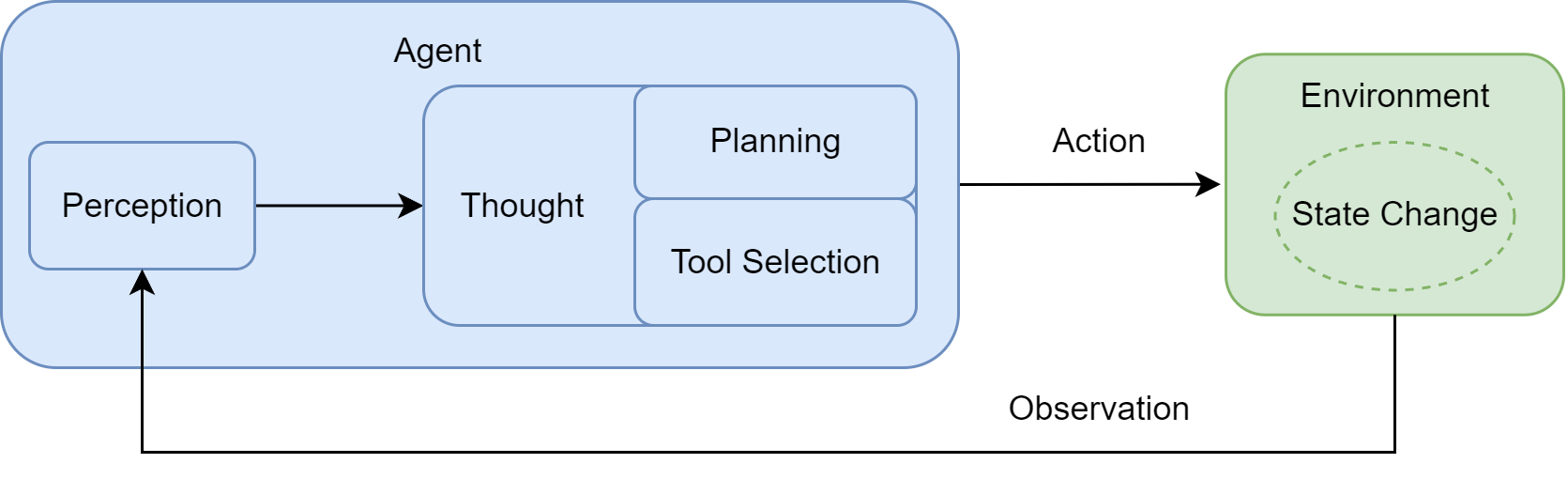
这个循环主要包含下面几个步骤:
-
感知(Perception):这是循环的起点。智能体通过传感器(如 API 接口、用户输入接口)接收来自环境的输入信息。这些信息,即观察(Observation),既可以是用户的初始指令,也可以是上一步行动所导致的环境状态变化反馈
-
思考(Thought):接收到观察信息后,智能体进入其核心决策阶段。对于 LLM 智能体而言,这通常是由大语言模型驱动的内部推理过程。“思考”阶段可进一步细分为两个关键环节:
-
规划(Planning):智能体基于当前的观察和其内部记忆,更新对任务和环境的理解,并制定或调整行动计划。这可能设计将复杂目标分解为一系列更具体的子任务
-
工具选择(Tool Selection):根据当前计划,智能体从其可用的工具库中,选择最适合执行下一步的工具,并确定调用该工具所需的具体参数
-
行动(Action):决策完成后,智能体通过其执行器(Actuators)执行具体的行动。这通常表现为调用一个选定的工具(如代码解释器、搜索 API),从而对环境施加影响,意图改变环境的竹笋给他
行动并不是循环的终点。智能体的行动会引起环境的状态变化,环境随即会产生一个新的观察作为结果反馈。这个新的观察又会在下一轮循环中被智能体的感知系统捕获,形成一个持续的“干吃-思考-行动-观察”闭环。智能体就是通过不断循环重复这一循环,逐步推进任务,从初始状态向目标状态演进
在工程实践中,为了让 LLM 能够有效驱动这个循环,需要定义一套交互协议(Interaction Protocol) 来规范其与环境之间的信息交换
在许多现代智能体框架中,这一协议体现在对智能体每一次输出的结构化定义上。智能体的输出不只是单一的自然语言恢复,而是一段遵守特定格式的文本,其中明确的体现了其内部的推理过程与最终决策
这个结构通常包含两个核心部分:
-
Thought(思考):这是智能体内部决策的“快照”,它用自然语言阐述了智能体是如何分析当前场景、回顾上一步的观察结果、进行自我反思与问题分解,并最终规划出下一步的具体行动
-
Action(行动):这是智能体基于思考后,决定对环境施加的具体操作,通常以函数调用的形式表示
Workflow和Agent的差异
Workflow 是让 AI 按部就班的执行指令,而 Agent 则是赋予 AI 自由度去自主达成目标
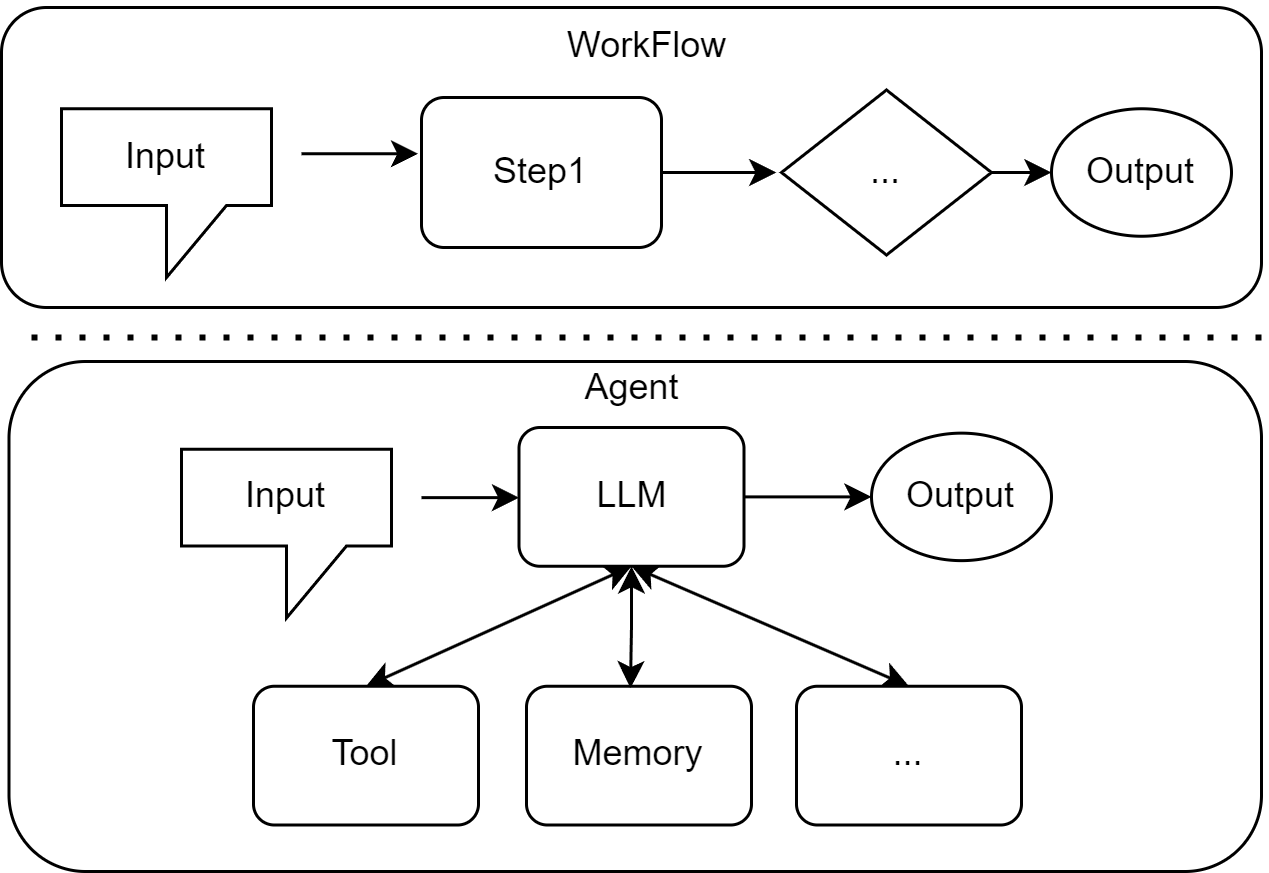
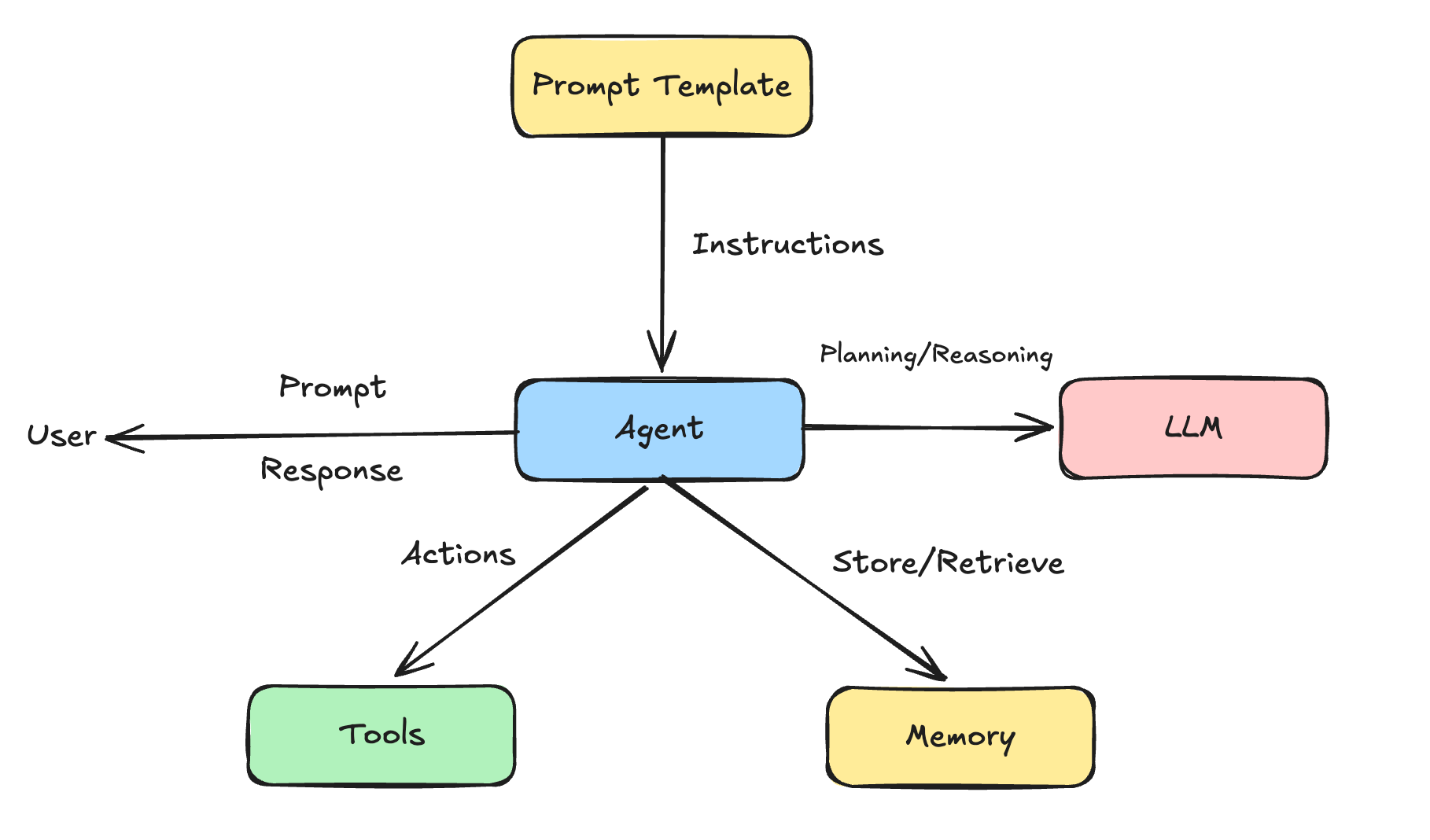
Agent 就是给大模型扩展了 Tool 和 Memory。Tool 扩展了大模型的能力,可以实现自动做事情,Memory 管理了记忆,用于记住想让它记住的事情,还有 RAG 来查询内部/专门数据来获取知识
这样一个知道内部记忆、能思考规划、有记忆、能做事情/操作、对环境具有感知能力和自主性的扩展后的大模型 ,就是一个 Agent
比如 Cursor 能够读写文件、执行命令,就是扩展了 Tool
RAG、Memory、Tool、Agent 可以使用 LangChain 来开发,LangChain 是用来开发多个 Agent 的,每个 Agent 做一件事情,但涉及到多个 Agent 协作,用 LangChain 自己维护的方式就比较麻烦了,需要使用 LangGraph
Tool
在没有 Tool 之前,跟大模型交互是问它问题,然后它告诉怎么操作,但它没法直接进行操作
但是 Cursor 之类的工具可以边回答边进行操作(比如写文件、读取文件、执行命令、访问网络等)
之所以能做到这些,是因为 Cursor 配置了 Tools,Cursor 会根据模型需要在必要的时候调用 Tools 来与外部交互
先跑通大模型调用:
一开始先用 langchain 调用各个平台的大模型,每个平台的接口结构都不一样,langchain 对各个平台的大模型调用都做了封装,可以省去不必要的对接精力
mkdir Tools
cd Tools
npm init -y

pnpm install dotenv @langchain/openai项目初始化完成后,创建src/hello-langchian.js
import { ChatOpenAI } from "@langchain/openai";
import dotenv from "dotenv";

dotenv.config();

const model = new ChatOpenAI({
  modelName: process.env.MODEL_NAME || "qwen-plus",
  apiKey: process.env.OPENAI_API_KEY,
  configuration: {
    baseURL: process.env.OPENAI_BASE_URL,
  }
});

const response = await model.invoke("介绍下自己");
console.log(response.content);运行测试:
node ./src/hello-langchian.js下面是一个简单的读取文件 Tool,以及与阿里百炼大模型交互的 demo:
.env 文件中配置环境变量:
# 阿里百炼 ApiKey
OPENAI_API_KEY="sk-a37693acee354580a14ad876ee90a155"
MODEL_NAME="qwen-plus"
OPENAI_BASE_URL="https://dashscope.aliyuncs.com/compatible-mode/v1"添加依赖:
pnpm install @langchain/openai dotenv zod创建hello-langchain.js文件:
import "dotenv/config";
import { ChatOpenAI } from "@langchain/openai";
import { tool } from "@langchain/core/tools";
import {
  HumanMessage,
  SystemMessage,
  ToolMessage,
} from "@langchain/core/messages";
import fs from "node:fs/promises";
import { z } from "zod";

// 大模型初始化
// 国内模型大多都兼容 OpenAI 接口
const model = new ChatOpenAI({
  modelName: process.env.MODEL_NAME || "qwen-plus",
  apiKey: process.env.OPENAI_API_KEY,
  // 温度参数,用于控制模型的创造性,在工具调用场景为了减少随机性追求稳定可以设置为 0
  temperature: 0,
  configuration: {
          // 可以支持自托管模型(如 Ollama 等)
    baseURL: process.env.OPENAI_BASE_URL,
  },
});

// `read_file`工具定义
// 异步读取任意本地文件,返回纯文本内容
// Schema 强约束:使用 zod 保证 LLM 只会传入 string 类型的 filePath 参数
const readFileTool = tool(
  async ({ filePath }) => {
    const content = await fs.readFile(filePath, "utf-8");
    console.log(
      `[工具调用] read_file("${filePath}") - 成功读取 ${content.length} 字节`,
    );
    return `文件内容:\\n${content}`;
  },
  {
    name: "read_file",
    description:
      "用此工具来读取文件内容。当用户要求读取文件、查看代码、分析文件内容时,调用此工具。输入文件路径(可以是相对路径或绝对路径)",
    schema: z.object({
      filePath: z.string().describe("要读取的文件路径"),
    }),
  },
);

// 工具注册并绑定到模型
// 将工具注入模型,使 LLM 在 invoke 时能够生成 tool_calls(函数调用 JSON)
const tools = [readFileTool];

const modelWithTools = model.bindTools(tools);

// 消息初始化
// SystemMessage 用于设定角色、工作流程和可用工具——相当于系统设置
// HumanMessage 用户发送的消息,用于触发整个流程的原始请求
const messages = [
  new SystemMessage(`你是一个代码助手,可以使用工具读取文件并解释代码。

        工作流程:
        1. 当用户要求读取文件时,理解调用 read_file 工具。
        2. 等待工具返回文件内容。
        3. 基于文件内容进行分析和解释。

        可用工具:
        - read_file: 读取文件内容(使用此工具来获取文件内容)
        `),
  new HumanMessage("请读取 src/tool-file-read.mjs 文件内容并解释代码"),
];

// 工具调用循环(ReAct 范式)
// 这是典型的 ReAct(Reasoning + Acting)范式(支持多工具调用,但当前只调用了一个)
// - Reasoning:LLM 判断需要调用什么工具(生成 tool_calls)
// - Act:代码执行工具,获取真实数据
// - Observe:把结果以 ToolMessage 的形式喂回 LLM
// - Repeat:直到 LLM 不再调用 Tool,直接输出 `response.content`
let response = await modelWithTools.invoke(messages);
// console.log(response);

messages.push(response);

while (response.tool_calls && response.tool_calls.length > 0) {
  console.log(`\\n[检测到 ${response.tool_calls.length} 个工具调用]`);

  // 并行执行所有工具调用
  const toolResults = await Promise.all(
    response.tool_calls.map(async (toolCall) => {
      const tool = tools.find((t) => t.name == toolCall.name);
      if (!tool) {
        return `错误:找不到工具 ${toolCall.name}`;
      }

      console.log(
        `[执行工具] ${toolCall.name}(${JSON.stringify(toolCall.args)})`,
      );
      try {
        const result = await tool.invoke(toolCall.args);
        return result;
      } catch (error) {
        return `错误: ${error.messages}`;
      }
    }),
  );

  // 将每个工具结果包装为 ToolMesage,添加到消息历史
  response.tool_calls.forEach((toolCall, index) => {
    messages.push(
      new ToolMessage({
        content: toolResults[index],
        tool_call_id: toolCall.id,
      }),
    );
  });

  // 再次调用模型,传入工具结果,让模型基于工具结果生成最终回复
  response = await modelWithTools.invoke(messages);
}

console.log(`\\n[最终回复]`);
console.log(response.content);运行测试:
node ./src/tool-file-read.jsmini cursor
上面给大模型扩展了读取文件的 Tool,如果继续扩展执行命令、写文件、创建目录、读取目录等 Tool,就可以实现类似 Cursor 的功能了
all-tools.js
import { tool } from "@langchain/core/tools";
import { spawn } from "node:child_process";
import fs from "node:fs/promises";
import path from "node:path";
import { z } from "zod";

// 读取文件工具
const readFileTool = tool(
  async ({ filePath }) => {
    try {
      const content = await fs.readFile(filePath, "utf-8");
      console.log(
        `[工具调用] read_file("${filePath}") - 成功读取 ${content.length} 字节`,
      );
      return `文件内容:\\n${content}`;
    } catch (error) {
      console.log(
        `[工具调用] read_file("${filePath}") - 错误 ${error.message}`,
      );
      return `读取文件失败: ${error.message}`;
    }
  },
  {
    name: "read_file",
    description: "读取指定路径的文件内容",
    schema: z.object({
      filePath: z.string().describe("文件路径"),
    }),
  },
);

// 写入文件工具
const writeFileTool = tool(
  async ({ filePath, content }) => {
    try {
      const dir = path.dirname(filePath);
      await fs.mkdir(dir, { recursive: true });
      await fs.writeFile(filePath, content, "utf-8");
      console.log(
        `[工具调用] write_file("${filePath}") - 成功写入 ${content.length} 字节`,
      );
      return `文件写入成功: ${filePath}`;
    } catch (error) {
      console.log(
        `[工具调用] write_file("${filePath}") - 错误: ${error.message}`,
      );
      return `文件写入失败: ${error.message}`;
    }
  },
  {
    name: "write_file",
    description: "向指定路径写入文件内容,自动创建目录",
    schema: z.object({
      filePath: z.string().describe("文件路径"),
      content: z.string().describe("要写入到文件内容"),
    }),
  },
);

// 执行命令工具(实时输出)
const executeCommandTool = tool(
  async ({ command, workingDirectory }) => {
    const cwd = workingDirectory || process.cwd();
    console.log(
      `[工具调用] execute_command("${command}")${workingDirectory ? ` - 工作目录: ${workingDirectory}` : ""}`,
    );

    return new Promise((resolve, reject) => {
      const child = spawn(command, {
        cwd,
        stdio: "inherit",
        shell: true,
      });

      let errorMsg = "";

      child.on("error", (error) => {
        errorMsg = error.message;
      });

      child.on("close", (code) => {
        if (code === 0) {
          console.log(`[工具调用] execute_command("${command}") - 执行成功`);
          const cwdInfo = workingDirectory
            ? `
         \\n\\n 重要提示: 命令在目录 "${workingDirectory}" 中执行成功。如果需要在这个项目目录中继续执行命令,请使用 workingDirectory: "${workingDirectory}" 参数,不要使用 cd 命令。`
            : "";
          resolve(`命令执行成功: ${command}${cwdInfo}`);
        } else {
          console.log(
            `[工具调用] execute_command("${command}") - 执行失败,退出码: ${code}`,
          );
          resolve(
            `命令执行失败,退出码: ${code}${errorMsg ? "\\n 错误: " + errorMsg : ""}`,
          );
        }
      });
    });
  },
  {
    name: "execute_command",
    description: "执行系统命令,支持指定工作目录,实时显示输出",
    schema: z.object({
      command: z.string().describe("要执行的命令"),
      workingDirectory: z.string().optional().describe("工作目录(推荐指定)"),
    }),
  },
);

// 列出目录内容工具
const listDirectoryTool = tool(
  async ({ directoryPath }) => {
    try {
      const files = await fs.readdir(directoryPath);
      console.log(
        `[工具调用] list_directory("${directoryPath}") - 找到 ${files.length} 个项目`,
      );
      return `目录内容:\\n${files.map((f) => `- ${f}`).join("\\n")}`;
    } catch (error) {
      console.log(
        `[工具调用] list_directory("${directoryPath}") - 错误: ${error.message}`,
      );
      return `列出目录内容失败: ${error.message}`;
    }
  },
  {
    name: "list_directory",
    description: "列出指定目录下的所有文件和文件夹",
    schema: z.object({
      directoryPath: z.string().describe("目录路径"),
    }),
  },
);

export { executeCommandTool, listDirectoryTool, readFileTool, writeFileTool };mini-cursor.js
import "dotenv/config";
import { ChatOpenAI } from "@langchain/openai";
import { tool } from "@langchain/core/tools";
import {
  HumanMessage,
  SystemMessage,
  ToolMessage,
} from "@langchain/core/messages";
import {
  executeCommandTool,
  listDirectoryTool,
  readFileTool,
  writeFileTool,
} from "./all-tools.js";
import chalk from "chalk";

const model = new ChatOpenAI({
  modelName: process.env.MODEL_NAME || "qwen-plus",
  apiKey: process.env.OPENAI_API_KEY,
  temperature: 0,
  modelKwargs: {
    thinking: {
      type: process.env.THINKING_TYPE || "disabled",
    },
  },
  configuration: {
    baseURL: process.env.OPENAI_BASE_URL,
  },
});

const tools = [
  readFileTool,
  writeFileTool,
  executeCommandTool,
  listDirectoryTool,
];

const modelWithTools = model.bindTools(tools);

// Agent 执行函数
async function runAgentWithTools(query, maxInterations = 30) {
  const messages = [
    new SystemMessage(`你是一个项目管理助手,使用工具完成任务。
            当前工作目录:${process.cwd()}

            工具:
            1. read_file: 读取文件
            2. write_file: 写入文件
            3. execute_command: 执行命令(支持 workingDirectory 参数)
            4. list_directory: 列出目录内容

            重要规则 - execute_command:
            - workingDirectory 参数会自动切换到指定目录
            - 当使用 workingDirectory 时,绝对不要在 command 中使用 cd
            - 错误示例: {command: "cd react-todo-app && pnpm install", workingDirectory: "react-todo-app"} 这是错误的!因为 workingDirectory 已经在 react-todo-app 目录了,再 cd react-todo-app 会找不到目录
            - 正确示例: {command: "pnpm install", workingDirectory: "react-todo-app"} 这是正确的!因为 workingDirectory 已经在 react-todo-app 目录了,直接执行命令就行了

            回答要简洁,只说做了什么
            `),
    new HumanMessage(query),
  ];

  for (let i = 0; i < maxInterations; i++) {
    console.log(chalk.bgGreen(`正在等待 AI 思考...`));
    const response = await modelWithTools.invoke(messages);
    messages.push(response);

    // 检查是否有工具调用
    if (!response.tool_calls || response.tool_calls.length === 0) {
      console.log(`\\nAI 最终回复:\\n${response.content}`);
      return response.content;
    }

    // 执行工具调用
    for (const toolCall of response.tool_calls) {
      const foundTool = tools.find((t) => t.name === toolCall.name);
      if (foundTool) {
        const toolResult = await foundTool.invoke(toolCall.args);
        messages.push(
          new ToolMessage({
            content: toolResult,
            tool_call_id: toolCall.id,
          }),
        );
      }
    }
  }
  return messages[messages.length - 1].content;
}

const case1 = `创建一个功能丰富的 React TodoList 应用:

1. 创建项目:echo -e "n\\nn" | pnpm create vite react-todo-app --template react-ts
2. 修改 src/App.tsx,实现完整功能的 TodoList:
 - 添加、删除、编辑、标记完成
 - 分类筛选(全部/进行中/已完成)
 - 统计信息显示
 - localStorage 数据持久化
3. 添加复杂样式:
 - 渐变背景(蓝到紫)
 - 卡片阴影、圆角
 - 悬停效果
4. 添加动画:
 - 添加/删除时的过渡动画
 - 使用 CSS transitions
5. 列出目录确认

注意:使用 pnpm,功能要完整,样式要美观,要有动画效果

之后在 react-todo-app 项目中:
1. 使用 pnpm install 安装依赖
2. 使用 pnpm run dev 启动服务器
`;

try {
  await runAgentWithTools(case1);
} catch (error) {
  console.error(`\\n❌ 错误: ${error.message}\\n`);
}MCP
读取文件和目录、执行命令这些 Tool,只要把对应的名字、描述、参数格式声明,模型会在发现需要用 Tool 的时候自动解析出参数传入来调用,然后把执行结果封装成ToolMessage传入 chat
就比如上面实现的 mini cursor,代码只是把这些 Tool 声明好,具体怎么调用、参数是什么都是大模型自己决定的。Tool 给大模型扩展了操作的能力,从原本只能聊天对话,到可以执行各种各样的操作。
但如果有些 Tool 是其他语言写的,和实现 Agent 的语言不一样。跨语言调用一般有两种方式:
-
标准输入输出流的命令行
-
HTTP 服务
但是为了统一规范,方便调用,这两种方式都应该遵循同一种通信协议:MCP(Model Context Protocal)
MCP 最大的作用就是跨进程调用工具,跨本地的进程调用(stdio)、跨远程的进程调用(HTTP)
AI Agent 就是 MCP 客户端,可以通过 MCP 协议调用各种 MCP Server,实现跨进程的工具调用
在langchain里面,MCP 也是 Tool 的一种
my-mcp-server.js
import { McpServer } from "@modelcontextprotocol/sdk/server/mcp.js";
import { StdioServerTransport } from "@modelcontextprotocol/sdk/server/stdio.js";
import { z } from "zod";

// 数据库
const database = {
  users: {
    "001": {
      id: "001",
      name: "张三",
      email: "zhangsan@example.com",
      role: "admin",
    },
    "002": {
      id: "002",
      name: "李四",
      email: "lisi@example.com",
      role: "user",
    },
    "003": {
      id: "003",
      name: "王五",
      email: "wangwu@example.com",
      role: "user",
    },
  },
};

const server = new McpServer({
  name: "my-mcp-server",
  version: "1.0.0",
});

// 注册工具:查询用户信息
server.registerTool(
  "query_user",
  {
    description:
      "查询数据库中的用户信息,输入用户 ID,返回改用户的详细信息(姓名、邮箱、角色)",
    inputSchema: {
      userId: z.string().describe("用户 ID,例如:001,002,003"),
    },
  },
  async ({ userId }) => {
    const user = database.users[userId];

    if (!user) {
      return {
        content: [
          {
            type: "text",
            text: `用户 ID ${userId} 不存在。可用的 ID:001,002,003。`,
          },
        ],
      };
    }

    return {
      content: [
        {
          type: "text",
          text: `用户信息:\\n- ID: ${user.id}\\n- 姓名:${user.name}\\n- 邮箱:${user.email}\\n- 角色:${user.role}`,
        },
      ],
    };
  },
);

server.registerResource(
  "使用指南",
  "docs://guide",
  {
    description: "MCP Server 使用文档",
    mimeType: "text/plain",
  },
  async () => {
    return {
      content: [
        {
          uri: "docs://guide",
          mimeType: "text/plain",
          text: `MCP Server 使用指南
                功能:提供用户查询等工具。
                使用:在 Cursor 等 MCP Client 中通过自然语言对话,Cursor 会自动调用响应工具。`,
        },
      ],
    };
  },
);

const transpost = new StdioServerTransport();
await server.connect(transpost);在 Cursor 中配置 MCP 并测试:
{
  "mcpServers": {
    "my-mcp-server": {
      "command": "node",
      "args": [
        "/Users/fangyuan/Code/Agent/Tools/src/my-mcp-server.js"
      ]
    }
  }
}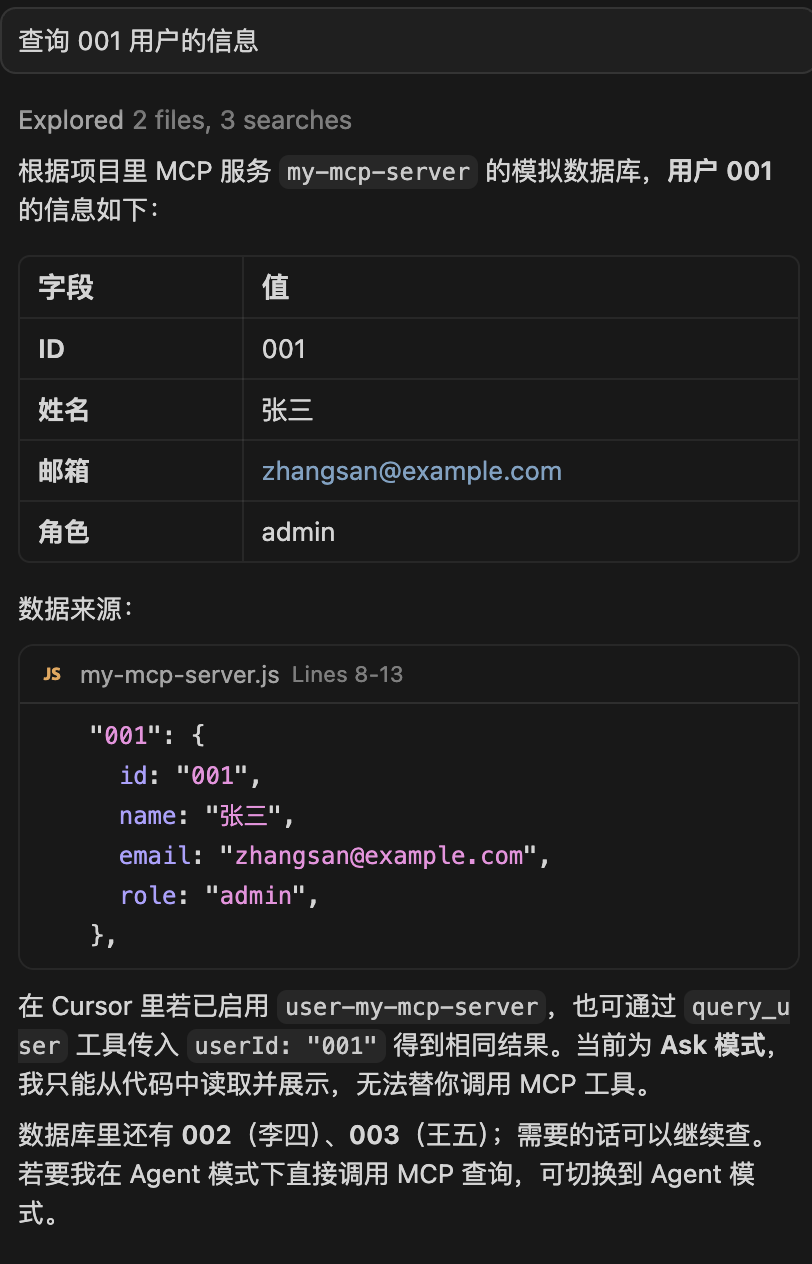
MCP 写好后可以插拔到任何地方当 Tool 使用,上面代码中的resource不是用来作为 Tool 来触发到,而是可以引用用来写 Prompt
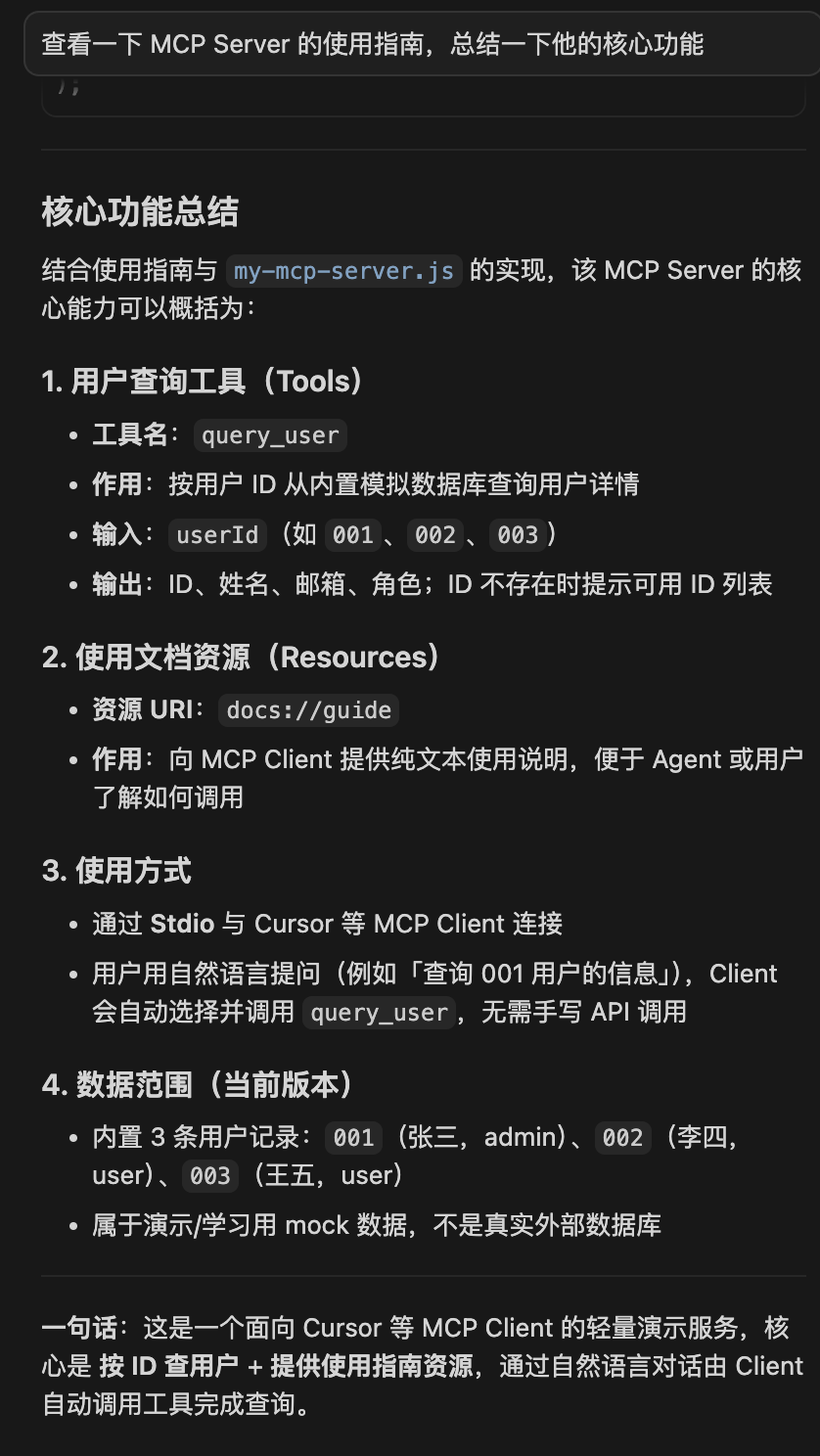
Resource 主要用于查询信息,而 Tool 则是执行功能
langchain 也封装了对 MCP 的调用
pnpm install @langchain/mcp-adaptersimport {
HumanMessage,
SystemMessage,
ToolMessage,
} from "@langchain/core/messages";
import { MultiServerMCPClient } from "@langchain/mcp-adapters";
import { ChatOpenAI } from "@langchain/openai";
import chalk from "chalk";
import "dotenv/config";
import { fileURLToPath } from "node:url";
const mcpServerPath = fileURLToPath(
new URL("./my-mcp-server.js", import.meta.url),
);
const model = new ChatOpenAI({
modelName: process.env.MODEL_NAME || "qwen-plus",
apiKey: process.env.OPENAI_API_KEY,
temperature: 0,
modelKwargs: {
thinking: {
type: process.env.THINKING_TYPE || "disabled",
},
},
configuration: {
baseURL: process.env.OPENAI_BASE_URL,
},
});
const mcpClient = new MultiServerMCPClient({
mcpServers: {
"my-mcp-server": {
command: "node",
args: [mcpServerPath],
},
},
});
const tools = await mcpClient.getTools();
const modelWithTools = model.bindTools(tools);
const res = mcpClient.listResources();
let resourceContent = "";
for (const [serverName, resources] of Object.entries(res)) {
for (const resource of resources) {
const content = await mcpClient.readResource(serverName, resource);
resourceContent += content[0].text;
}
}
async function runAgentWithTools(query, maxIterations = 30) {
const messages = [
new SystemMessage(resourceContent),
new HumanMessage(query),
];
for (let i = 0; i < maxIterations; i++) {
console.log(chalk.bgGreen("正在等待 AI 思考..."));
const response = await modelWithTools.invoke(messages);
messages.push(response);
// 检查是否有工具调用
if (!response.tool_calls || response.tool_calls.length === 0) {
console.log(`\\n AI 最终回复:\\n${response.content}\\n`);
return response.content;
}
console.log(
chalk.bgBlue(`检测到 ${response.tool_calls.length} 个工具调用`),
);
console.log(
chalk.bgBlue(
`工具调用 ${response.tool_calls.map((t) => t.name).join(", ")}`,
),
);
// 执行工具调用
for (const toolCall of response.tool_calls) {
const foundTool = tools.find((t) => t.name == toolCall.name);
if (foundTool) {
const toolResult = await foundTool.invoke(toolCall.args);
messages.push(
new ToolMessage({ content: toolResult, tool_call_id: toolCall.id }),
);
}
}
}
return messages[messages.length - 1].content;
}
await runAgentWithTools("查一下用户 002 的信息");
await runAgentWithTools("MCP Server 的使用指南是什么")
await mcpClient.close();RAG
RAG:Retrieval 检索 - Augmented 增强 - Generation 生成
用于去知识库中检索与问题相关的知识,作为背景知识加到 Prompt 中增强它,让大模型根据这些来生成回答,减少幻觉;这种语义搜索需要向量(Vector),通过向量计算实现语义检索
想要将某种知识转换成向量,需要嵌入模型(Enbedding Model)
流程为:用户的 Prompt 会通过嵌入模型转成向量,然后 retriever 基于这个向量去向量数据库中检索,找到相似的向量,把对应的文档快返回,加到 Prompt 中作为背景知识,然后发送给大模型
文档在向量化的时候,会在向量的元信息中记录来源文档
import "dotenv/config";
import { ChatOpenAI, OpenAIEmbeddings } from "@langchain/openai";
import { Document } from "@langchain/core/documents";
import { MemoryVectorStore } from "@langchain/classic/vectorstores/memory";

const model = new ChatOpenAI({
  modelName: process.env.MODEL_NAME || "qwen-plus",
  apiKey: process.env.OPENAI_API_KEY,
  configuration: {
    baseURL: process.env.OPENAI_BASE_URL,
  },
  temperature: 0,
});

const embeddings = new OpenAIEmbeddings({
  model: process.env.EMBEDDINGS_MODEL_NAME,
  apiKey: process.env.OPENAI_API_KEY,
  configuration: {
    baseURL: process.env.OPENAI_BASE_URL,
  },
});

const documents = [
  new Document({
    pageContent: `光光是一个活泼开朗的小男孩,他有一双明亮的大眼睛,总是带着灿烂的笑容。光光最喜欢的事情就是和朋友们一起玩耍,他特别擅长踢足球,每次在球场上奔跑时,就像一道阳光一样充满活力。`,
    metadata: {
      chapter: 1,
      character: "光光",
      type: "角色介绍",
      mood: "活泼",
    },
  }),
  new Document({
    pageContent: `东东是光光最好的朋友,他是一个安静而聪明的男孩。东东喜欢读书和画画,他的画总是充满了想象力。虽然性格不同,但东东和光光从幼儿园就认识了,他们一起度过了无数个快乐的时光。`,
    metadata: {
      chapter: 2,
      character: "东东",
      type: "角色介绍",
      mood: "温馨",
    },
  }),
  new Document({
    pageContent: `有一天,学校要举办一场足球比赛,光光非常兴奋,他邀请东东一起参加。但是东东从来没有踢过足球,他担心自己会拖累光光。光光看出了东东的担忧,他拍着东东的肩膀说:"没关系,我们一起练习,我相信你一定能行的!"`,
    metadata: {
      chapter: 3,
      character: "光光和东东",
      type: "友情情节",
      mood: "鼓励",
    },
  }),
  new Document({
    pageContent: `接下来的日子里,光光每天放学后都会教东东踢足球。光光耐心地教东东如何控球、传球和射门,而东东虽然一开始总是踢不好,但他从不放弃。东东也用自己的方式回报光光,他画了一幅画送给光光,画上是两个小男孩在球场上一起踢球的场景。`,
    metadata: {
      chapter: 4,
      character: "光光和东东",
      type: "友情情节",
      mood: "互助",
    },
  }),
  new Document({
    pageContent: `比赛那天终于到了,光光和东东一起站在球场上。虽然东东的技术还不够熟练,但他非常努力,而且他用自己的观察力帮助光光找到了对手的弱点。在关键时刻,东东传出了一个漂亮的球,光光接球后射门得分!他们赢得了比赛,更重要的是,他们的友谊变得更加深厚了。`,
    metadata: {
      chapter: 5,
      character: "光光和东东",
      type: "高潮转折",
      mood: "激动",
    },
  }),
  new Document({
    pageContent: `从那以后,光光和东东成为了学校里最要好的朋友。光光教东东运动,东东教光光画画,他们互相学习,共同成长。每当有人问起他们的友谊,他们总是笑着说:"真正的朋友就是互相帮助,一起变得更好的人!"`,
    metadata: {
      chapter: 6,
      character: "光光和东东",
      type: "结局",
      mood: "欢乐",
    },
  }),
  new Document({
    pageContent: `多年后,光光成为了一名职业足球运动员,而东东成为了一名优秀的插画师。虽然他们走上了不同的道路,但他们的友谊从未改变。东东为光光设计了球衣上的图案,光光在每场比赛后都会给东东打电话分享喜悦。他们证明了,真正的友情可以跨越时间和距离,永远闪闪发光。`,
    metadata: {
      chapter: 7,
      character: "光光和东东",
      type: "尾声",
      mood: "温馨",
    },
  }),
];

const vectoryStore = await MemoryVectorStore.fromDocuments(
  documents,
  embeddings,
);

const retriever = vectoryStore.asRetriever({ k: 3 });

const questions = ["东东和光光是怎么成为朋友的?"];

for (const question of questions) {
  console.log("=".repeat(80));
  console.log(`问题: ${question}`);
  console.log("=".repeat(80));

  // 使用 retriever 获取文档,用 retriever 把文档向量化
  const retrievedDocs = await retriever.invoke(question);

  // 使用 similaritySearchWithScore 获取相似度评分
  const scoredResults = await vectoryStore.similaritySearchWithScore(
    question,
    3,
  );

  // 打印用到的文档和相似度评分
  console.log("\n【检索到的文档及相似度评分】");
  retrievedDocs.forEach((doc, index) => {
    // 找到对应的评分
    const scoredResult = scoredResults.find(
      ([scoredDoc]) => scoredDoc.pageContent == doc.pageContent,
    );
    const score = scoredResult ? scoredResult[1] : null;
    const similarity = score !== null ? (1 - score).toFixed(4) : "N/A";

    console.log(`\n 文档 ${index + 1} 相似度: ${similarity}`);
    console.log(`内容: ${doc.pageContent}`);
    console.log(
      `元数据: 章节=${doc.metadata.chapter}, 角色=${doc.metadata.chapter}, 类型=${doc.metadata.type}, 心情=${doc.metadata.mood}`,
    );
  });

  // 构建 Prompt
  const context = retrievedDocs
    .map((doc, index) => `[片段${index + 1}]\n${doc.pageContent}`)
    .join("\n\n------\n\n");

  const prompt = `你是一个讲友情故事的老师。基于以下故事片段回答问题,用温暖生动的语言。如果故事中没有提到,就说"这个故事里还没有提到这个细节"。

故事片段:
${context}

问题: ${question}

老师的回答:`;

  console.log("\n【AI 回答】");
  const response = await model.invoke(prompt);
  console.log(response.content);
  console.log("\n");
}文本数据可以直接使用嵌入模型将文档向量化,存入向量数据库;但知识来源有很多:PDF、Word、URL、X 的推文、Youtube 视频等,这种知识来源需要用各种loader来转换,经过对应的loader处理后,变成Document,经过嵌入模型向量化后存入知识库。
但有时单个知识的量可能会很大,这时不能直接把转换后的 Document 直接向量化,需要先使用Splitter拆分文档,大的文档经过 TextSplitter 分割后变成一个个小文档,在由嵌入模型进行向量化
分割最简单的就是按照字符,比如换行符\n。但并不是每一行都要分成一个Document,而是要设置一个chunk size,按照换行符分割好的内容加到这个Chunk,当达到chunk size后,生成下一个Chunk;Chunk也是Document对象
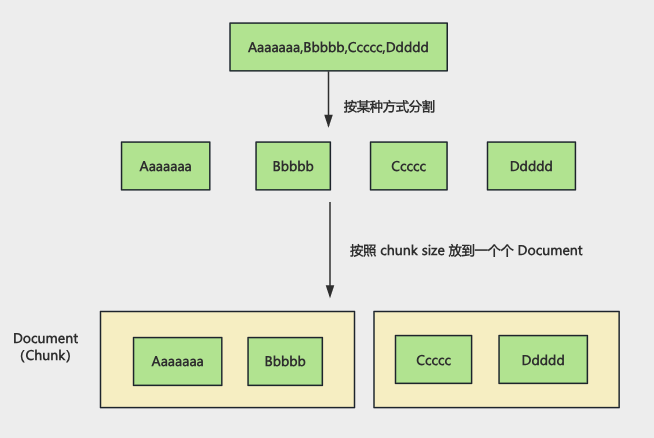
Splitter 会先使用第一个 spearator 来分割字符串,然后按照 chunk size 放入一个个 Document;如果分割后还是大于 chunk size,就需要按照后面的 spearator 继续分割,然后加上 overlap
注意:overloap 只有文本超过 chunk size,文本被打断了才会加,不是所有的块都有,这是为了保证语义连贯性 通常设置为 chunk size 的 10% - 20%,牺牲部分存储空间来提升模型对上下文理解的完整性
import "dotenv/config";
import "cheerio";
import { ChatOpenAI, OpenAIEmbeddings } from "@langchain/openai";
import { CheerioWebBaseLoader } from "@langchain/community/document_loaders/web/cheerio";
import { RecursiveCharacterTextSplitter } from "@langchain/textsplitters";
import { Document } from "@langchain/core/documents";
import { MemoryVectorStore } from "@langchain/classic/vectorstores/memory";

const model = new ChatOpenAI({
  modelName: process.env.MODEL_NAME || "qwen-plus",
  apiKey: process.env.OPENAI_API_KEY,
  configuration: {
    baseURL: process.env.OPENAI_BASE_URL,
  },
  temperature: 0,
});

const embeddings = new OpenAIEmbeddings({
  model: process.env.EMBEDDINGS_MODEL_NAME,
  apiKey: process.env.OPENAI_API_KEY,
  configuration: {
    baseURL: process.env.OPENAI_BASE_URL,
  },
});

const cheerioLoader = new CheerioWebBaseLoader(
  "https://juejin.cn/post/7233327509919547452",
  {
    selector: ".main-area p",
  },
);

const documents = await cheerioLoader.load();
console.assert(documents.length === 1);
console.log(`Total characters: ${documents[0].pageContent.length}`);

const textSplitter = new RecursiveCharacterTextSplitter({
  // 每个分开快的字符数
  chunkSize: 400,
  // 分块之间的重叠字符数
  chunkOverlap: 50,
  // 分隔符,优先使用段落分割
  separators: ["。", "!", "?"],
});

const splitDocuments = await textSplitter.splitDocuments(documents);

console.log(`文档分割完成,共 ${splitDocuments.length} 个分块\n`);

console.log("正在创建向量存储...");
const vectorStore = await MemoryVectorStore.fromDocuments(
  splitDocuments,
  embeddings,
);
console.log("向量存储完成\n");

const retriever = vectorStore.asRetriever({ k: 2 });

const questions = ["父亲的去世对作者的人生态度产生了怎样的根本性逆转?"];

// RAG 流程:对每个问题进行检索和回答
for (const question of questions) {
  console.log("=".repeat(80));
  console.log(`问题: ${question}\n`);
  console.log("=".repeat(80));

  const retrievedDocs = await retriever.invoke(question);

  const scoredResults = await vectorStore.similaritySearchWithScore(
    question,
    2,
  );

  console.log("\n检索到的相关文档及相似度评分");
  retrievedDocs.forEach((doc, index) => {
    const scoredResule = scoredResults.find(
      ([scoredDoc]) => scoredDoc.pageContent === doc.pageContent,
    );
    const score = scoredResule ? scoredResule[1] : null;
    const similarity = score !== null ? (1 - score).toFixed(4) : "N/A";

    console.log(`\n文档 ${index + 1} 相似度: ${similarity}`);
    console.log(`内容: ${doc.pageContent}`);

    if (doc.metadata && Object.keys(doc.metadata).length > 0) {
      console.log(`元数据: `, doc.metadata);
    }
  });

  const context = retrievedDocs
    .map((doc, index) => `[片段${index + 1}]\n${doc.pageContent}`)
    .join("\n\n------\n\n");

  const prompt = `你是一个文章辅助阅读助手,根据文章内容来解答:

  文章内容:
  ${context}

  问题: ${question}

  你的回答:`;

  console.log("\n【AI 回答】");
  const response = await model.invoke(prompt);
  console.log(response.content);
  console.log("\n");
}@langchain/textsplitters中有需要的 splitter
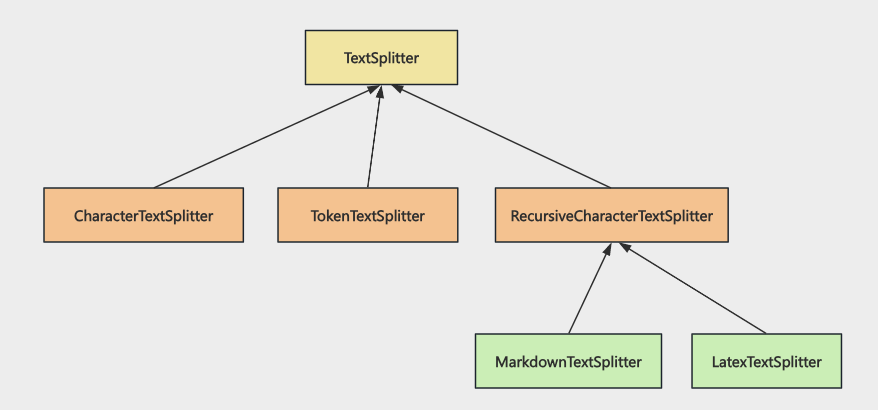
所有的 Splitter 都集成自 TextSplitter,而MarkdownTextSplitter、LatexTextSplitter 继承自 RecursiveCharacterTextSplitter
CharacterTextSplitter 是按照某个字符来进行分割,RecursiveCharacterTextSplitter 是递归分割;而 MarkdownTextSplitter 是按照 #、##、### 等标题来进行递归分割,Latex 同理
TokenTextSplitter 是另一种分割策略, 按照字符分割出来的文档的 token 大小是不一定的,token 是大模型输入的一个单位,在需要精准控制 token 数量的场景使用
Milvus
https://github.com/milvus-io/milvus
Milvus 存储数据的架构如下:
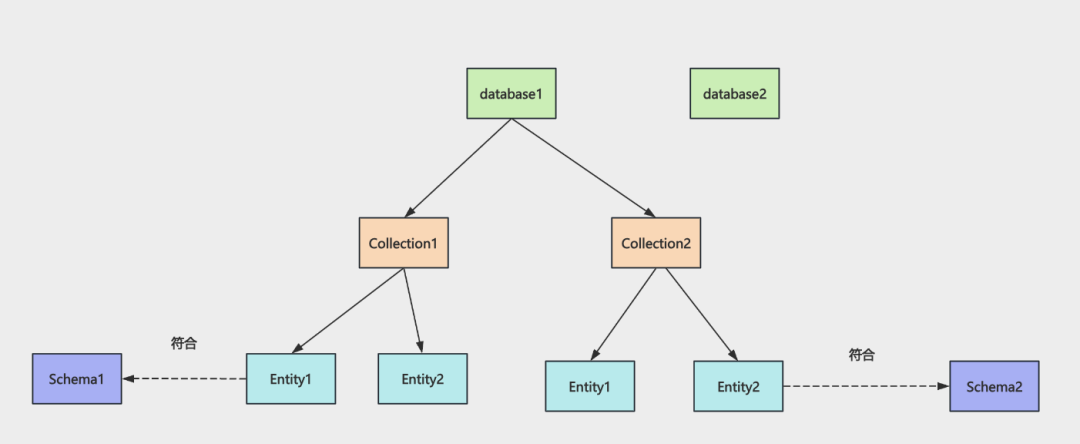
Milvus 中有多个 database,每个 database 下有多个 collection,每个 collection 下是符合 schema 的 entity,也就是数据
可视化工具:
https://github.com/zilliztech/attu
新增
import "dotenv/config";
import {
  MilvusClient,
  DataType,
  MetricType,
  IndexType,
} from "@zilliz/milvus2-sdk-node";
import { OpenAIEmbeddings } from "@langchain/openai";

const COLLECTION_NAME = "ai_diary";
const VECTOR_DIM = 1024;

const embeddings = new OpenAIEmbeddings({
  apiKey: process.env.OPENAI_API_KEY,
  model: process.env.EMBEDDINGS_MODEL_NAME,
  configuration: {
    baseURL: process.env.OPENAI_BASE_URL,
  },
  dimensions: VECTOR_DIM,
});

const client = new MilvusClient({
  address: "localhost:19530",
});

async function getEmbedding(text) {
  const result = await embeddings.embedQuery(text);
  return result;
}

async function main() {
  try {
    console.log("Connecting to Milvus...");
    await client.connectPromise;
    console.log("Connected\\n");

    // 创建集合
    console.log("Creating collection...");
    // 创建集合的时候需要定义 schema
    // vector 是向量字段,定义为 FloatVector 类型,也就是向量,指定维度是 1024 维
    // 同样在上面使用嵌入模型的时候也指定维度为 1024 的维度
    await client.createCollection({
      collection_name: COLLECTION_NAME,
      fields: [
        {
          name: "id",
          data_type: DataType.VarChar,
          max_length: 50,
          is_primary_key: true,
        },
        { name: "vector", data_type: DataType.FloatVector, dim: VECTOR_DIM },
        { name: "content", data_type: DataType.VarChar, max_length: 5000 },
        { name: "date", data_type: DataType.VarChar, max_length: 50 },
        { name: "mood", data_type: DataType.VarChar, max_length: 50 },
        {
          name: "tags",
          data_type: DataType.Array,
          element_type: DataType.VarChar,
          max_capacity: 10,
          max_length: 50,
        },
      ],
    });
    console.log("Collection created");

    // 创建索引
    // 向量字段需要建立索引
    // metric_type 指定用余弦相似度作为距离度量
    console.log("\\nCreating index...");
    await client.createIndex({
      collection_name: COLLECTION_NAME,
      field_name: "vector",
      index_type: IndexType.IVF_FLAT,
      metric_type: MetricType.COSINE,
      params: { nlist: 1024 },
    });
    console.log("Index created");

    // 加载集合
    console.log("\\nLoading collection...");
    await client.loadCollection({ collection_name: COLLECTION_NAME });
    console.log("Collection loaded");

    // 插入日记数据
    console.log("\\bInserting diary entries...");
    const diaryContents = [
      {
        id: "diary_001",
        content:
          "今天天气很好,去公园散步了,心情愉快。看到了很多花开了,春天真美好。",
        date: "2026-01-10",
        mood: "happy",
        tags: ["生活", "散步"],
      },
      {
        id: "diary_002",
        content:
          "今天工作很忙,完成了一个重要的项目里程碑。团队合作很愉快,感觉很有成就感。",
        date: "2026-01-11",
        mood: "excited",
        tags: ["工作", "成就"],
      },
      {
        id: "diary_003",
        content:
          "周末和朋友去爬山,天气很好,心情也很放松。享受大自然的感觉真好。",
        date: "2026-01-12",
        mood: "relaxed",
        tags: ["户外", "朋友"],
      },
      {
        id: "diary_004",
        content:
          "今天学习了 Milvus 向量数据库,感觉很有意思。向量搜索技术真的很强大。",
        date: "2026-01-12",
        mood: "curious",
        tags: ["学习", "技术"],
      },
      {
        id: "diary_005",
        content:
          "晚上做了一顿丰盛的晚餐,尝试了新菜谱。家人都说很好吃,很有成就感。",
        date: "2026-01-13",
        mood: "proud",
        tags: ["美食", "家庭"],
      },
    ];
    console.log("Generating embeddings...");
    const diaryData = await Promise.all(
      diaryContents.map(async (diary) => ({
        ...diary,
        vector: await getEmbedding(diary.content),
      })),
    );
    const insertResult = await client.insert({
      collection_name: COLLECTION_NAME,
      data: diaryData,
    });
    console.log(`Inserted ${insertResult.insert_cnt} records\\n`);
  } catch (error) {
    console.error("Error: ", error.message);
  }
}

main();查询
import "dotenv/config";
import { MilvusClient } from "@zilliz/milvus2-sdk-node";
import { OpenAIEmbeddings } from "@langchain/openai";

const COLLECTION_NAME = "ai_diary";
const VECTOR_DIM = 1024;

const embeddings = new OpenAIEmbeddings({
  apiKey: process.env.OPENAI_API_KEY,
  model: process.env.EMBEDDINGS_MODEL_NAME,
  configuration: {
    baseURL: process.env.OPENAI_BASE_URL,
  },
  dimensions: VECTOR_DIM,
});

const client = new MilvusClient({
  address: "localhost:19530",
});

async function getEmbedding(text) {
  const result = await embeddings.embedQuery(text);
  return result;
}

async function main() {
  try {
    console.log("Connecting to Milvus...");
    await client.connectPromise;
    console.log("✓ Connected\\n"); // 更新数据(Milvus 通过 upsert 实现更新)

    console.log("Updating diary entry...");
    const updateId = "diary_001";
    const updatedContent = {
      id: updateId,
      content:
        "今天下了一整天的雨,心情很糟糕。工作上遇到了很多困难,感觉压力很大。一个人在家,感觉特别孤独。",
      date: "2026-01-10",
      mood: "sad",
      tags: ["生活", "散步", "朋友"],
    };

    console.log("Generating new embedding...");
    const vector = await getEmbedding(updatedContent.content);
    const updateData = { ...updatedContent, vector };

    const result = await client.upsert({
      collection_name: COLLECTION_NAME,
      data: [updateData],
    });

    console.log(`✓ Updated diary entry: ${updateId}`);
    console.log(`  New content: ${updatedContent.content}`);
    console.log(`  New mood: ${updatedContent.mood}`);
    console.log(`  New tags: ${updatedContent.tags.join(", ")}\\n`);
  } catch (error) {
    console.error("Error:", error.message);
  }
}

main();RAG
import { ChatOpenAI, OpenAIEmbeddings } from "@langchain/openai";
import { MetricType, MilvusClient } from "@zilliz/milvus2-sdk-node";
import "dotenv/config";

const COLLECTION_NAME = "ai_diary";
const VECTOR_DIM = 1024;

const model = new ChatOpenAI({
  modelName: process.env.MODEL_NAME || "qwen-plus",
  apiKey: process.env.OPENAI_API_KEY,
  configuration: {
    baseURL: process.env.OPENAI_BASE_URL,
  },
  temperature: 0.7,
});

const embeddings = new OpenAIEmbeddings({
  apiKey: process.env.OPENAI_API_KEY,
  model: process.env.EMBEDDINGS_MODEL_NAME,
  configuration: {
    baseURL: process.env.OPENAI_BASE_URL,
  },
  dimensions: VECTOR_DIM,
});

// 初始化 Milvus 客户端
const client = new MilvusClient({
  address: "localhost:19530",
});

// 获取文本的向量嵌入
async function getEmbedding(text) {
  const result = await embeddings.embedQuery(text);
  return result;
}

// 从 Milvus 中检索相关的日记记录
async function retrieveRelevantDiaries(quertion, k = 2) {
  try {
    // 生成问题的向量
    const questionVector = await getEmbedding(quertion);

    // 在 Milvus 中搜索相似的日记
    const searchResult = await client.search({
      collection_name: COLLECTION_NAME,
      vector: questionVector,
      limit: k,
      metric_type: MetricType.COSINE,
      output_fields: ["id", "content", "date", "mood", "tags"],
    });

    return searchResult.results;
  } catch (error) {
    console.error("检索日记时出错: ", error.message);
    return [];
  }
}

// 使用 RAG 回答关于日记的问题
async function answerDiaryQuestion(question, k = 2) {
  try {
    console.log("=".repeat(80));
    console.log(`问题: ${question}`);
    console.log("=".repeat(80));

    // 1. 检索相关日记
    console.log("\\n【检索相关日记】");
    const retrievedDiaries = await retrieveRelevantDiaries(question, k);

    if (retrievedDiaries.length === 0) {
      console.log("未找到相关日记");
      return "抱歉,我没有找到相关的日记内容";
    }

    // 2. 打印检索到的日记及相似度
    retrievedDiaries.forEach((diary, index) => {
      console.log(`\\n[日记 ${index + 1}] 相似度: ${diary.score.toFixed(4)}`);
      console.log(`日期: ${diary.date}`);
      console.log(`心情: ${diary.mood}`);
      console.log(`标签: ${diary.tags?.join(", ")}`);
      console.log(`内容: ${diary.content}`);
    });

    // 3. 构建上下文
    const context = retrievedDiaries
      .map((diary, index) => {
        return `[日记 ${index + 1}]
            日期: ${diary.date}
            心情: ${diary.mood}
            标签: ${diary.tags?.join(", ")}
            内容: ${diary.content}`;
      })
      .join("\\n\\n---------\\n\\n");

    // 4. 构建 Prompt
    const prompt = `你是一个温暖贴心的 AI 日记助手。基于用户的日记内容回答问题,用亲切自然的语言。

请根据以下日记内容回答问题:
${context}

用户问题: ${question}

回答要求:
1. 如果日记中有相关信息,请结合日记内容给出详细、温暖的回答
2. 可以总结多篇日记的内容,找出共同点或趋势
3. 如果日记中没有相关信息,请温和地告知用户
4. 用第一人称"你"来称呼日记的作者
5. 回答要有同理心,让用户感到被理解和关心

AI 助手的回答:`;

    // 5. 调用 LLM 生成回答
    console.log("\\n【AI 回答】");
    const response = await model.invoke(prompt);
    console.log(response.content);
    console.log("\\n");

    return response.content;
  } catch (error) {
    console.error("回答问题时出错: ", error.message);
    return "抱歉,处理您问题时出现了错误。";
  }
}

async function main() {
  try {
    console.log("链接到 Milvus...");
    await client.connectPromise;
    console.log("已链接\\n");

    await answerDiaryQuestion("我最近做了什么让我感到快乐的事情?", 2);
  } catch (error) {
    onsole.error("错误: ", error.message);
  }
}

main();更新
import "dotenv/config";
import { MilvusClient } from "@zilliz/milvus2-sdk-node";
import { OpenAIEmbeddings } from "@langchain/openai";

const COLLECTION_NAME = "ai_diary";
const VECTOR_DIM = 1024;

const embeddings = new OpenAIEmbeddings({
  apiKey: process.env.OPENAI_API_KEY,
  model: process.env.EMBEDDINGS_MODEL_NAME,
  configuration: {
    baseURL: process.env.OPENAI_BASE_URL,
  },
  dimensions: VECTOR_DIM,
});

const client = new MilvusClient({
  address: "localhost:19530",
});

async function getEmbedding(text) {
  const result = await embeddings.embedQuery(text);
  return result;
}

async function main() {
  try {
    console.log("Connecting to Milvus...");
    await client.connectPromise;
    console.log("✓ Connected\\n"); // 更新数据(Milvus 通过 upsert 实现更新)

    console.log("Updating diary entry...");
    const updateId = "diary_001";
    const updatedContent = {
      id: updateId,
      content:
        "今天下了一整天的雨,心情很糟糕。工作上遇到了很多困难,感觉压力很大。一个人在家,感觉特别孤独。",
      date: "2026-01-10",
      mood: "sad",
      tags: ["生活", "散步", "朋友"],
    };

    console.log("Generating new embedding...");
    const vector = await getEmbedding(updatedContent.content);
    const updateData = { ...updatedContent, vector };

    const result = await client.upsert({
      collection_name: COLLECTION_NAME,
      data: [updateData],
    });

    console.log(`✓ Updated diary entry: ${updateId}`);
    console.log(`  New content: ${updatedContent.content}`);
    console.log(`  New mood: ${updatedContent.mood}`);
    console.log(`  New tags: ${updatedContent.tags.join(", ")}\\n`);
  } catch (error) {
    console.error("Error:", error.message);
  }
}

main();删除
import "dotenv/config";
import { MilvusClient } from "@zilliz/milvus2-sdk-node";

const COLLECTION_NAME = "ai_diary";

const client = new MilvusClient({
  address: "localhost:19530",
});

async function main() {
  try {
    console.log("Connecting to Milvus...");
    await client.connectPromise;
    console.log("✓ Connected\\n"); // 删除单条数据

    console.log("Deleting diary entry...");
    const deleteId = "diary_005";

    const result = await client.delete({
      collection_name: COLLECTION_NAME,
      filter: `id == "${deleteId}"`,
    });

    console.log(`✓ Deleted ${result.delete_cnt} record(s)`);
    console.log(`  ID: ${deleteId}\\n`); // 批量删除

    console.log("Batch deleting diary entries...");
    const deleteIds = ["diary_002", "diary_003"];
    const idsStr = deleteIds.map((id) => `"${id}"`).join(", ");

    const batchResult = await client.delete({
      collection_name: COLLECTION_NAME,
      filter: `id in [${idsStr}]`,
    });

    console.log(`✓ Batch deleted ${batchResult.delete_cnt} record(s)`);
    console.log(`  IDs: ${deleteIds.join(", ")}\\n`); // 条件删除

    console.log("Deleting by condition...");
    const conditionResult = await client.delete({
      collection_name: COLLECTION_NAME,
      filter: `mood == "sad"`,
    });

    console.log(
      `✓ Deleted ${conditionResult.delete_cnt} record(s) with mood="sad"\\n`,
    );
  } catch (error) {
    console.error("Error:", error.message);
  }
}

main();Milvus+RAG
ebook-write.js
import { EPubLoader } from "@langchain/community/document_loaders/fs/epub";
import { OpenAIEmbeddings } from "@langchain/openai";
import { RecursiveCharacterTextSplitter } from "@langchain/textsplitters";
import {
    DataType,
    IndexType,
    MetricType,
    MilvusClient,
} from "@zilliz/milvus2-sdk-node";
import "dotenv/config";
import { parse } from "path";

const COLLECTION_NAME = "ebook_collection";
const VECTOR_DIM = 1024;
const CHUNK_SIZE = 500; // 拆分到 500 字符
const EPUB_FILE = "./天龙八部.epub";

// 从文件名提取书名(去掉扩展名)
const BOOK_NAME = parse(EPUB_FILE).name;

// 初始化 Embeddings 模型
const embeddings = new OpenAIEmbeddings({
  apiKey: process.env.OPENAI_API_KEY,
  model: process.env.EMBEDDINGS_MODEL_NAME,
  configuration: {
    baseURL: process.env.OPENAI_BASE_URL,
  },
  dimensions: VECTOR_DIM,
});

// 初始化 Milvus 客户端
const client = new MilvusClient({
  address: "localhost:19530",
});

// 获取文本的向量嵌入
async function getEmbedding(text) {
  const result = await embeddings.embedQuery(text);
  return result;
}

// 创建或获取集合
async function ensureCollection(bookId) {
  try {
    // 检查集合是否存在
    const hasCollectionResult = await client.hasCollection({
      collection_name: COLLECTION_NAME,
    });

    if (!hasCollectionResult.value) {
      console.log("创建集合...");
      await client.createCollection({
        collection_name: COLLECTION_NAME,
        fields: [
          {
            name: "id",
            data_type: DataType.VarChar,
            max_length: 100,
            is_primary_key: true,
          },
          {
            name: "book_id",
            data_type: DataType.VarChar,
            max_length: 100,
          },
          {
            name: "book_name",
            data_type: DataType.VarChar,
            max_length: 200,
          },
          {
            name: "chapter_num",
            data_type: DataType.Int32,
          },
          {
            name: "index",
            data_type: DataType.Int32,
          },
          {
            name: "content",
            data_type: DataType.VarChar,
            max_length: 10000,
          },
          {
            name: "vector",
            data_type: DataType.FloatVector,
            dim: VECTOR_DIM,
          },
        ],
      });

      console.log("集合创建成功");

      // 创建索引
      console.log("创建索引...");
      await client.createIndex({
        collection_name: COLLECTION_NAME,
        field_name: "vector",
        index_type: IndexType.IVF_FLAT,
        metric_type: MetricType.COSINE,
        params: { nlist: 1024 },
      });
      console.log("索引创建成功");

      try {
        await client.loadCollection({ collection_name: COLLECTION_NAME });
        console.log("集合已加载");
      } catch (error) {
        console.log("集合已处于加载状态");
      }
    }
  } catch (error) {
    console.error("创建集合时出错: ", error.message);
    throw error;
  }
}

// 将文档块批量插入到 Milvus(流式处理)
async function insertChunkBatch(chunks, bookId, chapterNum) {
  try {
    if (chunks.length === 0) {
      return 0;
    }

    // 为每个文档块生成向量并构建插入数据
    const insertData = await Promise.all(
      chunks.map(async (chunk, chunkIndex) => {
        const vector = await getEmbedding(chunk);
        // 手动生成 ID:book_id_chapterNum_index
        return {
          id: `${bookId}_${chapterNum}_${chunkIndex}`,
          book_id: bookId,
          book_name: BOOK_NAME,
          chapter_num: chapterNum,
          index: chunkIndex,
          content: chunk,
          vector: vector,
        };
      }),
    );

    // 批量插入到 Milvus
    const insertResult = await client.insert({
      collection_name: COLLECTION_NAME,
      data: insertData,
    });

    return Number(insertResult.insert_cnt) || 0;
  } catch (error) {
    console.error(`插入章节 ${chapterNum} 的数据时出错: `, error.message);
    console.error("错误详情: ", error);
    throw error;
  }
}

// 加载 Epub 文件并进行流式处理(编处理编插入)
async function LoadAndProcessEPubStreaming(bookId) {
  try {
    console.log(`\\n 开始加载 EPUB 文件: ${EPUB_FILE}`);

    // 使用 EPubLoader 加载文件,按章节拆分
    const loader = new EPubLoader(EPUB_FILE, {
      splitChapters: true,
    });

    const documents = await loader.load();
    console.log(`加载完成,共 ${documents.length} 个章节\\n`);

    // 创建文件本拆分器,拆分到 500 个字符
    const textSplitter = new RecursiveCharacterTextSplitter({
      chunkSize: CHUNK_SIZE,
      chunkOverlap: 50, // 重复 50 个字符,保持上下文连贯性
    });

    let totalInserted = 0;

    // 遍历每个章节,进行二次拆分并理解插入
    for (
      let chapterIndex = 0;
      chapterIndex < documents.length;
      chapterIndex++
    ) {
      const chapter = documents[chapterIndex];
      const chapterContent = chapter.pageContent;

      console.log(`处理第 ${chapterIndex + 1}/${documents.length} 章...`);

      // 使用 splitter 进行二次拆分
      const chunks = await textSplitter.splitText(chapterContent);

      console.log(`拆分为 ${chunks.length} 个片段`);

      if (chunks.length === 0) {
        console.log("跳过空章节\\b");
        continue;
      }

      console.log("生成向量插入中...");

      // 立即生成喜庆了并插入该章节的所有片段
      const insertedCount = await insertChunkBatch(
        chunks,
        bookId,
        chapterIndex + 1,
      );
      totalInserted += insertedCount;

      console.log(`已插入 ${insertedCount} 条记录(累计: ${totalInserted})\\n`);
    }

    console.log(`\\n 总共插入 ${totalInserted} 条记录\\n`);
    return totalInserted;
  } catch (error) {
    console.error("加载 EPUB 文件时出错: ", error.message);
    throw error;
  }
}

async function main() {
  try {
    console.log("=".repeat(80));
    console.log("电子书处理程序");
    console.log("=".repeat(80));

    // 链接 Milvus
    console.log("\\n 连接 Milvus...");
    await client.connectPromise;
    console.log("已连接");

    // 设置 book_id
    const bookId = 1;

    // 确保集合存在
    await ensureCollection(bookId);

    // 加载并处理 EPUB 文件
    await LoadAndProcessEPubStreaming(bookId);

    console.log("=".repeat(80));
    console.log("处理完成");
    console.log("=".repeat(80));
  } catch (error) {
    console.error("\\n错误: ", error.message);
    console.error(error.stack);
    process.exit(1);
  }
}

main();ebook-query.js
import { ChatOpenAI, OpenAIEmbeddings } from "@langchain/openai";
import { MetricType, MilvusClient } from "@zilliz/milvus2-sdk-node";
import "dotenv/config";
import { parse } from "path";

const COLLECTION_NAME = "ebook_collection";
const VECTOR_DIM = 1024;
const CHUNK_SIZE = 500; // 拆分到 500 字符
const EPUB_FILE = "./天龙八部.epub";

// 从文件名提取书名(去掉扩展名)
const BOOK_NAME = parse(EPUB_FILE).name;

const model = new ChatOpenAI({
  modelName: process.env.MODEL_NAME || "qwen-plus",
  apiKey: process.env.OPENAI_API_KEY,
  configuration: {
    baseURL: process.env.OPENAI_BASE_URL,
  },
  temperature: 0.7,
});

// 初始化 Embeddings 模型
const embeddings = new OpenAIEmbeddings({
  apiKey: process.env.OPENAI_API_KEY,
  model: process.env.EMBEDDINGS_MODEL_NAME,
  configuration: {
    baseURL: process.env.OPENAI_BASE_URL,
  },
  dimensions: VECTOR_DIM,
});

// 初始化 Milvus 客户端
const client = new MilvusClient({
  address: "localhost:19530",
});

// 获取文本的向量嵌入
async function getEmbedding(text) {
  const result = await embeddings.embedQuery(text);
  return result;
}

// 从 Milvus 中检索相关的电子书内容
async function retrieveRelevantContent(question, k = 3) {
  try {
    const queryVector = await getEmbedding(question);
    const searchResult = await client.search({
      collection_name: COLLECTION_NAME,
      data: queryVector,
      limit: 3,
      metric_type: MetricType.COSINE,
      output_fields: ["id", "book_id", "chapter_num", "index", "content"],
    });

    return searchResult.results;
  } catch (error) {
    console.log("检索内容时出错: ", error.message);
    return [];
  }
}

// 使用 RAG 回答关于《天龙八部》的问题
async function answerEbookQuestion(question, k = 3) {
  try {
    console.log("=".repeat(80));
    console.log(`问题: ${question}`);
    console.log("=".repeat(80));

    // 1. 检索相关内容
    console.log("\n【检索相关内容】");
    const retrievedContent = await retrieveRelevantContent(question, k);

    if ((retrievedContent.length === 0)) {
      console.log("未找到相关内容");
      return "抱歉,我没有找到相关的《天龙八部》内容。";
    }

    // 2. 打印检索到的内容及相似度
    retrievedContent.forEach((item, i) => {
      console.log(`\n[片段 ${i + 1}] 相似度: ${item.score.toFixed(4)}`);
      console.log(`书籍: ${item.book_id}`);
      console.log(`章节: 第 ${item.chapter_num} 章`);
      console.log(`片段索引: ${item.index}`);
      console.log(
        `内容: ${item.content.substring(0, 200)}${item.content.length > 200 ? "..." : ""}`,
      );
    }); // 3. 构建上下文

    const context = retrievedContent
      .map((item, i) => {
        return `[片段 ${i + 1}]
章节: 第 ${item.chapter_num} 章
内容: ${item.content}`;
      })
      .join("\n\n━━━━━\n\n");

    // 4. 构建 prompt
    const prompt = `你是一个专业的《天龙八部》小说助手。基于小说内容回答问题,用准确、详细的语言。

请根据以下《天龙八部》小说片段内容回答问题:
${context}

用户问题: ${question}

回答要求:
1. 如果片段中有相关信息,请结合小说内容给出详细、准确的回答
2. 可以综合多个片段的内容,提供完整的答案
3. 如果片段中没有相关信息,请如实告知用户
4. 回答要准确,符合小说的情节和人物设定
5. 可以引用原文内容来支持你的回答

AI 助手的回答:`;

    // 5. 调用 LLM 生成回答
    console.log("\n【AI 回答】");
    const response = await model.invoke(prompt);
    console.log(response.content);
    console.log("\n");

    return response.content;
  } catch (error) {
    console.error("回答问题时出错: ", error.message);
    return "抱歉,处理问题时出现了错误";
  }
}

async function main() {
  try {
    console.log("\n 连接 Milvus...");
    await client.connectPromise;
    console.log("已连接");

    try {
      await client.loadCollection({ collection_name: COLLECTION_NAME });
      console.log("集合已加载");
    } catch (error) {
      if (!error.message.includes("already loaded")) {
        throw error;
      }
      console.log("集合已处于加载状态");
    }

    await answerEbookQuestion("段誉会什么武功?", 5);
  } catch (error) {
    console.error("Error: ", error.message);
  }
}

main();
Memory
如果不做 Memory 管理,大模型根本不知道之前回答过什么,每次提问都是无在你给他的
现在 Memory 管理主要有三种思路:截断、总结、检索
-
截断:根据总 token 数量来保留最近的 message
-
总结:调用大模型之前对之前的 message 生成一个摘要
-
检索:类似 RAG,对之前对话的 message 做语义检索
结构化大模型输出
json-output-parser.js
import "dotenv/config";
import { ChatOpenAI } from "@langchain/openai";
import { JsonOutputParser } from "@langchain/core/output_parsers";

const model = new ChatOpenAI({
  modelName: process.env.MODEL_NAME || "qwen-plus",
  apiKey: process.env.OPENAI_API_KEY,
  configuration: {
    baseURL: process.env.OPENAI_BASE_URL,
  },
});

const parser = new JsonOutputParser();

const question = `请介绍一下爱因斯坦的信息,请以 JSON 格式返回,包含一下字段:name(姓名)、birth_year(出生年份)、nationality(国籍)、major_achievements(主要成就,数组)、famous_theory(著名力量)。
${parser.getFormatInstructions()}`;

console.log("Question: ", question);

try {
  console.log("正在调用 LLM...");

  const response = await model.invoke(question);
  console.log("模型原始响应: \\n");
  console.log(response.content);

  const result = await parser.parse(response.content);

  console.log("JsonOutputParser 自动解析的结果: \\n");
  console.log(result);
  console.log(`姓名:${result.name}`);
  console.log(`出生年月:${result.birth_year}`);
  console.log(`国籍:${result.nationality}`);
  console.log(`著名理论:${result.famous_theory}`);
  console.log(`主要成就:${result.major_achievements}`);
} catch (error) {
  console.error("错误: ", error.message);
}stream-tool-calls-parser.js
import { JsonOutputToolsParser } from "@langchain/core/output_parsers/openai_tools";
import { ChatOpenAI } from "@langchain/openai";
import "dotenv/config";
import { z } from "zod";

const model = new ChatOpenAI({
  modelName: process.env.MODEL_NAME,
  apiKey: process.env.OPENAI_API_KEY,
  temperature: 0,
  configuration: {
    baseURL: process.env.OPENAI_BASE_URL,
  },
});

// 定义结构化输出的 schema
const scientistSchema = z.object({
  name: z.string().describe("科学家的全名"),
  birth_year: z.number().describe("出生年份"),
  death_year: z.number().optional().describe("去世年份,如果还在世则不填"),
  nationality: z.string().describe("国籍"),
  fields: z.array(z.string()).describe("研究领域列表"),
  achievements: z.array(z.string()).describe("主要成就"),
  biography: z.string().describe("简短传记"),
});

// 绑定工具到模型
const modelWithTool = model.bindTools([
  {
    name: "extract_scientist_info",
    description: "提取和结构化科学家的详细信息",
    schema: scientistSchema,
  },
]);

// 1. 绑定工具并挂载解析器
const parser = new JsonOutputToolsParser();
const chain = modelWithTool.pipe(parser);

try {
  // 2. 开启流
  const stream = await chain.stream("详细介绍牛顿的生平和成就");

  let lastContent = ""; // 记录已打印的完整内容
  let finalResult = null; // 存储最终的完整结果
  console.log("📡 实时输出流式内容:\\n");

  for await (const chunk of stream) {
    if (chunk.length > 0) {
      const toolCall = chunk[0]; // 获取当前工具调用的完整参数内容
      // const currentContent = JSON.stringify(toolCall.args || {}, null, 2);
      // if (currentContent.length > lastContent.length) {
      //     const newText = currentContent.slice(lastContent.length);
      //     process.stdout.write(newText); // 实时输出到控制台
      //     lastContent = currentContent; // 更新已读进度
      // }

      console.log(toolCall.args);
    }
  }

  console.log("\\n\\n✅ 流式输出完成");
} catch (error) {
  console.error("\\n❌ 错误:", error.message);
  console.error(error);
}smart-import.js
import { ChatOpenAI } from "@langchain/openai";
import "dotenv/config";
import mysql from "mysql2/promise";
import { z } from "zod";

// 初始化模型
const model = new ChatOpenAI({
  modelName: process.env.MODEL_NAME,
  apiKey: process.env.OPENAI_API_KEY,
  temperature: 0,
  configuration: {
    baseURL: process.env.OPENAI_BASE_URL,
  },
});

// 定义单个好友信息的 zod schema,匹配 friends 表结构
const friendSchema = z.object({
  name: z.string().describe("姓名"),
  gender: z.string().describe("性别(男/女)"),
  birth_date: z
    .string()
    .describe("出生日期,格式:YYYY-MM-DD,如果无法确定具体日期,根据年龄估算"),
  company: z.string().nullable().describe("公司名称,如果没有则返回 null"),
  title: z.string().nullable().describe("职位/头衔,如果没有则返回 null"),
  phone: z.string().nullable().describe("手机号,如果没有则返回 null"),
  wechat: z.string().nullable().describe("微信号,如果没有则返回 null"),
});

// 定义批量好友信息的 schema(数组)
const friendsArraySchema = z.array(friendSchema).describe("好友信息数组");

// 使用 withStructuredOutput 方法
const structuredModel = model.withStructuredOutput(friendsArraySchema);

// 数据库连接配置
const connectionConfig = {
  host: "localhost",
  port: 3306,
  user: "root",
  password: "root",
  multipleStatements: true,
};

async function extractAndInsert(text) {
  const connection = await mysql.createConnection(connectionConfig);

  try {
    // 切换到 hello 数据库
    await connection.query("USE hello;");

    console.log("🤔 正在从文本中提取信息...\\n");
    const prompt = `请从以下文本中提取所有好友信息,文本中可能包含一个或多个人的信息。请将每个人的信息分别提取出来,返回一个数组。

${text}

要求:
1. 如果文本中包含多个人,请为每个人创建一个对象
2. 每个对象包含以下字段:
   - 姓名:提取文本中的人名
   - 性别:提取性别信息(男/女)
   - 出生日期:如果能找到具体日期最好,否则根据年龄描述估算(格式:YYYY-MM-DD)
   - 公司:提取公司名称
   - 职位:提取职位/头衔信息
   - 手机号:提取手机号码
   - 微信号:提取微信号
3. 如果某个字段在文本中找不到,请返回 null
4. 返回格式必须是一个数组,即使只有一个人也要放在数组中`;

    const results = await structuredModel.invoke(prompt);

    console.log(`✅ 提取到 ${results.length} 条结构化信息:`);
    console.log(JSON.stringify(results, null, 2));
    console.log("");

    if (results.length === 0) {
      console.log("⚠️ 没有提取到任何信息");
      return { count: 0, insertIds: [] };
    }

    // 批量插入数据库
    const insertSql = `
      INSERT INTO friends (
        name,
        gender,
        birth_date,
        company,
        title,
        phone,
        wechat
      ) VALUES ?;
    `;

    const values = results.map((result) => [
      result.name,
      result.gender,
      result.birth_date || null,
      result.company,
      result.title,
      result.phone,
      result.wechat,
    ]);

    const [insertResult] = await connection.query(insertSql, [values]);
    console.log(`✅ 成功批量插入 ${insertResult.affectedRows} 条数据`);
    console.log(
      `   插入的ID范围:${insertResult.insertId} - ${insertResult.insertId + insertResult.affectedRows - 1}`,
    );

    return {
      count: insertResult.affectedRows,
      insertIds: Array.from(
        { length: insertResult.affectedRows },
        (_, i) => insertResult.insertId + i,
      ),
    };
  } catch (err) {
    console.error("❌ 执行出错:", err);
    throw err;
  } finally {
    await connection.end();
  }
}

// 主函数
async function main() {
  // 示例文本(包含多个人的信息)
  const sampleText =
    "我最近认识了几个新朋友。第一个是张总,女的,看起来30出头,在腾讯做技术总监,手机13800138000,微信是zhangzong2024。第二个是李工,男,大概28岁,在阿里云做架构师,电话15900159000,微信号lee_arch。还有一个是陈经理,女,35岁左右,在美团做产品经理,手机号是18800188000,微信chenpm2024。";

  console.log("📝 输入文本:");
  console.log(sampleText);
  console.log("");

  try {
    const result = await extractAndInsert(sampleText);
    console.log(`\\n🎉 处理完成!成功插入 ${result.count} 条记录`);
    console.log(`   插入的ID:${result.insertIds.join(", ")}`);
  } catch (error) {
    console.error("❌ 处理失败:", error.message);
    process.exit(1);
  }
}

main();mini-cursor.js
import "dotenv/config";
import { ChatOpenAI } from "@langchain/openai";
import { JsonOutputToolsParser } from "@langchain/core/output_parsers/openai_tools";
import { tool } from "@langchain/core/tools";
import { InMemoryChatMessageHistory } from "@langchain/core/chat_history";
import {
  HumanMessage,
  SystemMessage,
  ToolMessage,
} from "@langchain/core/messages";
import {
  executeCommandTool,
  listDirectoryTool,
  readFileTool,
  writeFileTool,
} from "./all-tools.js";
import chalk from "chalk";

const model = new ChatOpenAI({
  modelName: process.env.MODEL_NAME || "qwen-plus",
  apiKey: process.env.OPENAI_API_KEY,
  temperature: 0,
  modelKwargs: {
    thinking: {
      type: process.env.THINKING_TYPE || "disabled",
    },
  },
  configuration: {
    baseURL: process.env.OPENAI_BASE_URL,
  },
});

const tools = [
  readFileTool,
  writeFileTool,
  executeCommandTool,
  listDirectoryTool,
];

const modelWithTools = model.bindTools(tools);

// Agent 执行函数
async function runAgentWithTools(query, maxInterations = 30) {
  const history = new InMemoryChatMessageHistory();

  await history.addMessage(
    new SystemMessage(`你是一个项目管理助手,使用工具完成任务。
            当前工作目录:${process.cwd()}

            工具:
            1. read_file: 读取文件
            2. write_file: 写入文件
            3. execute_command: 执行命令(支持 workingDirectory 参数)
            4. list_directory: 列出目录内容

            重要规则 - execute_command:
            - workingDirectory 参数会自动切换到指定目录
            - 当使用 workingDirectory 时,绝对不要在 command 中使用 cd
            - 错误示例: {command: "cd react-todo-app && pnpm install", workingDirectory: "react-todo-app"} 这是错误的!因为 workingDirectory 已经在 react-todo-app 目录了,再 cd react-todo-app 会找不到目录
            - 正确示例: {command: "pnpm install", workingDirectory: "react-todo-app"} 这是正确的!因为 workingDirectory 已经在 react-todo-app 目录了,直接执行命令就行了

            回答要简洁,只说做了什么
            `),
  );
  await history.addMessage(new HumanMessage(query));

  for (let i = 0; i < maxInterations; i++) {
    console.log(chalk.bgGreen(`正在等待 AI 思考...`));

    // 获取当前历史消息
    const messages = await history.getMessages();

    const rawStream = await modelWithTools.stream(messages);

    // 准备一个空的容器来拼接完整的 AIMessage
    let fullAIMessage = null;

    // 准备一个 tool_call_chunks 的 JSON 增量解析器
    const toolParser = new JsonOutputToolsParser();

    // 记录每个工具调用已打印的长度(用 id 或 filePath 作为 key)
    const printedLengths = new Map();
    console.log("\\nAgent 开始思考并生成流...");

    for await (const chunk of rawStream) {
      // 这里的 chunk 是 AIMessageChunk,要拼接起来
      fullAIMessage = fullAIMessage ? fullAIMessage.concat(chunk) : chunk;

      let parsedTools = null;
      try {
        parsedTools = await toolParser.parseResult([
          { message: fullAIMessage },
        ]);
      } catch (error) {
        // 解析失败说明 JSON 还不完整,忽略错误继续积累
      }

      if (parsedTools && parsedTools.length > 0) {
        for (const toolCall of parsedTools) {
          if (toolCall.type === "write_file" && toolCall.args?.content) {
            const toolCallId =
              toolCall.id || toolCall.args.filePath || "default";
            const currentContent = String(toolCall.args.content);
            const previousLength = printedLengths.get(toolCallId);

            if (previousLength === undefined) {
              printedLengths.set(toolCallId, 0);
              console.log(
                chalk.bgBlue(
                  `\\n[工具调用] write_file("${toolCall.args.filePath}") - 开始写入(流式预览)\\n`,
                ),
              );
            }

            if (currentContent.length > previousLength) {
            }
            const newContent = currentContent.slice(previousLength);
            process.stdout.write(newContent);
            printedLengths.set(toolCallId, currentContent.length);
          }
        }
      } else {
        // 当前还没有解析出工具调用时,如果有文本内容就直接输出
        if (chunk.content) {
          process.stdout.write(
            typeof chunk.content === "string"
              ? chunk.content
              : JSON.stringify(chunk.content),
          );
        }
      }
    }

    // 此时 fullAIMessage 已经还原,直接存入 history
    await history.addMessage(fullAIMessage);
    console.log(chalk.green("\\n 消息已完整存入历史"));

    // 检查是否有工具调用
    if (!fullAIMessage.tool_calls || fullAIMessage.tool_calls.length === 0) {
      console.log(`\\nAI 最终回复:\\n${fullAIMessage.content}\\n`);
      return fullAIMessage.content;
    }

    // 执行工具调用
    for (const toolCall of fullAIMessage.tool_calls) {
      const foundTool = tools.find((t) => t.name === toolCall.name);
      if (foundTool) {
        const toolResult = await foundTool.invoke(toolCall.args);
        await history.addMessage(
          new ToolMessage({ content: toolResult, tool_call_id: toolCall.id }),
        );
      }
    }
  }
  const finalMessages = await history.getMessages();
  return finalMessages[finalMessages.length - 1].content;
}

const case1 = `创建一个功能丰富的 React TodoList 应用:

1. 创建项目:echo -e "n\\nn" | pnpm create vite react-todo-app --template react-ts
2. 修改 src/App.tsx,实现完整功能的 TodoList:
 - 添加、删除、编辑、标记完成
 - 分类筛选(全部/进行中/已完成)
 - 统计信息显示
 - localStorage 数据持久化
3. 添加复杂样式:
 - 渐变背景(蓝到紫)
 - 卡片阴影、圆角
 - 悬停效果
4. 添加动画:
 - 添加/删除时的过渡动画
 - 使用 CSS transitions
5. 列出目录确认

注意:使用 pnpm,功能要完整,样式要美观,要有动画效果

之后在 react-todo-app 项目中:
1. 使用 pnpm install 安装依赖
2. 使用 pnpm run dev 启动服务器
`;

try {
  await runAgentWithTools(case1);
} catch (error) {
  console.error(`\\n❌ 错误: ${error.message}\\n`);
}Prompt Template
使用组件化管理 Prompt,每个 Prompt 部分都可以单独维护,可以灵活的组合,随时根据新的业务场景组合新的 Prompt
定义一个 Prompt Template,其中有一些占位符,可以使用 format 方法传入占位符的具体内容
prompt-template-1.js
import { ChatOpenAI } from "@langchain/openai";
import dotenv from "dotenv";
import { PromptTemplate } from "@langchain/core/prompts";

dotenv.config();

const model = new ChatOpenAI({
  modelName: process.env.MODEL_NAME || "qwen-plus",
  apiKey: process.env.OPENAI_API_KEY,
  configuration: {
    baseURL: process.env.OPENAI_BASE_URL,
  },
});

const nativeTemplate = PromptTemplate.fromTemplate(`
    你是一名严谨但不失人情味的工程团队负责人,需要根据本周数据写一份周报。

公司名称:{company_name}
部门名称:{team_name}
直接汇报对象:{manager_name}
本周时间范围:{week_range}

本周团队核心目标:
{team_goal}

本周开发数据(Git 提交 / Jira 任务):
{dev_activities}

请根据以上信息生成一份【Markdown 周报】,要求:
- 有简短的整体 summary(两三句话)
- 有按模块/项目拆分的小结
- 用一个 Markdown 表格列出关键指标(字段示例:模块 / 亮点 / 风险 / 下周计划)
- 语气专业但有一点人情味,适合作为给老板和团队抄送的周报。
`);

const prompt = await nativeTemplate.format({
  company_name: "星航科技",
  team_name: "数据智能平台组",
  manager_name: "刘总",
  week_range: "2025-03-10 ~ 2025-03-16",
  team_goal: "完成用户画像服务的灰度上线,并验证核心指标是否达标。",
  dev_activities:
    "- 阿兵:完成用户画像服务的 Canary 发布与回滚脚本优化,提交 27 次,相关任务:DATA-321 / DATA-335\\n" +
    "- 小李:接入埋点数据,打通埋点 → Kafka → DWD → 画像服务的全链路,提交 22 次\\n" +
    "- 小赵:完善画像服务的告警与Dashboard,新增 8 个告警规则,提交 15 次\\n" +
    "- 小周:配合产品输出 A/B 实验报表,支持 3 条对外汇报用数据",
});

console.log("格式化后的提示词:");
console.log(prompt);

const stream = await model.stream(prompt);
console.log("\\nAI 回答:");
for await (const chunk of stream) {
  process.stdout.write(chunk.content);
}实际上一个完整的 Prompt 可能需要按照角色、背景、任务、格式等来拆分管理 Prompt,使用的时候再组合
pipeline-prompt-template.js
import { ChatOpenAI } from "@langchain/openai";
import dotenv from "dotenv";
import {
  PromptTemplate,
  PipelinePromptTemplate,
} from "@langchain/core/prompts";

dotenv.config();

const model = new ChatOpenAI({
  modelName: process.env.MODEL_NAME || "qwen-plus",
  apiKey: process.env.OPENAI_API_KEY,
  configuration: {
    baseURL: process.env.OPENAI_BASE_URL,
  },
});

// A. 人设模块
const personaPrompt =
  PromptTemplate.fromTemplate(`你是一名资深工程团队负责人,写作风格:{tone}。
你擅长把枯燥的技术细节写得既专业又有温度。\\n`);

// B. 背景模块
const contextPrompt = PromptTemplate.fromTemplate(`公司:{company_name}
部门:{team_name}
直接汇报对象:{manager_name}
本周时间范围:{week_range}
本周部门核心目标:{team_goal}\\n`);

// C. 任务模块
const taskPrompt =
  PromptTemplate.fromTemplate(`以下是本周团队的开发活动(Git / Jira 汇总):
{dev_activities}

请你从这些原始数据中提炼出:
1. 本周整体成就亮点
2. 潜在风险和技术债
3. 下周重点计划建议\\n`);

// D. 格式模块
const formatPrompt =
  PromptTemplate.fromTemplate(`请用 Markdown 输出周报,结构包含:
1. 本周概览(2-3 句话的 Summary)
2. 详细拆分(按模块或项目分段)
3. 关键指标表格,表头为:模块 | 亮点 | 风险 | 下周计划

注意:
- 尽量引用一些具体数据(如提交次数、完成的任务编号)
- 语气专业,但可以偶尔带一点轻松的口吻,符合 {company_values}。
`);

// E. 最终组合 Prompt
const finalWeeklyPrompt = PromptTemplate.fromTemplate(`{persona_block}
{context_block}
{task_block}
{format_block}

现在请生成本周的最终周报:`);

const pipelinePrompt = new PipelinePromptTemplate({
  pipelinePrompts: [
    { name: "persona_block", prompt: personaPrompt },
    { name: "context_block", prompt: contextPrompt },
    { name: "task_block", prompt: taskPrompt },
    { name: "format_block", prompt: formatPrompt },
  ],
  finalPrompt: finalWeeklyPrompt,
  inputVariables: [
    "tone",
    "company_name",
    "team_name",
    "manager_name",
    "week_range",
    "team_goal",
    "dev_activities",
    "company_values",
  ],
});

const pipelineFormatted = await pipelinePrompt.format({
  tone: "专业、清晰、略带幽默",
  company_name: "星航科技",
  team_name: "AI 平台组",
  manager_name: "王总",
  week_range: "2025-02-03 ~ 2025-02-09",
  team_goal: "完成智能周报 Agent 的 MVP 版本,并打通 Git / Jira 数据源。",
  dev_activities:
    "- Git: 58 次提交,3 个主要分支合并\\n" +
    "- Jira: 完成 12 个 Story,关闭 7 个 Bug\\n" +
    "- 关键任务:完成智能周报 Pipeline 设计、实现 Prompt 拆分、接入 ExampleSelector",
  company_values: "「极致、开放、靠谱」的价值观",
});

console.log("PipelinePromptTemplate 组合后的 Prompt:");
console.log(pipelineFormatted);有些值是比较固定的,不需要每次组合模板的时候都填一遍,可以使用 partial 来预填变量
partial.js
import { pipelinePrompt } from "./pipeline-prompt-template.js";

const pipelineWithPartial = await pipelinePrompt.partial({
  company_name: "星航科技",
  company_values: "「极致、开放、靠谱」的价值观",
  tone: "骗正式但不僵硬",
});

const partialFormatted = await pipelineWithPartial.format({
  team_name: "AI 平台组",
  manager_name: "刘东",
  week_range: "2025-02-10 ~ 2025-02-16",
  team_goal: "上线周报 Agent 到内部试用环境,并收集反馈。",
  dev_activities:
    "- 小明:完成 Git/Jira 集成封装\\n" +
    "- 小红:实现 Prompt 配置化加载\\n" +
    "- 小强:接入权限系统,支持按部门过滤数据",
});

const partialFormatted2 = await pipelineWithPartial.format({
  team_name: "AI 工程效率组",
  manager_name: "王强",
  week_range: "2025-02-17 ~ 2025-02-23",
  team_goal: "打通 CI/CD 可观测链路,并推动落地到核心服务。",
  dev_activities:
    "- 阿俊:完成流水线执行数据的链路追踪接入\\n" +
    "- 小白:梳理核心服务发布流程,补齐变更记录\\n" +
    "- 小七:研发发布回滚一键脚本 PoC 版本",
});

console.log(partialFormatted);
console.log("\\n================ 分割线:第二份周报模板 ================\\n");
console.log(partialFormatted2);PromptTemplate 产出的只是字符串,对于大模型来说,更友好的形式还是 SystemMessage、HumanMessage、AIMessage、ToolMessage 的 messages 数组;这时候需要使用 ChatPromptTemplate
chat-prompt-template.js
import { ChatOpenAI } from "@langchain/openai";
import dotenv from "dotenv/config";
import { ChatPromptTemplate } from "@langchain/core/prompts";

const model = new ChatOpenAI({
  modelName: process.env.MODEL_NAME || "qwen-plus",
  apiKey: process.env.OPENAI_API_KEY,
  configuration: {
    baseURL: process.env.OPENAI_BASE_URL,
  },
});

const chatPrompt = ChatPromptTemplate.fromMessages([
  [
    "system",
    `你是一名资深工程团队负责人,擅长用结构化、易读的方式写技术周报。
写作风格要求:{tone}。

请根据后续用户提供的信息,帮他生成一份适合给老板和团队同时抄送的周报草稿。`,
  ],
  [
    "human",
    `本周信息如下:

公司名称:{company_name}
团队名称:{team_name}
直接汇报对象:{manager_name}
本周时间范围:{week_range}

本周团队核心目标:
{team_goal}

本周开发数据(Git 提交 / Jira 任务等):
{dev_activities}

请据此输出一份 Markdown 周报,结构建议包含:
1. 本周概览(2-3 句话)
2. 详细拆分(按项目或模块分段)
3. 关键指标表格(字段示例:模块 / 亮点 / 风险 / 下周计划)

语气专业但有人情味。`,
  ],
]);

const chatMessages = await chatPrompt.formatMessages({
  tone: "专业、清晰、略带鼓励",
  company_name: "星航科技",
  team_name: "智能应用平台组",
  manager_name: "王总",
  week_range: "2025-05-05 ~ 2025-05-11",
  team_goal: "完成内部 AI 助手灰度上线,并确保核心链路稳定。",
  dev_activities:
    "- 小李:完成 AI 助手工单流转能力,对接客服系统,提交 25 次\\n" +
    "- 小张:接入日志检索和知识库查询,提交 19 次\\n" +
    "- 小王:完善监控、告警与埋点,新增 10 条核心告警规则\\n" +
    "- 实习生小陈:补充使用文档和 FAQ,支持 3 个内部试点团队",
});

console.log("ChatPromptTemplate 生成的消息:");
console.log(chatMessages);

const response = await model.invoke(chatMessages);

console.log("\\nAI 生成的周报草稿:");
console.log(response.content);现在还是在数组中写大量字符串,可以将 ChatPromptTemplate 和 PipelinePromptTemplate 结合起来
pipeline-prompt-template-2.js
import { ChatOpenAI } from "@langchain/openai";
import dotenv from "dotenv/config";
import {
  ChatPromptTemplate,
  PromptTemplate,
  PipelinePromptTemplate,
} from "@langchain/core/prompts";
import { personaPrompt, contextPrompt } from "./pipeline-prompt-template.js";

const model = new ChatOpenAI({
  modelName: process.env.MODEL_NAME || "qwen-plus",
  apiKey: process.env.OPENAI_API_KEY,
  configuration: {
    baseURL: process.env.OPENAI_BASE_URL,
  },
  temperature: 0,
});

// A. 本场景自己的任务说明模块
const weeklyTaskPrompt = PromptTemplate.fromTemplate(
  `以下是本周与你所在团队相关的关键事实与数据(Git / Jira / 运维等):
{dev_activities}

请你基于这些信息,帮我生成一份【技术周报】,重点包含:
1. 本周整体达成情况
2. 关键成果与亮点
3. 主要问题 / 风险
4. 下周的改进方向与优先级建议
`,
);

// B. 本场景自己的格式要求模块
const weeklyFormatPrompt = PromptTemplate.fromTemplate(
  `请用 Markdown 写这份周报,结构建议为:
1. 本周概览(2-3 句话)
2. 详细拆分(按项目或模块分段)
3. 关键指标表格(字段示例:模块 / 亮点 / 风险 / 下周计划)

语气要求:{tone},既专业清晰,又适合发给老板并抄送团队。`,
);

// C. 最终的 ChatPromptTemplate:接收由 Pipeline 拼好的几块内容
const finalChatPrompt = ChatPromptTemplate.fromMessages([
  [
    "system",
    `你是一名资深工程团队负责人,擅长把复杂的技术细节总结成结构化、易读的周报。

下面是一些已经预先整理好的信息块,请你综合理解后,再根据用户补充的信息生成周报。`,
  ],
  [
    "human",
    `人设与写作风格:
{persona_block}

团队与本周背景:
{context_block}

任务与输入数据:
{task_block}

输出格式要求:
{format_block}

现在请基于以上信息,直接输出最终的周报内容。`,
  ],
]);

const weeklyChatPipelinePrompt = new PipelinePromptTemplate({
  pipelinePrompts: [
    { name: "persona_block", prompt: personaPrompt },
    { name: "context_block", prompt: contextPrompt },
    { name: "task_block", prompt: weeklyTaskPrompt },
    { name: "format_block", prompt: weeklyFormatPrompt },
  ],
  // 注意:这里的 finalPrompt 是 ChatPromptTemplate,不是普通的 PromptTemplate
  finalPrompt: finalChatPrompt,
  inputVariables: [
    "tone",
    "company_name",
    "team_name",
    "manager_name",
    "week_range",
    "team_goal",
    "dev_activities",
  ],
});

// E. 示例:构造一份消息数组并喂给 Chat 模型
const promptValue = await weeklyChatPipelinePrompt.formatPromptValue({
  tone: "专业、清晰、略带鼓励",
  company_name: "星航科技",
  team_name: "AI 平台组",
  manager_name: "王总",
  week_range: "2025-05-12 ~ 2025-05-18",
  team_goal: "完成周报自动生成能力的灰度验证,并收集团队反馈。",
  dev_activities:
    "- Git:本周合并 4 个主要特性分支,包含 Prompt 配置化和日志观测优化\\n" +
    "- Jira:关闭 9 个 Story / 5 个 Bug,新增 2 个 TechDebt 任务\\n" +
    "- 运维:本周线上 P1 事故 0 起,P2 1 起(由配置变更引起,已完成复盘)\\n" +
    "- 其他:完成与数据平台、运维平台两次联合评审会议",
});

console.log("Pipeline + ChatPromptTemplate 生成的消息:");
console.log(promptValue.toChatMessages());ChatPromptTemplate 还有另一种写法:
import {
    ChatPromptTemplate,
    HumanMessagePromptTemplate,
    SystemMessagePromptTemplate,
} from "@langchain/core/prompts";
import { ChatOpenAI } from "@langchain/openai";

const model = new ChatOpenAI({
  modelName: process.env.MODEL_NAME || "qwen-plus",
  apiKey: process.env.OPENAI_API_KEY,
  configuration: {
    baseURL: process.env.OPENAI_BASE_URL,
  },
});

const systemTemplate = SystemMessagePromptTemplate.fromTemplate(
  `你是一名资深工程团队负责人,擅长用结构化、易读的方式写技术周报。
写作风格要求:{tone}。

请根据后续用户提供的信息,帮他生成一份适合给老板和团队同时抄送的周报草稿。`,
);

const humanTemplate = HumanMessagePromptTemplate.fromTemplate(
  `本周信息如下:

公司名称:{company_name}
团队名称:{team_name}
直接汇报对象:{manager_name}
本周时间范围:{week_range}

本周团队核心目标:
{team_goal}

本周开发数据(Git 提交 / Jira 任务等):
{dev_activities}

请据此输出一份 Markdown 周报,结构建议包含:
1. 本周概览(2-3 句话)
2. 详细拆分(按项目或模块分段)
3. 关键指标表格(字段示例:模块 / 亮点 / 风险 / 下周计划)

语气专业但有人情味。`,
);

const composedTemplate = ChatPromptTemplate.fromMessages([
  systemTemplate,
  humanTemplate,
]);

const chatMessages = await composedTemplate.formatMessages({
  tone: "专业、清晰、略带鼓励",
  company_name: "星航科技",
  team_name: "智能应用平台组",
  manager_name: "王总",
  week_range: "2025-05-05 ~ 2025-05-11",
  team_goal: "完成内部 AI 助手灰度上线,并确保核心链路稳定。",
  dev_activities:
    "- 小李:完成 AI 助手工单流转能力,对接客服系统,提交 25 次\\n" +
    "- 小张:接入日志检索和知识库查询,提交 19 次\\n" +
    "- 小王:完善监控、告警与埋点,新增 10 条核心告警规则\\n" +
    "- 实习生小陈:补充使用文档和 FAQ,支持 3 个内部试点团队",
});

console.log(
  "使用 SystemMessagePromptTemplate / HumanMessagePromptTemplate 生成的消息:",
);
console.log(chatMessages);想要插入一些聊天记录的话,需要使用 MessagesPlaceholder
message-placeholder.js
import {
  ChatPromptTemplate,
  MessagesPlaceholder,
} from "@langchain/core/prompts";
import { ChatOpenAI } from "@langchain/openai";

// 1. 初始化 Chat 模型
const model = new ChatOpenAI({
  modelName: process.env.MODEL_NAME || "qwen-plus",
  apiKey: process.env.OPENAI_API_KEY,
  configuration: {
    baseURL: process.env.OPENAI_BASE_URL,
  },
});

// 2. 定义一个包含 MessagesPlaceholder 的 ChatPromptTemplate
const chatPromptWithHistory = ChatPromptTemplate.fromMessages([
  [
    "system",
    `你是一名资深工程效率顾问,善于在多轮对话的上下文中给出具体、可执行的建议。`,
  ],
  // 这里用 MessagesPlaceholder 来承载「之前的多轮对话」
  new MessagesPlaceholder("history"),
  [
    "human",
    `这是用户本轮的新问题:{current_input}

请结合上面的历史对话,一并给出你的建议。`,
  ],
]);

// 3. 构造一个模拟的历史对话 + 当前输入
const historyMessages = [
  {
    role: "human",
    content: "我们团队最近在做一个内部的周报自动生成工具。",
  },
  {
    role: "ai",
    content:
      "听起来不错,可以先把数据源(Git / Jira / 运维)梳理清楚,再考虑 Prompt 模块化设计。",
  },
  {
    role: "human",
    content: "我们已经把 Prompt 拆成了「人设」「背景」「任务」「格式」四块。",
  },
  {
    role: "ai",
    content:
      "很好,接下来可以考虑把这些模块做成可复用的 PipelinePromptTemplate,方便在不同场景复用。",
  },
];

const formattedMessages = await chatPromptWithHistory.formatPromptValue({
  history: historyMessages,
  current_input: "现在我们想再优化一下多人协调编辑周报的流程,有什么建议?",
});

console.log("包含历史对话的消息数组:");
console.log(formattedMessages.toChatMessages());最后还有一个 FewShotPromptTemplate,也就是生成一些带少量示例的 Prompt
fewshot-prompt-template.js
import {
    FewShotPromptTemplate,
    PromptTemplate
} from "@langchain/core/prompts";
import { ChatOpenAI } from "@langchain/openai";

// 1. 初始化 Chat 模型
const model = new ChatOpenAI({
  modelName: process.env.MODEL_NAME || "qwen-plus",
  apiKey: process.env.OPENAI_API_KEY,
  configuration: {
    baseURL: process.env.OPENAI_BASE_URL,
  },
});

// 2. 定义 few-shot 示例模板(单条示例长什么样)
const examplePrompt = PromptTemplate.fromTemplate(
  `用户输入:{user_requirement}
期望周报结构:{expected_style}
模型示例输出片段:
{report_snippet}
---`,
);

// 3. 准备几条示例数据(few-shot examples)
const examples = [
  {
    user_requirement:
      "重点突出稳定性治理,本周主要在修 Bug 和清理技术债,适合发给偏关注风险的老板。",
    expected_style: "语气稳健、偏保守,多强调风险识别和已做的兜底动作。",
    report_snippet:
      `- 支付链路本周共处理线上 P1 Bug 2 个、P2 Bug 3 个,全部在 SLA 内完成修复;\\n` +
      `- 针对历史高频超时问题,完成 3 个核心接口的超时阈值和重试策略优化;\\n` +
      `- 清理 12 条重复/噪音告警,减少值班同学 30% 的告警打扰。`,
  },
  {
    user_requirement:
      "偏向对外展示成果,希望多写一些亮点,适合发给更大范围的跨部门同学。",
    expected_style: "语气积极、突出成果,对技术细节做适度抽象。",
    report_snippet:
      `- 新上线「订单实时看板」,业务侧可以实时查看核心转化漏斗;\\n` +
      `- 首次打通埋点 → 数据仓库 → 实时服务链路,为后续精细化运营提供基础能力;\\n` +
      `- 和产品、运营一起完成 2 场内部分享,会后收到 15 条正向反馈。`,
  },
];

// 4. 把示例封装成 FewShotPromptTemplate
const fewShotPrompt = new FewShotPromptTemplate({
  examples,
  examplePrompt,
  prefix: `下面是几条已经写好的【周报示例】,你可以从中学习语气、结构和信息组织方式:\\n`,
  suffix:
    `\\n基于上面的示例风格,请帮我写一份新的周报。` +
    `\\n如果用户有额外要求,请在满足要求的前提下,尽量保持示例中的结构和条理性。`,
  inputVariables: [],
});

const fewShotBlock = await fewShotPrompt.format({});
console.log(fewShotBlock);示例其实是很有用,而且 FewShotPromptTemplate 可以结合其他 PromptTemplate 一起用,通过 PipelinePromptTemplate 组合到一起
但如果不想示例很多或者不同的 query 需要选一些不同的示例来加入 Prompt,又或者根据长度限制来选择示例呢?这时候就要用到 ExampleSelector(示例选择器)
根据长度选择示例:
example-selector-1.js
import { ChatOpenAI } from "@langchain/openai";
import dotenv from "dotenv/config";
import { FewShotPromptTemplate, PromptTemplate } from "@langchain/core/prompts";
import { LengthBasedExampleSelector } from "@langchain/core/example_selectors";

// 使用 LengthBasedExampleSelector 自动选择「长度合适」的 few-shot 示例

// 1. 初始化 Chat 模型
const model = new ChatOpenAI({
  modelName: process.env.MODEL_NAME || "qwen-plus",
  apiKey: process.env.OPENAI_API_KEY,
  configuration: {
    baseURL: process.env.OPENAI_BASE_URL,
  },
});

// 2. 定义单条示例的 Prompt 模板
const examplePrompt = PromptTemplate.fromTemplate(
  `用户需求:{user_requirement}
周报片段示例:
{report_snippet}
---`,
);

// 3. 构造一批「长度差异明显」的示例,方便观察选择效果
const examples = [
  {
    user_requirement: "本周主要在做基础设施稳定性治理,想突出风险控制。",
    report_snippet:
      `- 核心链路共处理 P1 级别故障 1 起,P2 故障 2 起,均在 SLA 内完成处置;\\n` +
      `- 对 5 个高风险接口补充了限流与熔断策略,覆盖 80% 高峰流量;\\n` +
      `- 新增 6 条针对延迟抖动的告警规则,减少漏报风险。`,
  },
  {
    user_requirement: "偏向对外展示成果,多写一些亮点和业务价值。",
    report_snippet:
      `- 上线「实时订单看板」,支持业务实时查看转化漏斗;\\n` +
      `- 打通埋点 → 数据仓库 → 实时服务的闭环,支撑后续精细化运营;\\n` +
      `- 完成 2 场内部分享,会后收到 15 条正向反馈。`,
  },
  {
    user_requirement:
      "只是想要一个非常简短的周报,两三句话就够了,主要告诉老板「一切稳定」即可。",
    report_snippet: `本周整体运行平稳,未发生重大事故,核心指标均在预期范围内。`,
  },
  {
    user_requirement:
      "需要一份比较详细的技术周报,涵盖研发、测试、上线、监控等各个环节,篇幅可以略长。",
    report_snippet:
      `- 研发:完成结算服务重构第一阶段,拆分出 3 个独立子服务,接口延迟较旧架构下降约 35%;\\n` +
      `- 测试:补齐 20+ 条关键路径自动化用例,整体用例数量提升到 180 条,回归时间从 2 天缩短到 0.5 天;\\n` +
      `- 上线:采用灰度 + Canary 策略,期间监控到 2 次轻微指标抖动,均在 5 分钟内回滚处理;\\n` +
      `- 监控:新增 8 条核心告警和 3 个 SLO 指标,后续会结合值班反馈继续收敛噪音告警。`,
  },
];

// 4. 创建 LengthBasedExampleSelector
const exampleSelector = await LengthBasedExampleSelector.fromExamples(
  examples,
  {
    examplePrompt,
    // 这里简单地用字符长度近似控制,真实项目中可以配合 token 估算
    maxLength: 700,
    getTextLength: (text) => text.length,
  },
);

// 5. 基于 selector 构建 FewShotPromptTemplate
const fewShotPrompt = new FewShotPromptTemplate({
  examplePrompt,
  exampleSelector,
  prefix:
    "下面是一些不同风格和长度的周报片段示例,你可以从中学习语气和结构:\\n",
  suffix:
    "\\n\\n现在请根据上面的示例风格,为下面这个场景写一份新的周报:\\n" +
    "场景描述:{current_requirement}\\n" +
    "请输出一份适合发给老板和团队同步的 Markdown 周报草稿。",
  inputVariables: ["current_requirement"],
});

// 6. 演示:给定一个较长/较复杂的需求,让 selector 自动选出合适的示例
const currentRequirement =
  "我们本周在做「内部 AI 助手」项目,既有稳定性保障(处理线上问题)," +
  "也有新功能上线(接入知识库、日志检索)。希望周报既能体现「把坑都兜住了」," +
  "又能展示一部分业务侧能感知到的亮点。";

const finalPrompt = await fewShotPrompt.format({
  current_requirement: currentRequirement,
});

console.log(finalPrompt);根据语义选择相近的示例
weekly-report-examples-writter-milvus.js
import { ChatOpenAI, OpenAIEmbeddings } from "@langchain/openai";
import {
  DataType,
  IndexType,
  MetricType,
  MilvusClient,
} from "@zilliz/milvus2-sdk-node";
import "dotenv/config";

const COLLECTION_NAME = "weekly_report_examples";
const VECTOR_DIM = 1024;

const model = new ChatOpenAI({
  modelName: process.env.MODEL_NAME || "qwen-plus",
  apiKey: process.env.OPENAI_API_KEY,
  configuration: {
    baseURL: process.env.OPENAI_BASE_URL,
  },
});

const EXAMPLES = [
  {
    scenario: "支付系统稳定性治理,强调风险防控、告警收敛和应急预案完善。",
    report_snippet:
      `- 本周聚焦支付链路稳定性,共处理 P1 事故 1 起、P2 事故 2 起,均在 SLA 内完成修复;\\n` +
      `- 针对历史高频超时问题,完成 3 个关键接口的超时阈值和重试策略优化;\\n` +
      `- 优化告警策略,合并冗余告警 10 条,新增 5 条基于 SLO 的告警规则。`,
  },
  {
    scenario:
      "新功能首发,更多是对外展示亮点,如新看板、新能力上线,适合发给大量跨部门同学。",
    report_snippet:
      `- 上线「运营实时看板」,支持业务实时查看核心转化漏斗;\\n` +
      `- 打通埋点 → DWD → 实时服务链路,为后续精细化运营提供基础;\\n` +
      `- 组织 2 场跨部门分享,帮助非技术同学理解新能力的业务价值。`,
  },
  {
    scenario:
      "重大版本发布节奏紧凑,需要对外同步一揽子新能力,强调可视化展示和业务价值。",
    report_snippet:
      `- 正式发布「增长分析 2.0」版本,新增留存分群、活动追踪等 5 项核心能力;\\n` +
      `- 与市场同学联合输出发布解读文档,并在周会中向核心干系人进行路演;\\n` +
      `- 配合运营梳理了 3 条重点推广场景,推动更多业务线接入新能力。`,
  },
  {
    scenario:
      "偏向产品体验优化和灰度试点,虽然不是大规模首发,但需要让老板看到长期产品线升级方向。",
    report_snippet:
      `- 针对「自助配置」后台完成一轮体验优化,减少 3 个关键操作步骤,提升整体可用性;\\n` +
      `- 在小流量场景下灰度上线「智能推荐」能力,观察首周转化率提升约 3 个百分点;\\n` +
      `- 拉通产品、运营和数据同学,对后续两个月的产品升级路线图达成一致。`,
  },
  {
    scenario:
      "技术债清理为主,核心工作是重构、单测补齐、文档完善,节奏偏稳,不强调对外大新闻。",
    report_snippet:
      `- 对老旧结算模块进行分层重构,拆出 3 个独立子模块,代码结构更加清晰;\\n` +
      `- 补齐 25 条关键路径单元测试用例,整体覆盖率从 55% 提升到 68%;\\n` +
      `- 完成 2 份系统设计文档补全,方便后续同学接手维护。`,
  },
  {
    scenario:
      "以老系统拆分和代码瘦身为主,更多是内部质量提升,重点在于风险可控和长期维护成本下降。",
    report_snippet:
      `- 拆分历史「大单体」服务中的账务子模块,沉淀为独立结算服务,减少跨模块耦合;\\n` +
      `- 清理 30+ 条废弃接口和配置项,并在网关层加保护,降低后续演进阻力;\\n` +
      `- 对关键重构路径补充回滚预案和演练手册,保证发布过程可控。`,
  },
  {
    scenario:
      "聚焦测试补齐和监控完善,希望通过一轮技术债治理把「隐性风险」暴露并关掉。",
    report_snippet:
      `- 新增 40+ 条端到端回归用例,覆盖主交易链路和高风险边界场景;\\n` +
      `- 完成核心链路埋点和监控指标补齐,为后续 SLO 建设打下基础;\\n` +
      `- 针对本周发现的 3 个潜在性能瓶颈,拉齐改造方案并排入后续技术债清单。`,
  },
  {
    scenario:
      "偏向团队协作和流程优化,比如值班轮值、需求评审机制、跨团队沟通等软性建设。",
    report_snippet:
      `- 完成新一轮值班排班和值班手册更新,降低新同学值班心理压力;\\n` +
      `- 优化需求评审流程,引入「技术风险清单」模板,帮助更早发现潜在问题;\\n` +
      `- 与运维、产品同学一起梳理了故障复盘模板,后续复盘将更聚焦于可执行改进项。`,
  },
];

const embeddings = new OpenAIEmbeddings({
  apiKey: process.env.OPENAI_API_KEY,
  model: process.env.EMBEDDINGS_MODEL_NAME,
  configuration: {
    baseURL: process.env.OPENAI_BASE_URL,
  },
  dimensions: VECTOR_DIM,
});

// 初始化 Milvus 客户端
const client = new MilvusClient({
  address: process.env.MILVUS_ADDRESS ?? "localhost:19530",
});

/**
 * 获取文本的向量嵌入
 */
async function getEmbedding(text) {
  const result = await embeddings.embedQuery(text);
  return result;
}

/**
 * 创建或获取集合
 */
async function ensureCollection() {
  try {
    // 检查集合是否存在
    const hasCollection = await client.hasCollection({
      collection_name: COLLECTION_NAME,
    });

    if (!hasCollection.value) {
      console.log("创建集合...");
      await client.createCollection({
        collection_name: COLLECTION_NAME,
        fields: [
          {
            name: "id",
            data_type: DataType.VarChar,
            max_length: 100,
            is_primary_key: true,
          },
          {
            name: "scenario",
            data_type: DataType.VarChar,
            max_length: 2000,
          },
          {
            name: "report_snippet",
            data_type: DataType.VarChar,
            max_length: 10000,
          },
          {
            name: "vector",
            data_type: DataType.FloatVector,
            dim: VECTOR_DIM,
          },
        ],
      });
      console.log("✓ 集合创建成功"); // 创建索引

      console.log("创建索引...");
      await client.createIndex({
        collection_name: COLLECTION_NAME,
        field_name: "vector",
        index_type: IndexType.IVF_FLAT,
        metric_type: MetricType.COSINE,
        params: { nlist: 1024 },
      });
      console.log("✓ 索引创建成功");
    } // 确保集合已加载

    try {
      await client.loadCollection({ collection_name: COLLECTION_NAME });
      console.log("✓ 集合已加载");
    } catch (error) {
      console.log("✓ 集合已处于加载状态");
    }
  } catch (error) {
    console.error("创建集合时出错:", error.message);
    throw error;
  }
}

/**
 * 将周报示例插入到 Milvus
 */
async function insertExamples() {
  try {
    if (EXAMPLES.length === 0) {
      return0;
    }

    console.log(`\\n开始生成向量并插入 ${EXAMPLES.length} 条周报示例...`);

    const insertData = await Promise.all(
      EXAMPLES.map(async (example, index) => {
        // 这里用 scenario + report_snippet 作为向量文本
        const vector = await getEmbedding(
          example.scenario + example.report_snippet,
        );
        return {
          id: `weekly_${index + 1}`,
          scenario: example.scenario,
          report_snippet: example.report_snippet,
          vector,
        };
      }),
    );

    const insertResult = await client.insert({
      collection_name: COLLECTION_NAME,
      data: insertData,
    });

    const insertedCount = Number(insertResult.insert_cnt) || 0;
    console.log(`✓ 已插入 ${insertedCount} 条记录`);
    return insertedCount;
  } catch (error) {
    console.error("插入周报示例时出错:", error.message);
    console.error("错误详情:", error);
    throw error;
  }
}

/**
 * 主函数
 */
async function main() {
  try {
    console.log("=".repeat(80));
    console.log("周报示例写入 Milvus");
    console.log("=".repeat(80)); // 连接 Milvus

    console.log("\\n连接 Milvus...");
    await client.connectPromise;
    console.log("✓ 已连接\\n"); // 确保集合存在

    await ensureCollection(); // 插入示例数据

    await insertExamples();

    console.log("=".repeat(80));
    console.log("写入完成!");
    console.log("=".repeat(80));
  } catch (error) {
    console.error("\\n错误:", error.message);
    console.error(error.stack);
    process.exit(1);
  }
}

main();example-selector-2.js
import "dotenv/config";
import { ChatOpenAI, OpenAIEmbeddings } from "@langchain/openai";
import { FewShotPromptTemplate, PromptTemplate } from "@langchain/core/prompts";
import { SemanticSimilarityExampleSelector } from "@langchain/core/example_selectors";
import { Milvus } from "@langchain/community/vectorstores/milvus";

const COLLECTION_NAME = "weekly_report_examples";
const VECTOR_DIM = 1024;

const model = new ChatOpenAI({
  modelName: process.env.MODEL_NAME || "qwen-plus",
  apiKey: process.env.OPENAI_API_KEY,
  configuration: {
    baseURL: process.env.OPENAI_BASE_URL,
  },
  temperature: 0,
});

// 初始化 Embeddings 模型
const embeddings = new OpenAIEmbeddings({
  apiKey: process.env.OPENAI_API_KEY,
  model: process.env.EMBEDDINGS_MODEL_NAME,
  configuration: {
    baseURL: process.env.OPENAI_BASE_URL,
  },
  dimensions: VECTOR_DIM,
});

// 定义单条 Prompt 示例模板
const examplePrompt = PromptTemplate.fromTemplate(
  `用户场景:{scenario}
生成的周报片段:
{report_snippet}
---`,
);

// 4. 连接 Milvus,并基于已存在的集合创建向量库
const milvusAddress = process.env.MILVUS_ADDRESS ?? "localhost:19530";

const vectorStore = await Milvus.fromExistingCollection(embeddings, {
  collectionName: COLLECTION_NAME,
  clientConfig: {
    address: milvusAddress,
  },
  // 与 weekly-report-examples-writer-milvus.mjs 中创建的索引保持一致
  indexCreateOptions: {
    index_type: "IVF_FLAT",
    metric_type: "COSINE",
    params: { nlist: 1024 },
    search_params: {
      nprobe: 10,
    },
  },
});

const exampleSelector = new SemanticSimilarityExampleSelector({
  vectorStore,
  k: 2, // 每次只选出语义上最相近的 2 条示例
});

// 5. 用 selector 构建 FewShotPromptTemplate
const fewShotPrompt = new FewShotPromptTemplate({
  examplePrompt,
  exampleSelector,
  prefix:
    "下面是一些不同类型的周报示例,你可以从中学习语气和结构(系统会自动从 Milvus 选出和当前场景最相近的示例):\\n",
  suffix:
    "\\n\\n现在请根据上面的示例风格,为下面这个场景写一份新的周报:\\n" +
    "场景描述:{current_scenario}\\n" +
    "请输出一份适合发给老板和团队同步的 Markdown 周报草稿。",
  inputVariables: ["current_scenario"],
});

// 6. 演示:给定几个不同的场景描述,让 selector 挑出语义上最接近的示例
const currentScenario1 =
  "我们本周主要是在清理历史技术债:重构老旧的订单模块、补齐核心接口的单测," +
  "同时也完善了一些文档,方便后面新人接手。整体没有对外大范围发布的新功能。";

// 一个语义上明显不同的场景:偏「首发上线 + 对外宣传」
const currentScenario2 =
  "本周完成新一代运营看板的首批功能上线,重点打通埋点和实时数仓链路," +
  "并面向运营和市场同学做了多场宣讲,希望更多同学开始使用新能力。";

console.log("\\n===== 场景 1:技术债清理为主 =====\\n");
const finalPrompt1 = await fewShotPrompt.format({
  current_scenario: currentScenario1,
});
console.log(finalPrompt1);

console.log("\\n\\n===== 场景 2:新功能首发 + 对外宣传 =====\\n");
const finalPrompt2 = await fewShotPrompt.format({
  current_scenario: currentScenario2,
});
console.log(finalPrompt2);有 FewShotPromptTemplate 自然就有 FewShotChatMessagePromptTemplate,也就是对话形式的 Prompt
和 FewShotPromptTemplate 区别只是示例变成了 ai 和 human 的对话历史
fewshot-chat-prompt-template.js
import "dotenv/config";
import { ChatOpenAI } from "@langchain/openai";
import {
  ChatPromptTemplate,
  FewShotChatMessagePromptTemplate,
} from "@langchain/core/prompts";

// 1. 初始化 Chat 模型
const model = new ChatOpenAI({
  modelName: process.env.MODEL_NAME || "qwen-plus",
  apiKey: process.env.OPENAI_API_KEY,
  configuration: {
    baseURL: process.env.OPENAI_BASE_URL,
  },
  temperature: 0.3,
});

// 2. few-shot 示例:每条示例是「human 问 + ai 答」的聊天片段
const EXAMPLES = [
  {
    input: "本周主要推进支付稳定性治理,做了事故处置、告警优化和演练。",
    output:
      "- 本周围绕支付链路稳定性开展治理工作:完成 1 起 P1 事故与 2 起 P2 事故的排查与修复,均在 SLA 内关闭;\\n" +
      "- 梳理并合并冗余告警规则 8 条,新建 4 条基于 SLO 的告警,大幅降低无效告警噪音;\\n" +
      "- 组织 1 次故障应急演练,验证支付核心链路的应急预案可行性。",
  },
  {
    input: "本周交付了新运营看板,并给业务同学做了多场分享。",
    output:
      "- 上线新一代「运营实时看板」,支持业务实时查看关键转化指标和漏斗数据;\\n" +
      "- 衔接埋点、数据仓库与可视化链路,为后续精细化运营提供统一数据口径;\\n" +
      "- 面向市场和运营团队组织 2 场产品培训,帮助非技术同学理解看板核心能力和使用场景。",
  },
];

// 3. 把上面的结构映射为 FewShotChatMessagePromptTemplate 可用的 examples
const fewShotExamples = new FewShotChatMessagePromptTemplate({
  examplePrompt: ChatPromptTemplate.fromMessages([
    [
      "human",
      "下面是本周的工作概述:\\n{input}\\n\\n请帮我整理成适合发在团队周报里的要点列表。",
    ],
    ["ai", "{output}"],
  ]),
  examples: EXAMPLES,
  exampleSeparator: "\\n\\n", // 可选:示例之间的分隔符,仅影响 formatMessages 输出
  inputVariables: [], // 示例本身不依赖运行时变量
});

// 4. 把 few-shot 示例和最终用户输入组合成一个完整的 ChatPromptTemplate
const chatPrompt = ChatPromptTemplate.fromMessages([
  [
    "system",
    "你是一名资深技术负责人,请根据给定的工作内容,参考上面的示例,帮我写一段结构清晰、重点突出的周报片段(使用 Markdown 列表)。",
  ],
  [
    "system",
    "下面是若干参考示例,请重点学习它们的「表达方式和结构」,而不是照搬具体内容:",
  ],
  fewShotExamples,
  ["human", "这是我本周的实际工作内容,请帮我整理成周报:\\n{current_work}"],
]);

const currentWork =
  "本周完成了订单模块的一轮重构,拆分了历史遗留的大文件,并补齐了核心路径的单测;" +
  "同时修复了两起线上性能问题,并把指标接入统一监控看板。";

async function main() {
  // 组装成消息
  const messages = await chatPrompt.formatMessages({
    current_work: currentWork,
  });

  console.log("\\n===== 发送给模型的消息 =====\\n");
  console.log(messages);

  // 如果你配置了模型,可以真正调用一次
  try {
    const stream = await model.stream(messages);
    console.log("\\n===== 模型输出 =====\\n");
    for await (const chunk of stream) {
      process.stdout.write(chunk.content);
    }
    console.log("\\n");
  } catch (e) {
    console.log(
      "\\n(提示:如需真实调用模型,请确认已配置 MODEL_NAME / OPENAI_API_KEY / OPENAI_BASE_URL)",
    );
  }
}

main();Runnable
LangChain 很多 API 都实现了 Runnable 借口,比如 PromptTemplate、OutputParser、ChatOpenAI 等
Runnable 的作用是让人可以声明式的写代码,从写逻辑封装变成组装 chain
没有 Runnable 之前这么写
before.js
import "dotenv/config";
import { StructuredOutputParser } from "@langchain/core/output_parsers";
import { PromptTemplate } from "@langchain/core/prompts";
import { ChatOpenAI } from "@langchain/openai";
import { z } from "zod";

const model = new ChatOpenAI({
  modelName: process.env.MODEL_NAME || "qwen-plus",
  apiKey: process.env.OPENAI_API_KEY,
  configuration: {
    baseURL: process.env.OPENAI_BASE_URL,
  },
  temperature: 0,
});

// 定义输出结构
const schema = z.object({
  trasnlation: z.string().describe("翻译后的英文文本"),
  keywords: z.array(z.string()).length(3).describe("3 个关键词"),
});

const outputParser = StructuredOutputParser.fromZodSchema(schema);

const promptTemplate = PromptTemplate.fromTemplate(
  "将以下文本翻译成英文,然后总结为 3 个关键词。\\n\\n 文本: {text}\\n\\n{format_instructions}",
);

const input = {
  text: "LangChain 是一个强大的 AI 应用开发框架",
  format_instructions: outputParser.getFormatInstructions(),
};

// 步骤 1:格式化 Prompt
const formattedPrompt = await promptTemplate.format(input);
// 步骤 2:调用模型
const response = await model.invoke(formattedPrompt);
// 步骤 3:解析输出
const result = await outputParser.invoke(response);
console.log("最终结果:");
console.log(result);用 PromptTemplate 管理 Prompt,调用 format 传入占位符的值;使用 invoke 方法调用 ChatOpenAI 的大模型;用 StructuredOutputParser 做结构化解析
有了 Runnable 可以这么写:
runnable.js
import { StructuredOutputParser } from "@langchain/core/output_parsers";
import { PromptTemplate } from "@langchain/core/prompts";
import { RunnableSequence } from "@langchain/core/runnables";
import { ChatOpenAI } from "@langchain/openai";
import "dotenv/config";
import { z } from "zod";

const model = new ChatOpenAI({
  modelName: process.env.MODEL_NAME || "qwen-plus",
  apiKey: process.env.OPENAI_API_KEY,
  configuration: {
    baseURL: process.env.OPENAI_BASE_URL,
  },
  temperature: 0,
});

// 定义输出结构
const schema = z.object({
  trasnlation: z.string().describe("翻译后的英文文本"),
  keywords: z.array(z.string()).length(3).describe("3 个关键词"),
});

const outputParser = StructuredOutputParser.fromZodSchema(schema);

const promptTemplate = PromptTemplate.fromTemplate(
  "将以下文本翻译成英文,然后总结为 3 个关键词。\\n\\n 文本: {text}\\n\\n{format_instructions}",
);

const chain = RunnableSequence.from([promptTemplate, model, outputParser]);

const input = {
  text: "LangChain 是一个强大的 AI 应用开发框架",
  format_instructions: outputParser.getFormatInstructions(),
};

const result = await chain.invoke(input);
console.log("最终结果:");
console.log(result);用 RunnableSequence 声明这三个顺序执行,然后直接执行这条 chain
除了 RunnableSequence 外,还可以直接 pipe:
const chain = promptTemplate.pipe(model).pipe(outputParser);pipe 本质上和 RunnableSequence 没区别
这种声明式的写法叫做 LCEL(Lang Chain Expression Language,LangChain 表达式语言)
LCEL 就是实现了 Runnable 接口的一些 api 组合成 chain,然后统一执行
Runnable 都有 invoke、stream、batch 方法
当调用 invoke 时,会依次调用这个链条上每个组件的 invoke
batch 是并发进行多个独立的 invoke
调用 stream 就是调用这个链条上每个组件的 stream,不断返回数据
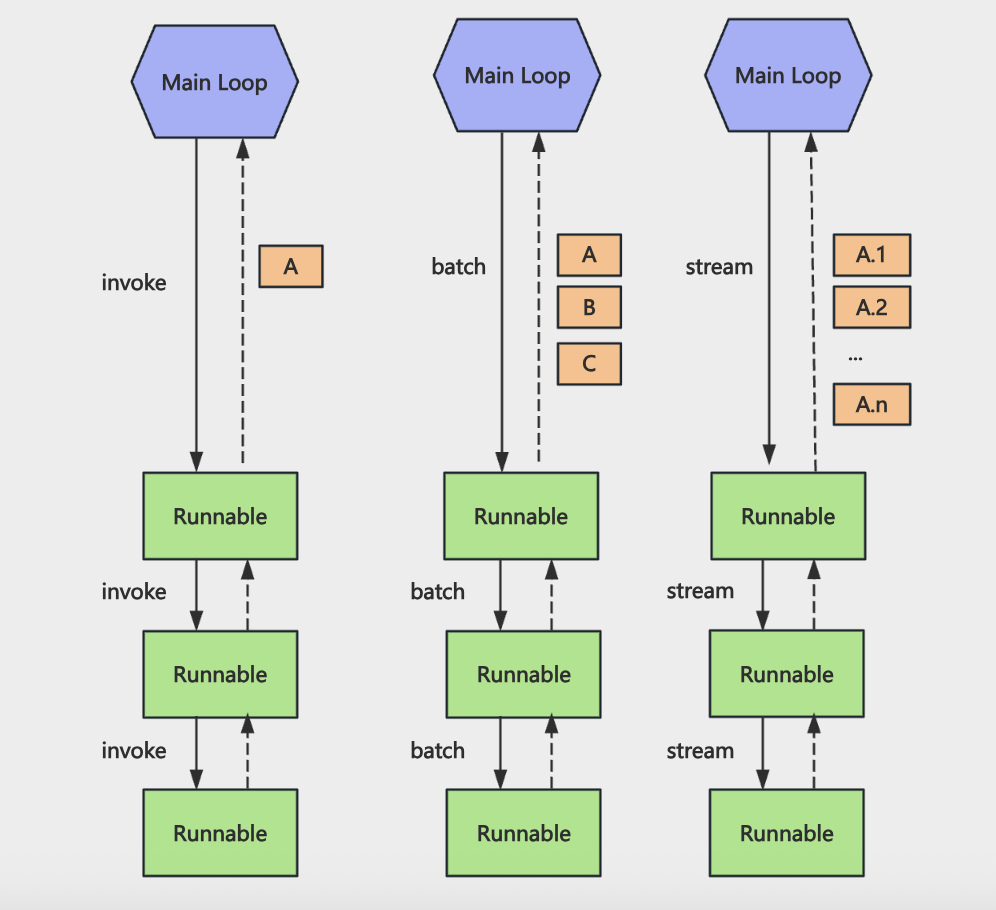
串联起来的 Runnable 的 chain 自然也支持同步调用、批量调用、流式返回
除了 RunnableSequence 外还有其他的 Runnable API:
RunnableLambda,可以把普通的函数封装成 Runnable 对象:
runnable-lambda.js
import "dotenv/config";
import { RunnableSequence, RunnableLambda } from "@langchain/core/runnables";

const addOne = RunnableLambda.from((input) => {
  console.log(`输入: ${input}`);
  return input + 1;
});

const multiplyTwo = RunnableLambda.from((input) => {
  console.log(`输入: ${input}`);
  return input * 2;
});

const chain = RunnableSequence.from([addOne, multiplyTwo, addOne]);

const result = await chain.invoke(5);
console.log(result);RunnableMap,可以并行执行多个 Runnable:
runnable-map.js
import "dotenv/config";
import {
  RunnableSequence,
  RunnableLambda,
  RunnableMap,
} from "@langchain/core/runnables";
import { PromptTemplate } from "@langchain/core/prompts";

const addOne = RunnableLambda.from((input) => {
  return input.num + 1;
});

const multiplyTwo = RunnableLambda.from((input) => {
  return input.num * 2;
});

const square = RunnableLambda.from((input) => input.num * input.num);

const greenTemplate = PromptTemplate.fromTemplate("你好, {name}!");
const weatherTemplate = PromptTemplate.fromTemplate("今天天气{weather}");

const runnable = RunnableMap.from({
    // 数学运算
    add: addOne,
    multiply: multiplyTwo,
    square: square,

    // Prompt 格式化
    greeting: greenTemplate,
    weather: weatherTemplate,
})

const input = {
    name: "空白",
    weather: "多云",
    num: 5
}

const result = await runnable.invoke(input);
console.log(result);RunnableBranch,类似 if-else:
runnable-branch.js
import { RunnableBranch, RunnableLambda } from "@langchain/core/runnables";

// 创建条件判断函数
const isPositive = RunnableLambda.from((input) => input > 0);
const isNegative = RunnableLambda.from((input) => input < 0);
const isEven = RunnableLambda.from((input) => input % 2 === 0);

// 创建分支处理函数
const handlePositive = RunnableLambda.from(
  (input) => `正数: ${input} + 10 = ${input + 10}`,
);
const handleNegative = RunnableLambda.from(
  (input) => `负数: ${input} - 10 = ${input - 10}`,
);
const handleEven = RunnableLambda.from(
  (input) => `偶数: ${input} * 2 = ${input * 2}`,
);
const handleDefault = RunnableLambda.from((input) => `默认: ${input}`);

// 创建 RunnableBranch
const branch = RunnableBranch.from([
  [isPositive, handlePositive],
  [isNegative, handleNegative],
  [isEven, handleEven],
  handleDefault,
]);

// 测试不同的输入
const testCases = [5, -3, 4, 0];

for (const testCase of testCases) {
  const result = await branch.invoke(testCase);
  console.log(`输入: ${testCase} => ${result}`);
}RouterRounable,相当于 switch-case:
router-runnable.js
import { RouterRunnable, RunnableLambda } from "@langchain/core/runnables";

// 创建两个简单的 RunnableLambda
const toUpperCase = RunnableLambda.from((text) => text.toUpperCase());
const reverseText = RunnableLambda.from((text) =>
  text.split("").reverse().join(""),
);

// 创建 RouterRunnable,根据 key 选择要调用的 runnable
const router = new RouterRunnable({
  runnables: {
    toUpperCase,
    reverseText,
  },
});

// 测试:调用 reverseText
const result1 = await router.invoke({
  key: "reverseText",
  input: "Hello World",
});
console.log("reverseText 结果:", result1);

// 测试:调用 toUpperCase
const result2 = await router.invoke({
  key: "toUpperCase",
  input: "Hello World",
});
console.log("toUpperCase 结果:", result2);RunnablePassthrough,它是传入的最初的值:
runnable-passthrough.js
import {
  RunnablePassthrough,
  RunnableLambda,
  RunnableSequence,
  RunnableMap,
} from "@langchain/core/runnables";

const chain = RunnableSequence.from([
  RunnableLambda.from((input) => ({ concept: input })),
  RunnableMap.from({
    original: new RunnablePassthrough(),
    processed: RunnableLambda.from((obj) => ({
      concept: input,
      upper: obj.concept.toUpperCase(),
      length: obj.concept.length,
    })),
  }),
]);

const input = "空白无上";
const result = await chain.invoke(input);
console.log(result);original 用 RunnablePassthrough 拿到原始值
processd 部分用 RunnableLambda 处理
其实还能简化成:
const chain = RunnableSequence.from([
  (input) => ({ concept: input }),
  {
    original: new RunnablePassthrough(),
    processed: (obj) => ({
      concept: input,
      upper: obj.concept.toUpperCase(),
      length: obj.concept.length,
    }),
  },
]);只保留函数、对象就行,LangChain 会把函数转换为 RunnableLambda,把对象转为 RunnableMap
如果是想在保留原始属性的基础上扩展一些数学,可以用 RunnablePassthrough.assign:
const chain = RunnableSequence.from([
  (input) => ({ concept: input }),
  RunnablePassthrough.assign({
    original: new RunnablePassthrough(),
    processed: (obj) => ({
      concept: input,
      upper: obj.concept.toUpperCase(),
      length: obj.concept.length,
    }),
  }),
]);现在之前的属性也保留着,知识合并了新的属性,就像Object.assign
RunnableEach,循环:
runnable-each.js
import {
  RunnableEach,
  RunnableLambda,
  RunnableSequence,
} from "@langchain/core/runnables";

const toUpperCase = RunnableLambda.from((input) => input.toUpperCase());
const addGreeting = RunnableLambda.from((input) => `你好,${input}!`);

const processItem = RunnableSequence.from([toUpperCase, addGreeting]);

// 使用 RunnableEach 对数组中的每个元素应用这个链
const chain = new RunnableEach({
  bound: processItem,
});

const input = ["alice", "bob", "carol"];
const result = await chain.invoke(input);

console.log("✅ RunnableEach - 数组元素处理:");
console.log("输入:", input);
console.log("输出:", result);RunnablePick,从对象中取一些属性:
runnable-pick.js
import { RunnablePick, RunnableSequence } from "@langchain/core/runnables";

const inputData = {
  name: "空白无上",
  age: 22,
  city: "北京",
  country: "中国",
  email: "kws13@163.com",
  phone: "+86-13800138000",
};

const chain = RunnableSequence.from([
  (input) => ({
    ...input,
    fullInfo: `${input.name},${input.age}岁,来自${input.city}`,
  }),
  new RunnablePick(["name", "fullInfo"]),
]);

const result = await chain.invoke(inputData);
console.log(result);RunnableWithMessageHistory,给 chain 加上 memory 功能:
runnable-with-message-history.js
import "dotenv/config";
import { RunnableWithMessageHistory } from "@langchain/core/runnables";
import { InMemoryChatMessageHistory } from "@langchain/core/chat_history";
import { ChatOpenAI } from "@langchain/openai";
import {
  ChatPromptTemplate,
  MessagesPlaceholder,
} from "@langchain/core/prompts";
import { StringOutputParser } from "@langchain/core/output_parsers";

const model = new ChatOpenAI({
  modelName: process.env.MODEL_NAME,
  apiKey: process.env.OPENAI_API_KEY,
  temperature: 0.3,
  configuration: {
    baseURL: process.env.OPENAI_BASE_URL,
  },
});

const prompt = ChatPromptTemplate.fromMessages([
  [
    "system",
    "你是一个简洁、有帮助的中文助手,会用 1-2 句话回答用户问题,重点给出明确、有用的信息。",
  ],
  new MessagesPlaceholder("history"),
  ["human", "{question}"],
]);

const simpleChain = prompt.pipe(model).pipe(new StringOutputParser());

const messageHistories = new Map();

const getMessageHistory = (sessionId) => {
  if (!messageHistories.has(sessionId)) {
    messageHistories.set(sessionId, new InMemoryChatMessageHistory());
  }
  return messageHistories.get(sessionId);
};

// 创建带消息历史的链
const chain = new RunnableWithMessageHistory({
  runnable: simpleChain,
  getMessageHistory: (sessionId) => getMessageHistory(sessionId),
  inputMessagesKey: "question",
  historyMessagesKey: "history",
});

// 测试:第一次对话
console.log("--- 第一次对话(提供信息) ---");
const result1 = await chain.invoke(
  {
    question: "我的名字是空白无上,我来自河北,我喜欢编程、写作、金铲铲。",
  },
  {
    configurable: {
      sessionId: "user-123",
    },
  },
);
console.log("问题: 我的名字是空白无上,我来自河北,我喜欢编程、写作、金铲铲。");
console.log("回答:", result1);
console.log();

// 测试:第二次对话
console.log("--- 第二次对话(询问之前的信息) ---");
const result2 = await chain.invoke(
  {
    question: "我刚才说我来自哪里?",
  },
  {
    configurable: {
      sessionId: "user-123",
    },
  },
);
console.log("问题: 我刚才说我来自哪里?");
console.log("回答:", result2);
console.log();

// 测试:第三次对话
console.log("--- 第三次对话(继续询问) ---");
const result3 = await chain.invoke(
  {
    question: "我的爱好是什么?",
  },
  {
    configurable: {
      sessionId: "user-123",
    },
  },
);
console.log("问题: 我的爱好是什么?");
console.log("回答:", result3);
console.log();使用 LCEL 重构 RAG+Milvus
ebook-reader-rag.js
import "dotenv/config";
import { ChatOpenAI, OpenAIEmbeddings } from "@langchain/openai";
import { RunnableSequence, RunnableLambda } from "@langchain/core/runnables";
import { MilvusClient, MetricType } from "@zilliz/milvus2-sdk-node";
import { PromptTemplate } from "@langchain/core/prompts";
import { StringOutputParser } from "@langchain/core/output_parsers";

const COLLECTION_NAME = "ebook_collection";
const VECTOR_DIM = 1024;

// 初始化 OpenAI Chat 模型
const model = new ChatOpenAI({
  modelName: process.env.MODEL_NAME || "qwen-plus",
  apiKey: process.env.OPENAI_API_KEY,
  configuration: {
    baseURL: process.env.OPENAI_BASE_URL,
  },
  temperature: 0.7,
});

// 初始化 Embeddings 模型
const embeddings = new OpenAIEmbeddings({
  apiKey: process.env.OPENAI_API_KEY,
  model: process.env.EMBEDDINGS_MODEL_NAME,
  configuration: {
    baseURL: process.env.OPENAI_BASE_URL,
  },
  dimensions: VECTOR_DIM,
});

// 初始化 Milvus 客户端
const milvusClient = new MilvusClient({
  address: "localhost:19530",
});

// 从 Milvus 中检索内容的 Runnable
const milvusSearch = new RunnableLambda({
  func: async (input) => {
    const { question, k = 3 } = input;

    try {
      // 生成问题向量
      const queryVector = await embeddings.embedQuery(question);

      // 调用 Milvus 搜索
      const searchResult = await milvusClient.search({
        collection_name: COLLECTION_NAME,
        vector: queryVector,
        limit: k,
        metric_type: MetricType.COSINE,
        output_fields: ["id", "book_id", "chapter_num", "index", "content"],
      });

      const results = searchResult.results ?? [];
      const retrievedContent = results.map((item, index) => ({
        id: item.id,
        book_id: item.book_id,
        chapter_num: item.chapter_num,
        index: item.index ?? index,
        content: item.content,
        score: item.score,
      }));

      return { question, retrievedContent };
    } catch (error) {
      console.error("检索内容时出错: ", error.message);
      return { question, retrievedContent: [] };
    }
  },
});

// PromptTemplate:负责把 context/question 拼成最终 Prompt
const promptTemplate = PromptTemplate.fromTemplate(
  `你是一个专业的《天龙八部》小说助手。基于小说内容回答问题,用准确、详细的语言。

请根据以下《天龙八部》小说片段内容回答问题:
{context}

用户问题: {question}

回答要求:
1. 如果片段中有相关信息,请结合小说内容给出详细、准确的回答
2. 可以综合多个片段的内容,提供完整的答案
3. 如果片段中没有相关信息,请如实告知用户
4. 回答要准确,符合小说的情节和人物设定
5. 可以引用原文内容来支持你的回答

AI 助手的回答:`,
);

// 构建 context+日志打印的 Runnable
const buildPromptInput = new RunnableLambda({
  func: async (input) => {
    const { question, retrievedContent } = input;

    if (!retrievedContent.length) {
      return {
        hasContext: false,
        question,
        context: "",
        retrievedContent,
      };
    }

    // 打印检索结果
    console.log("=".repeat(80));
    console.log(`问题: ${question}`);
    console.log("=".repeat(80));
    console.log("\\n【检索相关内容】");

    retrievedContent.forEach((item, i) => {
      console.log(`\\n[片段 ${i + 1}] 相似度: ${item.score ?? "N/A"}`);
      console.log(`书籍: ${item.book_id}`);
      console.log(`章节: 第 ${item.chapter_num} 章`);
      console.log(`片段索引: ${item.index}`);
      const content = item.content ?? "";
      console.log(
        `内容: ${content.substring(0, 200)}${
          content.length > 200 ? "..." : ""
        }`,
      );
    });

    const context = retrievedContent
      .map((item, i) => {
        return `[片段 ${i + 1}]
章节: 第 ${item.chapter_num} 章
内容: ${item.content}`;
      })
      .join("\\n\\n━━━━━\\n\\n");

    return {
      hasContext: true,
      question,
      context,
      retrievedContent,
    };
  },
});

// 组合成完整的 RAG Runnable(检索 =》构建 Prompt 输入 =》PromptTemplate =》LLM =》文本)
const ragChain = RunnableSequence.from([
  milvusSearch,
  buildPromptInput,
  new RunnableLambda({
    func: async (input) => {
      const { hasContext, question, context } = input;
      if (!hasContext) {
        const fallback =
          "抱歉,我没有找到相关的《天龙八部》内容,请尝试换一个问题。";
        console.log(fallback);
        return { question, context: "", answer: fallback, noContext: true };
      }

      return { question, context, noContext: false };
    },
  }),
  promptTemplate,
  model,
  new StringOutputParser(),
]);

async function initMilvusCollection() {
  console.log("连接到 Milvus...");
  await milvusClient.connectPromise;
  console.log("✓ 已连接\\n");

  try {
    await milvusClient.loadCollection({ collection_name: COLLECTION_NAME });
    console.log("✓ 集合已加载\\n");
  } catch (error) {
    if (!error.message.includes("already loaded")) {
      throw error;
    }
    console.log("✓ 集合已处于加载状态\\n");
  }
}

async function main() {
  try {
    await initMilvusCollection();

    const input = {
      question: "鸠摩智会什么武功?",
      k: 5,
    };

    console.log("=".repeat(80));
    console.log(`问题: ${input.question}`);
    console.log("=".repeat(80));
    console.log("\\n【AI 流式回答】\\n");

    const stream = await ragChain.stream(input);

    for await (const chunk of stream) {
      process.stdout.write(chunk);
    }

    console.log("\\n");
  } catch (error) {
    console.error("错误:", error.message);
  }
}

await main();用 chain 的方式调用,可以很方便的实现如重试、传入配置、回调等
runnable-with-retry.js
import { RunnableLambda } from "@langchain/core/runnables";

let attempt = 0;

// 一个会随机失败的 Runnable
const unstableRunnable = RunnableLambda.from(async (input) => {
  attempt += 1;
  console.log(`第 ${attempt} 次尝试,输入: ${input}`);

  // 模拟 70% 改了失败的情况
  if (Math.random() < 0.7) {
    console.log("本次尝试失败,抛出错误");
    throw new Error("模拟的随机错误");
  }

  console.log("本次尝试成功");
  return `成功处理: ${input}`;
});

// 使用 withRetry 为 Runnable 加上重试逻辑
const runnableWithRetry = unstableRunnable.withRetry({
  // 最多重试 5 次
  stopAfterAttempt: 5,
});

try {
  const result = await runnableWithRetry.invoke("演示 withRetry");
  console.log("✅ 最终结果:", result);
} catch (err) {
  console.error("❌ 重试多次后仍然失败:", err?.message ?? err);
}runnable-with-fallback.js
import { RunnableLambda } from "@langchain/core/runnables";

// 模拟三个"翻译服务",优先级从高到低

const premiumTranslator = RunnableLambda.from(async (text) => {
  console.log("[Premium] 尝试翻译...");
  // 模拟高级服务不可用
  throw new Error("Premium 服务超时");
});

const standardTranslator = RunnableLambda.from(async (text) => {
  console.log("[Standard] 尝试翻译...");
  // 模拟标准服务也挂了
  throw new Error("Standard 服务限流");
});

const localTranslator = RunnableLambda.from(async (text) => {
  console.log("[Local] 使用本地词典翻译...");
  const dict = { hello: "你好", world: "世界", goodbye: "再见" };
  const words = text.toLowerCase().split(" ");
  return words.map((w) => dict[w] ?? w).join("");
});

// withFallbacks:依次尝试 premium → standard → local
const translator = premiumTranslator.withFallbacks({
  fallbacks: [standardTranslator, localTranslator],
});

const result = await translator.invoke("hello world");
console.log("翻译结果:", result);可以使用 withConfig 给 chain 传入配置,它会在每个 Runnable 节点的第二个参数拿到
下面例子中,第一个节点根据配置拿用户信息,第二个节点根据配置做权限判断,第三个节点根据配置返回不同语言的内容
runnable-with-config.js
import "dotenv/config";
import { RunnableLambda, RunnableSequence } from "@langchain/core/runnables";

// 模拟一个简单的"用户数据库"
const mockUsers = new Map([
  [
    "user-123",
    {
      id: "user-123",
      name: "空白无上",
      email: "kbws13@163.com",
    },
  ],
]);

// 节点1:根据 config.configurable.userId 查用户
const fetchUserFromConfig = RunnableLambda.from(async (input, config) => {
  const userId = config?.configurable?.userId;

  console.log("【节点1】收到了通知内容:", input);
  console.log("【节点1】从 config 里拿到 userId:", userId);

  const user = userId ? mockUsers.get(userId) : null;

  if (!user) {
    throw new Error("未找到用户,无法发送通知");
  }

  return {
    user,
    notification: input,
  };
});

// 节点2:根据 config.configurable.role 做权限判断
const checkPermissionByRole = RunnableLambda.from(async (state, config) => {
  const role = config?.configurable?.role ?? "普通用户";

  console.log("【节点2】当前角色:", role);

  const canSend = role === "管理员" || role === "运营" || role === "系统";

  if (!canSend) {
    throw new Error(`角色「${role}」无权限发送系统通知`);
  }

  return {
    ...state,
    role,
  };
});

// 节点3:根据 locale 生成最终通知文案
const formatNotificationByLocale = RunnableLambda.from(
  async (state, config) => {
    const locale = config?.configurable?.locale ?? "zh-CN";

    console.log("【节点3】locale:", locale);

    let content;
    if (locale === "en-US") {
      content = `Dear ${state.user.name},\\n\\n${state.notification}\\n\\n(from role: ${state.role})`;
    } else {
      content = `亲爱的 ${state.user.name},\\n\\n${state.notification}\\n\\n(发送人角色:${state.role})`;
    }

    return {
      ...state,
      locale,
      finalContent: content,
    };
  },
);

// 把三个节点串起来
const chain = RunnableSequence.from([
  fetchUserFromConfig,
  checkPermissionByRole,
  formatNotificationByLocale,
]);

// 使用 withConfig 为整个 chain 绑定统一的配置
const chainWithConfig = chain.withConfig({
  tags: ["demo", "withConfig", "notification"],
  metadata: {
    demoName: "RunnableWithConfig",
  },
  configurable: {
    userId: "user-123",
    role: "管理员",
    locale: "zh-CN",
  },
});

// 再创建一个不同配置的 chainWithConfig2,使用英文 locale
const chainWithConfig2 = chain.withConfig({
  tags: ["demo", "withConfig", "notification-en"],
  metadata: {
    demoName: "RunnableWithConfig2",
  },
  configurable: {
    userId: "user-123",
    role: "运营",
    locale: "en-US",
  },
});

// 输入为"要发送的通知文案"
const result =
  await chainWithConfig.invoke("你有一条新的系统通知,请及时查看。");
console.log("✅ 最终通知内容:\\n", result.finalContent);

console.log("\\n--- chainWithConfig2 ---\\n");

const result2 = await chainWithConfig2.invoke(
  "System maintenance scheduled tonight.",
);
console.log("✅ 最终通知内容:\\n", result2.finalContent);给每个节点加回调逻辑
比如想要知道每个节点的输入输出,直接把日志打印加到节点逻辑中不太好,可以用 callback 来打印
runnable-with-callback.js
import "dotenv/config";
import { RunnableLambda, RunnableSequence } from "@langchain/core/runnables";

// 文本处理链:清洗 → 分词 → 统计
const clean = RunnableLambda.from((text) => {
  return text.trim().replace(/\\s+/g, " ");
});

const tokenize = RunnableLambda.from((text) => {
  return text.split(" ");
});

const count = RunnableLambda.from((tokens) => {
  return { tokens, wordCount: tokens.length };
});

const chain = RunnableSequence.from([clean, tokenize, count]);

// 用 callbacks 观测每一步的输出
const callback = {
  handleChainStart(chain) {
    const step = chain?.id?.[chain.id.length - 1] ?? "unknown";
    console.log(`[START] ${step}`);
  },
  handleChainEnd(output) {
    console.log(`[END]   output=${JSON.stringify(output)}\\n`);
  },
  handleChainError(err) {
    console.log(`[ERROR] ${err.message}\\n`);
  },
};

const result = await chain.invoke("  hello   world   from   langchain  ", {
  callbacks: [callback],
});

console.log("结果:", result);Nest+LangChain
使用 Nest+LangChain 实现基于 SSE 的流式 AI 接口
npm install -g @nestjs/cli
nest new nest-langchain 创建 AI 模块
nest g res ai --no-spec

pnpm install @nestjs/serve-static
pnpm install @nestjs/configpublic/sse-test.html
<!DOCTYPE html>
<html lang="zh-CN">

<head>
    <meta charset="UTF-8" />
    <meta name="viewport" content="width=device-width, initial-scale=1.0" />
    <title>SSE 流式接口测试</title>
    <style>
        * {
            box-sizing: border-box;
        }

        body {
            font-family: system-ui, -apple-system, sans-serif;
            max-width: 640px;
            margin: 2rem auto;
            padding: 01rem;
        }

        label {
            display: block;
            margin-bottom: 0.5rem;
            font-weight: 500;
        }

        input[type="text"] {
            width: 100%;
            padding: 0.75rem;
            border: 1px solid #ccc;
            border-radius: 6px;
            font-size: 1rem;
            margin-bottom: 1rem;
        }

        button {
            padding: 0.6rem1.2rem;
            font-size: 1rem;
            border: none;
            border-radius: 6px;
            cursor: pointer;
        }

        button.primary {
            background: #2563eb;
            color: white;
        }

        button.primary:hover {
            background: #1d4ed8;
        }

        button:disabled {
            opacity: 0.6;
            cursor: not-allowed;
        }

        .output {
            margin-top: 1.5rem;
            padding: 1rem;
            border: 1px solid #e5e7eb;
            border-radius: 8px;
            background: #f9fafb;
            min-height: 120px;
            white-space: pre-wrap;
            word-break: break-word;
        }

        .output:empty::before {
            content: "回复将显示在这里...";
            color: #9ca3af;
        }

        .status {
            margin-top: 0.5rem;
            font-size: 0.875rem;
            color: #6b7280;
        }
    </style>
</head>

<body>
    <h1>SSE 流式接口测试</h1>
    <label for="apiUrl">API 地址</label>
    <input type="text" id="apiUrl" value="<http://localhost:3000>" placeholder="<http://localhost:3000>" />
    <label for="query">问题</label>
    <input type="text" id="query" placeholder="例如:什么是 LangChain?" value="什么是 LangChain?" />
    <button type="button" id="btn" class="primary">开始流式请求</button>
    <p class="status" id="status"></p>
    <div class="output" id="output"></div>

    <script>
        const apiUrlInput = document.getElementById("apiUrl");
        const queryInput = document.getElementById("query");
        const btn = document.getElementById("btn");
        const output = document.getElementById("output");
        const status = document.getElementById("status");

        btn.addEventListener("click", () => {
            const baseUrl = apiUrlInput.value.replace(/\\/$/, "");
            const q = queryInput.value.trim();
            if (!q) {
                status.textContent = "请输入问题";
                return;
            }

            const url = `${baseUrl}/ai/chat/stream?query=${encodeURIComponent(q)}`;
            output.textContent = "";
            btn.disabled = true;
            status.textContent = "连接中...";

            const eventSource = new EventSource(url);

            eventSource.onmessage = ({ data }) => {
                output.textContent += data;
                status.textContent = "接收中...";
            };

            eventSource.onerror = () => {
                eventSource.close();
                btn.disabled = false;
                status.textContent = "连接已结束";
            };

            eventSource.addEventListener("done", () => {
                eventSource.close();
                btn.disabled = false;
                status.textContent = "完成";
            });
        });
    </script>
</body>

</html>src/app.module.ts
import { Module } from '@nestjs/common';
import { AppController } from './app.controller';
import { AppService } from './app.service';
import { AiModule } from './ai/ai.module';
import { ConfigModule } from '@nestjs/config';
import { ServeStaticModule } from '@nestjs/serve-static';
import { join } from 'path';

@Module({
  imports: [
    ServeStaticModule.forRoot({
      rootPath: join(__dirname, '..', 'public')
    }),
    AiModule,
    ConfigModule.forRoot({
      isGlobal: true,
      envFilePath: '.env',
    }),
  ],
  controllers: [AppController],
  providers: [AppService],
})
export class AppModule {}src/ai/ai.service.ts
import { StringOutputParser } from '@langchain/core/output_parsers';
import { PromptTemplate } from '@langchain/core/prompts';
import type { Runnable } from '@langchain/core/runnables';
import { ChatOpenAI } from '@langchain/openai';
import { Inject, Injectable } from '@nestjs/common';

@Injectable()
export class AiService {
  private readonly chain: Runnable;

  constructor(@Inject('CHAT_MODEL') model: ChatOpenAI) {
    const prompt = PromptTemplate.fromTemplate(`请回答以下问题: \\n\\n{query}`);
    this.chain = prompt.pipe(model).pipe(new StringOutputParser());
  }

  async runChain(query: string): Promise<string> {
    return this.chain.invoke({ query });
  }

  async *streamChain(query: string): AsyncGenerator<string> {
    const stream = await this.chain.stream({ query });
    for await (const chunk of stream) {
      yield chunk;
    }
  }
}src/ai/ai.controller.ts
import { Controller, Get, Query, Sse } from '@nestjs/common';
import { from, map, Observable } from 'rxjs';
import { AiService } from './ai.service';

@Controller('ai')
export class AiController {
  constructor(private readonly aiService: AiService) {}

  @Get('chat')
  async chat(@Query('query') query: string) {
    const answer = await this.aiService.runChain(query);
    return { answer };
  }

  @Sse('chat/stream')
  chatStream(@Query('query') query: string): Observable<{ data: string }> {
    return from(this.aiService.streamChain(query)).pipe(
      map((chunk) => ({ data: chunk })),
    );
  }
}仿 OpenClaw 定时任务
安装依赖:
pnpm install nodemailer @nestjs-modules/mailer
pnpm install --save @nestjs/typeorm typeorm mysql2
pnpm install cron @nestjs/schedule
pnpm add --save-dev @types/cronai-agent-course-code/cron-job-tool at main · QuarkGluonPlasma/ai-agent-course-code
语音交互:ASR+流式TTS
STT(Speech To Text)语音转文字,TTS(Text to Speech)文字转语音基本是 Agent 开发必备
简单实现 TTS
import "dotenv/config";
import tencentcloud from "tencentcloud-sdk-nodejs-tts";
import fs from "node:fs";

const secretId = process.env.SECRET_ID;
const secretKey = process.env.SECRET_KEY;

const TtsClient = tencentcloud.tts.v20190823.Client;

const client = new TtsClient({
  credential: {
    secretId,
    secretKey,
  },
  region: "ap-beijing",
  profile: {
    httpProfile: {
      endpoint: "tts.tencentcloudapi.com",
    },
  },
});

const params = {
  Text: "下班路上,我还在为晚霞开心。突然电话响起:系统崩了。我的心一下揪紧,冲进办公室时几乎要绝望。可当大家一起排查、重启,屏幕终于恢复正常,我长长松了口气,笑着说:还好,我们没放弃。", // 要合成的文本
  SessionId: "session-001",
  VoiceType: 502006, // 101007:智瑜(女声)
  Codec: "mp3", // 指定输出格式为 mp3
};

client.TextToVoice(params).then(
  (data) => {
    // 返回到 Audio 字段是 Base64 编码的音频数据
    const audioBuffer = Buffer.from(data.Audio, "base64");
    const outputPath = "./output.mp3";

    fs.writeFile(outputPath, audioBuffer, (error) => {
      if (error) {
        console.error("保存文件失败: ", error);
      } else {
        console.log("MP3 已保存至: ", outputPath);
      }
    });
  },
  (error) => {
    console.error("合成失败: ", error);
  },
);
流式语音合成
streaming-tts-test.js
import "dotenv/config";
import WebSocket from "ws";
import crypto from "node:crypto";
import fs from "node:fs";

const SECRET_ID = process.env.SECRET_ID;
const SECRET_KEY = process.env.SECRET_KEY;
const APP_ID = process.env.APP_ID;

const VOICE_TYPE = 101001;
const OUTPUT_FILE = "output3.mp3";
const TEXT_INTERVAL_MS = 3000;
const TEXTS = [
  "傍晚我还在为晚霞开心,",
  "突然接到电话说系统崩了,",
  "我心里一沉冲回办公室,",
  "好在大家一起排查后终于恢复,",
  "我长长松了口气。",
];

const sleep = (ms) => new Promise((resolve) => setTimeout(resolve, ms));

function buildWsUrl() {
  const now = Math.floor(Date.now() / 1000);
  const sessionId = `session_${now}_${Math.random().toString(36).slice(2)}`;

  const params = {
    Action: "TextToStreamAudioWSv2",
    AppId: parseInt(APP_ID),
    Codec: "mp3",
    Expired: now + 3600,
    SampleRate: 16000,
    SecretId: SECRET_ID,
    SessionId: sessionId,
    Speed: 0,
    Timestamp: now,
    VoiceType: VOICE_TYPE,
    Volume: 5,
  };

  const sortedKeys = Object.keys(params).sort();
  const signStr = sortedKeys.map((k) => `${k}=${params[k]}`).join("&");
  const rawStr = `GETtts.cloud.tencent.com/stream_wsv2?${signStr}`;
  const signature = crypto
    .createHmac("sha1", SECRET_KEY)
    .update(rawStr)
    .digest("base64");
  const searchParams = new URLSearchParams({
    ...params,
    Signature: signature,
  });

  return {
    sessionId,
    url: `wss://tts.cloud.tencent.com/stream_wsv2?${searchParams.toString()}`,
  };
}

async function sendTexts(ws, sessionId) {
  for (let i = 0; i < TEXTS.length; i++) {
    ws.send(
      JSON.stringify({
        session_id: sessionId,
        message_id: `msg_${i}`,
        action: "ACTION_SYNTHESIS",
        data: TEXTS[i],
      }),
    );
    console.log(`[文本] 已发送: ${TEXTS[i]}`);
    if (i < TEXTS.length - 1) await sleep(TEXT_INTERVAL_MS);
  }
  ws.send(JSON.stringify({ session_id: sessionId, action: "ACTION_COMPLETE" }));
  console.log("[文本] 已发送 ACTION_COMPLETE");
}

function streamTTS() {
  if (!SECRET_ID || !SECRET_KEY || !APP_ID) {
    thrownewError("请先在 .env 配置 SECRET_ID、SECRET_KEY、APP_ID");
  }

  const { url, sessionId } = buildWsUrl();
  const ws = new WebSocket(url);
  const writeStream = fs.createWriteStream(OUTPUT_FILE, { flags: "w" });
  let totalBytes = 0;
  let closed = false;
  let sent = false;

  const closeAll = () => {
    if (closed) return;
    closed = true;
    writeStream.end(() => {
      console.log(`[保存] 音频已保存至 ${OUTPUT_FILE},共 ${totalBytes} 字节`);
    });
    if (ws.readyState < WebSocket.CLOSING) ws.close();
  };

  ws.on("open", () => {
    console.log("[连接] WebSocket 已建立,等待服务端就绪...");
  });

  ws.on("message", async (data, isBinary) => {
    if (isBinary) {
      writeStream.write(data);
      totalBytes += data.length;
      return;
    }

    try {
      const msg = JSON.parse(data.toString());
      console.log("[消息]", JSON.stringify(msg));

      if (msg.ready === 1 && !sent) {
        sent = true;
        await sendTexts(ws, sessionId);
      }

      if (msg.code && msg.code !== 0) {
        console.error(`[错误] code=${msg.code}, message=${msg.message}`);
        closeAll();
      } else if (msg.final === 1) {
        console.log("[完成] 合成结束。");
        closeAll();
      }
    } catch (e) {
      console.error("[解析错误]", e.message);
    }
  });

  ws.on("error", (err) => {
    console.error("[WebSocket 错误]", err.message);
    closeAll();
  });

  ws.on("close", (code, reason) => {
    console.log(`[断开] 连接已关闭,code=${code}, reason=${reason}`);
    closeAll();
  });
}

streamTTS();
ASR(Automatic Speech Recognition)也叫 STT,这个不需要流式,因为在业务场景中都是说完一段话后才转成文本
asr-test.js
import "dotenv/config";
import tencentcloud from "tencentcloud-sdk-nodejs";
import fs from "node:fs";

const SECRET_ID = process.env.SECRET_ID;
const SECRET_KEY = process.env.SECRET_KEY;

const AsrClient = tencentcloud.asr.v20190614.Client;
const AUDIO_FILE = "./output3.mp3";

const client = new AsrClient({
  credential: {
    secretId: SECRET_ID,
    secretKey: SECRET_KEY,
  },
  region: "ap-shanghai",
  profile: {
    httpProfile: {
      reqMethod: "POST",
      reqTimeout: 30,
    },
  },
});

async function run() {
  const audioData = fs.readFileSync(AUDIO_FILE).toString("base64");

  const params = {
    EngSerViceType: "16k_zh",
    SourceType: 1,
    Data: audioData,
    DataLen: Buffer.byteLength(audioData),
    VoiceFormat: "mp3",
  };

  try {
    const data = await client.SentenceRecognition(params);
    console.log("识别结果: ", data.Result);
  } catch (error) {
    console.error("识别失败: ", error);
  }
}

run();
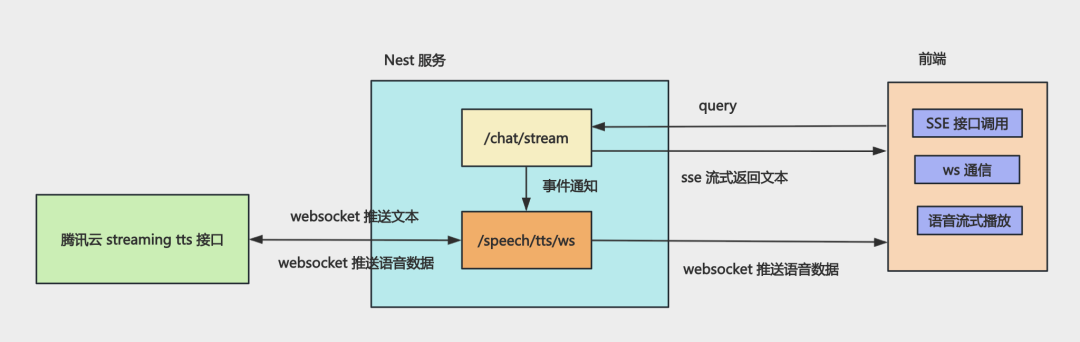
ai-agent-course-code/asr-and-tts-nest-service at main · QuarkGluonPlasma/ai-agent-course-code
AGUI 协议
Vercel AI SDK + LangChain 实现流式组件渲染
AGUI(Agent-User Interaction Protocol),定义 Agent 和图形界面怎么交互的
https://github.com/QuarkGluonPlasma/ai-agent-course-code/tree/main/agui-frontend
https://github.com/QuarkGluonPlasma/ai-agent-course-code/tree/main/agui-backend
LangGraph 和多 Agent 架构
多 Agent 架构比单 Agent 有极大的优势:
-
决策准确率更高、token 消耗更低:每个 Agent 只带必要的最少prompt,没有冗余信息干扰,虽然调用 LLM 次数多了,但更省 token、决策更准、更稳定
-
并行思考和任务处理:主管分派任务,子 Agent 并行处理,整体效率更高
-
多角色互相讨论,纠错能力更强:多 Agent 有不同角色,可以互相监督、互相纠错,比单个 Agent 自己反思更靠谱,复杂任务表现更强
想要实现 Multi Agent 需要用 LangGraph,API 还是 LangChain 那些,但多了图编排引擎
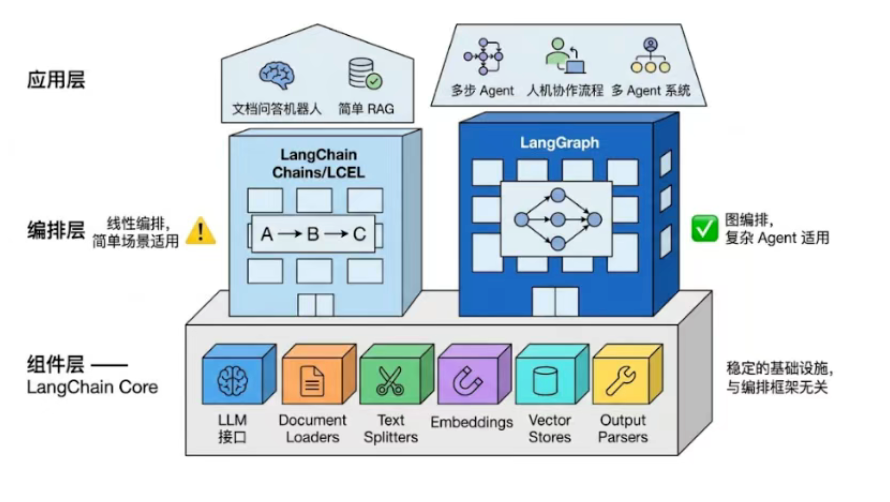
安装依赖:
pnpm install @langchain/graph @langchain/core @langchain/openai zodbasic-graph.js
import {Annotation, END, START, StateGraph} from "@langchain/langgraph";

const StateAnnotation = Annotation.Root({
    text: Annotation({
        reducer: (prev, next) => next,
        default: () => '',
    })
});

const step1 = (state) => ({text: `${state.text} -> step1`})
const step2 = (state) => ({text: `${state.text} -> step2`})

const graph = new StateGraph(StateAnnotation)
    .addNode('step1', step1)
    .addNode('step2', step2)
    .addEdge(START, 'step1')
    .addEdge('step1', 'step2')
    .addEdge('step2', END)
    .compile();

// 导出为 Mermaid

const drawable = await graph.getGraphAsync();
const mermaid = drawable.drawMermaid({withStyles: true})
console.log(mermaid)

const result = await graph.invoke({text: 'Hello'})
console.log('result: ', result)执行结果:
(base) ➜  langgraph-test node ./src/basic-graph.js
%%{init: {'flowchart': {'curve': 'linear'}}}%%
graph TD;
        __start__([<p>__start__</p>]):::first
        step1(step1)
        step2(step2)
        __end__([<p>__end__</p>]):::last
        __start__ --> step1;
        step1 --> step2;
        step2 --> __end__;
        classDef default fill:#f2f0ff,line-height:1.2;
        classDef first fill-opacity:0;
        classDef last fill:#bfb6fc;

result:  { text: 'Hello -> step1 -> step2' }
(base) ➜ langgraph-test 使用分支
conditional-routing.js
import {Annotation, END, START, StateGraph} from "@langchain/langgraph";

const StateAnnotation = Annotation.Root({
    query: Annotation({
        reducer: (prev, next) => next,
        default: () => ''
    }),
    route: Annotation({
        reducer: (prev, next) => next,
        default: () => 'chat'
    }),
    answer: Annotation({
        reducer: (prev, next) => next,
        default: () => ''
    })
})

const router = (state) => {
    const isMath = /[+\-*/]/.test(state.query);
    return {route: isMath ? 'math' : 'chat'}
}

const mathNode = (state) => {
    try {
        return {answer: String(eval(state.query))}
    } catch {
        return {answer: '表达式无法计算'}
    }
}

const chatNode = (state) => ({answer: `你说的是: ${state.query}`})

const graph = new StateGraph(StateAnnotation)
    .addNode('router', router)
    .addNode('math', mathNode)
    .addNode('chat', chatNode)
    .addEdge(START, 'router')
    // 用 addConditionalEdges 添加分支
    .addConditionalEdges('router', (state) => state.route, {
        math: 'math',
        chat: 'chat'
    })
    .addEdge('math', END)
    .addEdge('chat', END)
    .compile()

const drawable = await graph.getGraphAsync();
const mermaid = drawable.drawMermaid({withStyles: true})
console.log(mermaid)

console.log('result: ', await graph.invoke({query: '你好'}))
console.log('result: ', await graph.invoke({query: '10 * 8'}))循环
loop-retry.js
import {Annotation, END, START, StateGraph} from "@langchain/langgraph";

const StateAnnotation = Annotation.Root({
    tries: Annotation({
        reducer: (_prev, next) => next,
        default: () => 0,
    }),
    ok: Annotation({
        reducer: (_prev, next) => next,
        default: () => false,
    }),
    message: Annotation({
        reducer: (_prev, next) => next,
        default: () => "",
    }),
});

const attempt = (state) => {
    const tries = state.tries + 1;
    const ok = tries >= 3;
    return {
        tries,
        ok,
        message: ok ? `第 ${tries} 次成功` : `第 ${tries} 次失败,继续重试`,
    };
};

const graph = new StateGraph(StateAnnotation)
    .addNode("attempt", attempt)
    .addEdge(START, "attempt")
    .addConditionalEdges("attempt", (state) => (state.ok ? "done" : "retry"), {
        retry: "attempt",
        done: END,
    })
    .compile();

// 导出为 Mermaid:可复制到 https://mermaid.live 或 Markdown 的 ```mermaid 代码块
const drawable = await graph.getGraphAsync();
const mermaid = drawable.drawMermaid({withStyles: true});
console.log(mermaid);

const result = await graph.invoke({tries: 0});
console.log("result:", result);从上面例子可以看出,节点之间的通信或者说状态的共享,是通过 state 实现的,那么把 state 保存下来就是把当前图的执行状态保存下来,可以使用 CheckpointerSaver 实现
checkpointer-memory.js
import {Annotation, END, MemorySaver, START, StateGraph} from "@langchain/langgraph";

const StateAnnotation = Annotation.Root({
    visitCount: Annotation({
        reducer: (prev, next) => next,
        default: () => 0,
    }),
    message: Annotation({
        reducer: (prev, next) => next,
        default: () => "",
    })
})

// 每跑一轮,就给「当前会话」访问次数+1
function recordVisit(state) {
    const visitCount = state.visitCount + 1;
    const message = visitCount === 1 ? '这是你在本回话里第 1 次进入' : `这是你在本回话里第 ${visitCount} 次进入`
    return {visitCount, message}
}

const graph = new StateGraph(StateAnnotation)
    .addNode('recordVisit', recordVisit)
    .addEdge(START, 'recordVisit')
    .addEdge('recordVisit', END)

const checkpointer = new MemorySaver();
const app = graph.compile(({checkpointer}))

const user1 = {configurable: {thread_id: '用户-1'}}
const user2 = {configurable: {thread_id: '用户-2'}}

const res1 = await app.invoke({}, user1)
const res2 = await app.invoke({}, user1)
const res3 = await app.invoke({}, user1)
const res4 = await app.invoke({}, user2)

console.log(res1)
console.log(res2)
console.log(res3)
console.log(res4)使用 MemorySaver 可以把 state 保存到内存中,这样下次执行就会基于上次的 state 继续执行
有时执行过程中需要用户交互来继续下一步,这种打断当前执行过程并与外部交互,可以使用 interrupt 实现
graph-interrupt.js
import {Annotation, Command, END, interrupt, MemorySaver, START, StateGraph} from "@langchain/langgraph";
import {createInterface} from "node:readline/promises"

const StateAnnotation = Annotation.Root({
    actionSummary: Annotation({
        reducer: (prev, next) => next,
        default: () => ""
    }),
    userInput: Annotation({
        reducer: (prev, next) => next,
        default: () => ''
    })
})

// 展示一笔待确认的转账
const showTransfer = () => ({
    actionSummary: "向 xxx 转账 100",
})

// 停在这里等待用户输入 resume 的值会写进 userInput
const waitConfirm = (state) => {
    const text = interrupt({
        hint: '终端中输入「确认」或备注后回车来继续',
        actionSummary: state.actionSummary,
    })
    return {userInput: String(text)}
}

const graph = new StateGraph(StateAnnotation)
    .addNode('showTransfer', showTransfer)
    .addNode('waitConfirm', waitConfirm)
    .addEdge(START, 'showTransfer')
    .addEdge('showTransfer', 'waitConfirm')
    .addEdge('waitConfirm', END)
    .compile({checkpointer: new MemorySaver()})

const drawable = await graph.getGraphAsync()
const mermaid = drawable.drawMermaid({withStyles: true})
console.log(mermaid);

const config = {configurable: {thread_id: 'interrupt-demo'}}

const pause = await graph.invoke({}, config);
console.log("\n等待确认: ", pause.__interrupt__?.[0]?.value);

const rl = createInterface({input: process.stdin, output: process.stdout})
const line = (await rl.question("> ")).trim()
await rl.close();

if (!line) {
    console.error("未输入,退出")
    process.exit(1);
}

const done = await graph.invoke(new Command({resume: line}), config)
console.log("结果: ", done);(base) ➜ langgraph-test node ./src/graph-interrupt.js
%%{init: {'flowchart': {'curve': 'linear'}}}%%
graph TD;
__start__([<p>__start__</p>]):::first
showTransfer(showTransfer)
waitConfirm(waitConfirm)
__end__([<p>__end__</p>]):::last
__start__ --> showTransfer;
showTransfer --> waitConfirm;
waitConfirm --> __end__;
classDef default fill:#f2f0ff,line-height:1.2;
classDef first fill-opacity:0;
classDef last fill:#bfb6fc;
等待确认: { hint: '终端中输入「确认」或备注后回车来继续', actionSummary: '向 xxx 转账 100' }
> 确认
结果: { actionSummary: '向 xxx 转账 100', userInput: '确认' }
(base) ➜ langgraph-test 用 interrupt 中断图的执行,等待用户输入后再次 invoke,传入new Command({resume: line},这样图就会在上次断点的位置继续执行
LangGraph 封装了一些常用的节点,放在 prebuilt 下
想要在 graph 中调用 tool,需要创建 model 节点和 tool 节点,然后加一个 conditional 节点,判断如果有 tool call 就走 tool 节点,否则走 END,判断节点不用自己写,可以直接使用 LangGraph 内置的 ToolNode 和 toolsCondition
inventory.mock.js
/** 假数据,模拟「按 SKU 查库存」接口 */
const rows = [
  { sku: "SKU-001", name: "无线鼠标", stock: 42 },
  { sku: "SKU-002", name: "机械键盘", stock: 7 },
  { sku: "SKU-003", name: "USB-C 线缆", stock: 120 },
];

export function getProductBySku(sku) {
  const key = String(sku).trim().toUpperCase();
  const row = rows.find((r) => r.sku.toUpperCase() === key);
  if (!row) return JSON.stringify({ found: false, sku: String(sku).trim() });
  return JSON.stringify({ found: true, ...row });
}prebuilt-tool-node.js
import "dotenv/config";
import {tool} from "@langchain/core/tools";
import {getProductBySku} from "./inventory.mock.js";
import {z} from "zod";
import {ChatOpenAI} from "@langchain/openai";
import {END, MessagesAnnotation, START, StateGraph} from "@langchain/langgraph";
import {ToolNode, toolsCondition} from "@langchain/langgraph/prebuilt";
import {HumanMessage} from "@langchain/core/messages";

const getProductStock = tool(
    async ({sku}) => getProductBySku(sku),
    {
        name: 'get_product_stock',
        description: '按 SKU 查商品名与库存,SKU 如 SKU-001',
        schema: z.object({
            sku: z.string().describe("商品 SKU")
        })
    }
)

const tools = [getProductStock]
const llm = new ChatOpenAI({
    modelName: process.env.MODEL_NAME,
    apiKey: process.env.OPENAI_API_KEY,
    configuration: {
        baseURL: process.env.OPENAI_BASE_URL,
    }
}).bindTools(tools);

const toolNode = new ToolNode(tools)

async function agent(state) {
    const response = await llm.invoke(state.messages);
    return {messages: response}
}

const graph = new StateGraph(MessagesAnnotation)
    .addNode('agent', agent)
    .addNode('tools', toolNode)
    .addEdge(START, 'agent')
    .addConditionalEdges('agent', toolsCondition, ['tools', END])
    .addEdge('tools', "agent")
    .compile()

const result = await graph.invoke({
    messages: [
        new HumanMessage('查一下 SKU-001 的库存还有多少,回答里带上商品名和数字。')
    ]
})

const drawable = await graph.getGraphAsync();
const mermaid = drawable.drawMermaid({withStyles: true})
console.log(mermaid);

const last = result.messages.at(-1)
console.log(last?.content ?? result.messages)当然,常用的 Agent Loop 也给封装好了,就是 createAgent
prebuilt-agent.js
import "dotenv/config"
import {getProductBySku} from "./inventory.mock.js";
import {z} from 'zod'
import {ChatOpenAI} from "@langchain/openai";
import {createAgent, tool} from "langchain";
import {MemorySaver} from "@langchain/langgraph";
import {HumanMessage} from "@langchain/core/messages";

const getProductStock = tool(
    async ({sku}) => getProductBySku(sku),
    {
        name: 'get_product_stock',
        description: '按 SKU 查商品名与库存,SKU 如 SKU-001。',
        schema: z.object({
            sku: z.string().describe("商品 SKU")
        })
    }
)

const model = new ChatOpenAI({
    modelName: process.env.MODEL_NAME,
    apiKey: process.env.OPENAI_API_KEY,
    configuration: {
        baseURL: process.env.OPENAI_BASE_URL,
    }
});

const agent = createAgent({
    model,
    tools: [getProductStock],
    systemPrompt: "你是仓库助手。问库存时必须调用 get_product_stock(模拟数据),禁止编造。",
    checkpointer: new MemorySaver()
})

const result = await agent.invoke(
    {messages: [new HumanMessage("SKU-002 还剩多少库存?")]},
    {configurable: {thread_id: "demo-thread"}},
)

const drawable = await agent.graph.getGraphAsync()
const mermaid = drawable.drawMermaid({withStyles: true})
console.log(mermaid);

const last = result.messages.at(-1);
console.log(last?.content ?? result)LangGraph 提供了多 Agent 架构的包@langchain/langgraph-supervisor
使用createAgent创建了两个子 Agent,然后用createSupervisor创建主管 Agent,子 Agent 一个查天气,一个查城市历史,用 stream 可以拿到整个图运行过程的状态
state 中的内容很多,支持几种模式,updates 是增量模式,过滤出这个即可点增量修改的 state 来;values 是全量模式,给你所有的 state;这里用 updates 模式拿到经过的节点的名字,最后的回复用 values 模式拿
simple-mock.js
/** 假接口:演示 supervisor 如何把问题分给不同子代理 */

function normCity(city) {
    return String(city).trim();
}

const weatherTable = {
    杭州: { summary: "多云转小雨", tempHighC: 22, tempLowC: 15, aqi: "良" },
    北京: { summary: "晴", tempHighC: 26, tempLowC: 12, aqi: "轻度污染" },
    上海: { summary: "阴", tempHighC: 20, tempLowC: 16, aqi: "良" },
};

const triviaTable = {
    杭州: "西湖文化景观是世界文化遗产之一。",
    北京: "故宫是世界上现存规模最大的古代宫殿建筑群之一。",
    上海: "外滩万国建筑博览群是近代城市历史的缩影。",
};

/** 查某地当日天气摘要(模拟) */
export function lookupWeather(city) {
    const c = normCity(city);
    const w = weatherTable[c];
    if (!w) {
        return JSON.stringify({
            city: c,
            summary: "暂无该城市数据,以下为占位",
            tempHighC: 20,
            tempLowC: 12,
            aqi: "—",
        });
    }
    return JSON.stringify({ city: c, ...w });
}

/** 查与某城市相关的一句小知识(模拟) */
export function lookupCityTrivia(city) {
    const c = normCity(city);
    const line = triviaTable[c];
    return JSON.stringify({
        city: c,
        trivia: line ?? `没有为「${c}」准备内置小知识,可换杭州/北京/上海试试。`,
    });
}multi-agent-supervisor.js
import "dotenv/config"
import {ChatOpenAI} from "@langchain/openai";
import {createAgent, tool} from "langchain";
import {lookupWeather} from "./simple-mock.js";
import {z} from 'zod'
import {createSupervisor} from "@langchain/langgraph-supervisor";
import {HumanMessage} from "@langchain/core/messages";

const model = new ChatOpenAI({
    modelName: process.env.MODEL_NAME,
    apiKey: process.env.OPENAI_API_KEY,
    configuration: {
        baseURL: process.env.OPENAI_BASE_URL,
    }
});

const lookupWeatherTool = tool(
    async ({city}) => lookupWeather(city),
    {
        name: 'lookup_weather',
        description: '查询某城市当日天气概况(气温区间、天气、空气质量等)。',
        schema: z.object({
            city: z.string().describe("城市名,如 杭州")
        })
    }
)

const lookupCityTrivialTool = tool(
    async ({city}) => lookupCityTrivialTool(city),
    {
        name: 'lookup_city_trivia',
        description: '查询与某城市相关的一句趣味知识。',
        schema: z.object({
            city: z.string().describe("城市名,如 杭州")
        })
    }
)

// 子代理 A:只回答「天气」类问题
const weatherAgent = createAgent({
    name: 'weather_agent',
    description: "专门查天气",
    model,
    tools: [lookupWeatherTool],
    systemPrompt: '你只处理天气。用户提到城市时,用 lookup_weather 查询后再用中文简短说明。'
})

// 子代理 B:只回答「城市小知识」
const trivialAgent = createAgent({
    name: 'trivial_agent',
    description: "专门讲与城市相关的小知识;必须调用 lookup_city_trivia。",
    model,
    tools: [lookupWeatherTool],
    systemPrompt: '你只讲城市小知识。先 lookup_city_trivia,再用人话转述,不要编造工具里没有的内容。'
})

// Supervisor:根据用户问的是「天气」还是「小知识」切换子代理
// (真实业务还可以加更多子代理,思路一样)

const workflow = createSupervisor({
    agents: [weatherAgent.graph, trivialAgent.graph],
    llm: model,
    prompt: `你是调度员,只负责选人,不要自己报气温、也不要自己讲城市百科。

- 问天气、气温、下不下雨、空气 → 用 weather_agent
- 问小知识、名胜、历史、一句介绍 → 用 trivia_agent
`,
})

const app = workflow.compile();

const drawable = await app.getGraphAsync();
console.log(drawable.drawMermaid({withStyles: true}))

const input = {
    messages: [
        new HumanMessage("查一下杭州的天气,再讲一条和杭州有关的小知识")
    ]
}

const nodePath = [];
let finalState = null;
const stream = await app.stream(input, {streamMode: ['updates', 'values']})
for await (const event of stream) {
    const [mode, payload] = event;
    if (mode === 'updates' && payload && typeof payload === 'object') {
        nodePath.push(...Object.keys(payload))
    } else if (mode === 'values') {
        finalState = payload
    }
}

console.log("路径: ", nodePath.join(' -> '))
const last = finalState?.messages?.at(-1)
console.log(last?.content ?? finalState?.messages)Agentic RAG
基于 LangGraph 实现大模型自主决策的 RAG 闭环系统
传统的 RAG 是这样的:查询的时候,把 query 用嵌入模型向量化,根据余弦相似度,匹配向量数据库中最相近的文档返回,把命中的文档嵌入 Prompt一起发送给大模型
但这个流程太固定,会有一些问题:
-
所有问题都走检索,其实简单常识类问题不需要检索,浪费资源
-
没有纠错和评估机制,无法判断检索内容是否准确,是否足够
-
处理不了需要多步检索的复杂问题,比如先查 A、再查 B 才能得出结论
-
专业术语、精准实体更适合关键词检索,纯语义检索表现容易变差
-
本地知识库没有的内容,不会去网络搜索补充,容易编造答案
想要解决这些问题,需要在 RAG 的流程中,引入大模型来思考
-
让模型根据问题类型选择检索策略,简单问题直接回答,复杂问题才走完整流程
-
评估检索结果是否相关、是否足够,让模型判断是否需要重新检索或补充检索
-
让模型自动拆解复杂问题,决定先查什么、后查什么,实现多步检索
-
同时结合关键词检索与语义检索,由模型统一融合多路结果,提升专业场景准确率
-
让模型判断本地知识库是否覆盖答案,没有覆盖时自动触发网络搜索补充信息
这种由大模型自主决策怎么检索、检索的信息是否足够、是否要重新检索等的 RAG 流程就是 Agentic RAG
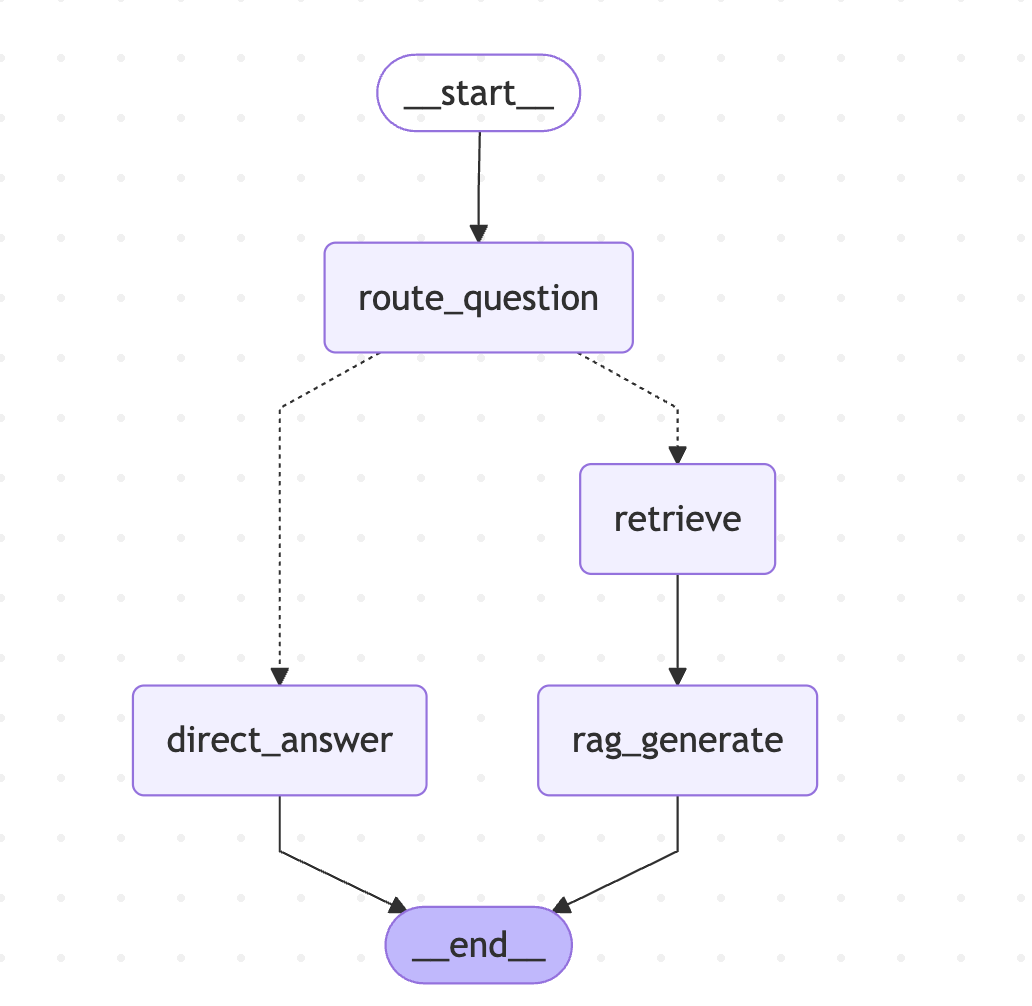
rag-query-router.js
import "dotenv/config"
import {ChatOpenAI, OpenAIEmbeddings} from "@langchain/openai";
import {z} from "zod"
import {Annotation, END, START, StateGraph} from "@langchain/langgraph";
import {Milvus} from "@langchain/community/vectorstores/milvus";

const llm = new ChatOpenAI({
    temperature: 0,
    model: 'qwen-plus',
    configuration: {
        baseURL: process.env.OPENAI_BASE_URL,
    },
    apiKey: process.env.OPENAI_API_KEY,
})

const embeddings = new OpenAIEmbeddings({
    model: 'text-embedding-v3',
    dimensions: 1024,
    configuration: {
        baseURL: process.env.OPENAI_BASE_URL,
    },
    apiKey: process.env.OPENAI_API_KEY,
})

const RouteSchema = z.object({
    strategy: z.enum(['simple', 'complex']),
    reason: z.string()
})

const GraphState = Annotation.Root({
    question: Annotation,
    k: Annotation,
    strategy: Annotation,
    routeReason: Annotation,
    documents: Annotation,
    generation: Annotation,
})

let vectorStore;

async function retrieveRelevantContent(question, k) {
    try {
        const docsWithScores = await vectorStore.similaritySearchWithScore(question, k)
        return docsWithScores.map(([doc, score]) => ({
            score,
            content: doc.pageContent,
            id: doc.metadata?.id ?? 'unknow',
            book_id: doc.metadata?.chapter_num ?? '未知',
            index: doc.metadata?.index ?? "未知"
        }))
    } catch (e) {
        console.error("检索内容时出错: ", e.message);
        return [];
    }
}

const routeQuestionNode = async (state) => {
    console.log("---ROUTE_QUESTION---");
    const router = llm.withStructuredOutput(RouteSchema);
    const route = await router.invoke(`
你是问答路由器。请判断用户问题是否需要外部检索。

规则:
- simple: 常识问答、简短定义、无需特定小说细节即可回答。
- complex: 需要《天龙八部》具体情节、人物关系、章节事实、原文细节或证据支持。

用户问题:${state.question}
`);

    console.log(`路由策略: ${route.strategy} (${route.reason})`)
    return {
        question: state.question,
        k: state.k,
        strategy: state.strategy,
        routeReason: route.reason,
    }
}

const retrieveNode = async (state) => {
    console.log('---RETRIEVE---');
    const documents = await retrieveRelevantContent(state.question, state.k);
    if (documents.length === 0) {
        console.log('RETRIEVE结果: 未命中文档');
    } else {
        console.log(`RETRIEVE结果: 命中 ${documents.length} 条`)
        documents.forEach((item, i) => {
            const preview = item.content.length > 120 ? `${item.content.substring(0, 120)}...` : item.content
            console.log(
                `[R${i + 1}] score=${Number(item.score).toFixed(4)} chapter=${item.chapter_num} index=${item.index}`,
            );
            console.log(`      ${preview}`);
        })
    }

    return {
        question: state.question,
        k: state.k,
        strategy: state.strategy,
        routeReason: state.reason,
        documents
    }
}

const directAnswerNode = async (state) => {
    console.log('---DIRECT_ANSWER---')
    process.stdout.write("\n 【AI 回答(流式)】\n")
    let generation = ''
    const stream = await llm.stream(`
    你是一个中文问答助手,请直接简洁回答问题。

    问题:${state.question}
    `)

    for await (const chunk of stream) {
        const text = typeof chunk.content === 'string' ? chunk.content : ''
        if (!text) continue
        generation += text;
        process.stdout.write(text)
    }
    process.stdout.write("\n")

    return {
        question: state.question,
        k: state.k,
        strategy: state.strategy,
        routeReason: state.reason,
        documents: [],
        generation
    }
}

const ragGenerateNode = async (state) => {
    console.log("---RAG_GENERATE---");
    const context = state.documents
        .map(
            (item, i) =>
                `[片段${i + 1}]
章节: 第${item.chapter_num}章
内容:${item.content}`,
        )
        .join("\n\n━━━━━\n\n");
    process.stdout.write("\n【AI 回答(流式)】\n");
    let generation = "";
    const stream = await llm.stream(`你是一个专业的《天龙八部》小说助手。基于小说内容回答问题,用准确、详细的语言。

请根据以下《天龙八部》小说片段内容回答问题:
${context || "(未检索到相关内容)"}

用户问题:${state.question}

回答要求:
1. 如果片段中有相关信息,请结合小说内容给出详细、准确的回答
2. 可以综合多个片段的内容,提供完整的答案
3. 如果片段中没有相关信息,请如实告知用户
4. 回答要准确,符合小说的情节和人物设定
5. 可以引用原文内容来支持你的回答

AI 助手的回答:`);
    for await(const chunk of stream) {
        const text = typeof chunk.content === "string" ? chunk.content : "";
        if (!text) continue;
        generation += text;
        process.stdout.write(text);
    }
    process.stdout.write("\n");

    return {
        question: state.question,
        k: state.k,
        strategy: state.strategy,
        routeReason: state.routeReason,
        documents: state.documents,
        generation,
    };
};

function decideNext(state) {
    return state.strategy === 'simple' ? 'direct_answer' : 'retrieve'
}

const graph = new StateGraph(GraphState)
    .addNode('route_question', routeQuestionNode)
    .addNode('direct_answer', directAnswerNode)
    .addNode('retrieve', retrieveNode)
    .addNode('rag_generate', ragGenerateNode)
    .addEdge(START, 'route_question')
    .addConditionalEdges('route_question', decideNext, {
        direct_answer: 'direct_answer',
        retrieve: 'retrieve'
    })
    .addEdge('retrieve', 'rag_generate')
    .addEdge('direct_answer', END)
    .addEdge('rag_generate', END)
    .compile()

async function main() {
    const question = "阿朱的结局是什么?";
    const k = 5;

// 导出为 Mermaid:可复制到 https://mermaid.live 或 Markdown 的 ```mermaid 代码块
    const drawable = await graph.getGraphAsync();
    const mermaid = drawable.drawMermaid({withStyles: true});
    console.log(mermaid);

    console.log("连接到 Milvus...");
    vectorStore = await Milvus.fromExistingCollection(embeddings, {
        collectionName: "ebook_collection",
        url: "localhost:19530",
        textField: "content",
        primaryField: "id",
        vectorField: "vector",
        indexCreateOptions: {
            metric_type: "COSINE",
            index_type: "HNSW",
            params: {M: 16, efConstruction: 200},
            search_params: {ef: 64},
        },
    });
    vectorStore.indexSearchParams = {metric_type: "COSINE", params: JSON.stringify({ef: 64})};
    console.log("✓ 已连接\n");

    try {
        await vectorStore.client.loadCollection({collection_name: "ebook_collection"});
        console.log("✓ 集合 ebook_collection 已加载\n");
    } catch (error) {
        if (!error.message.includes("already loaded")) {
            throw error;
        }
        console.log("✓ 集合 ebook_collection 已处于加载状态\n");
    }

    console.log("=".repeat(80));
    console.log(`问题:${question}`);
    console.log("=".repeat(80));

    const result = await graph.invoke({
        question,
        k: Number.isFinite(k) ? k : 5,
        strategy: "",
        routeReason: "",
        documents: [],
        generation: "",
    });

    if (result.strategy === "complex") {
        console.log("\n【检索相关内容】");
        if (result.documents.length === 0) {
            console.log("未找到相关内容");
        } else {
            result.documents.forEach((item, i) => {
                console.log(`\n[片段${i + 1}] 相似度:${item.score.toFixed(4)}`);
                console.log(`书籍:${item.book_id}`);
                console.log(`章节: 第${item.chapter_num}章`);
                console.log(`片段索引:${item.index}`);
                console.log(
                    `内容:${item.content.substring(0, 200)}${item.content.length > 200 ? "..." : ""}`,
                );
            });
        }
    }

    console.log(`\n最终策略:${result.strategy}`);
    if (!result.generation?.trim()) {
        console.log("模型未返回内容。");
    }
}

main()现在的 RAG 的代码还不能处理需要多步检索的复杂问题,比如先查 A、再查 B 才能得到结论
下面支持子问题的查询:
rag-multihop.js
import "dotenv/config";
import {z} from "zod";
import {ChatOpenAI, OpenAIEmbeddings} from "@langchain/openai";
import {Annotation, END, START, StateGraph} from "@langchain/langgraph";
import {Milvus} from "@langchain/community/vectorstores/milvus";

const llm = new ChatOpenAI({
    temperature: 0,
    model: "qwen-plus",
    configuration: {
        baseURL: process.env.OPENAI_BASE_URL,
    },
    apiKey: process.env.OPENAI_API_KEY,
});

const embeddings = new OpenAIEmbeddings({
    model: "text-embedding-v3",
    dimensions: 1024,
    configuration: {
        baseURL: process.env.OPENAI_BASE_URL,
    },
    apiKey: process.env.OPENAI_API_KEY,
});

/**
 * complex:先拆解子问题序列,再按序检索
 */
const GraphState = Annotation.Root({
    question: Annotation,
    k: Annotation,
    strategy: Annotation,
    routeReason: Annotation,
    /** 拆解得到的有序子问题,仅用于检索 */
    subQuestions: Annotation,
    /** 下一轮 retrieve 要用的下标(指向 subQuestions 中尚未检索的那一条) */
    nextSubIdx: Annotation,
    documents: Annotation,
    currentQuery: Annotation,
    retrievalCount: Annotation,
    maxRetrievals: Annotation,
    plannedNext: Annotation,
    generation: Annotation,
});

let vectorStore;

async function retrieveRelevantContent(question, k) {
    try {
        const docsWithScores = await vectorStore.similaritySearchWithScore(question, k);
        return docsWithScores.map(([doc, score]) => ({
            score,
            content: doc.pageContent,
            id: doc.metadata?.id ?? "unknown",
            book_id: doc.metadata?.book_id ?? "未知",
            chapter_num: doc.metadata?.chapter_num ?? "未知",
            index: doc.metadata?.index ?? "未知",
        }));
    } catch (error) {
        console.error("检索内容时出错:", error.message);
        return [];
    }
}

/** 按 id 合并;同 id 保留更高 score */
function mergeUnique(existingDocs, newDocs) {
    const map = new Map();
    for (const d of [...existingDocs, ...newDocs]) {
        const key = String(d.id);
        const prev = map.get(key);
        if (!prev || Number(d.score) > Number(prev.score)) {
            map.set(key, d);
        }
    }
    return Array.from(map.values()).sort((a, b) => Number(b.score) - Number(a.score));
}

const RouteSchema = z.object({
    strategy: z.enum(["simple", "complex"]),
    reason: z.string(),
});

const NextStepSchema = z.object({
    nextAction: z.enum(["retrieve", "generate"]),
    reason: z.string(),
});

const routeQuestionNode = async (state) => {
    console.log("---ROUTE_QUESTION---");
    const router = llm.withStructuredOutput(RouteSchema);
    const route = await router.invoke(`
你是问答路由器。请判断用户问题是否需要外部检索。

规则:
- simple: 常识问答、简短定义、无需特定小说细节即可回答。
- complex: 需要《天龙八部》具体情节、人物关系、章节事实、原文细节或证据支持。

用户问题:${state.question}
`);

    console.log(`路由策略: ${route.strategy} (${route.reason})`);
    return {
        strategy: route.strategy,
        routeReason: route.reason,
        retrievalCount: 0,
        maxRetrievals: state.maxRetrievals ?? 8,
        documents: [],
        subQuestions: [],
        nextSubIdx: 0,
        currentQuery: "",
    };
};

const DecomposeSchema = z.object({
    sub_questions: z.array(z.string()).min(1).max(8),
    reason: z.string(),
});

const decomposeQuestionNode = async (state) => {
    console.log("---DECOMPOSE_QUESTION---");
    const decomposer = llm.withStructuredOutput(DecomposeSchema);
    const out = await decomposer.invoke(`你是《天龙八部》多条问答的「子问题拆解器」。

用户原始问题:
${state.question}

任务:将问题拆成**有序**子问题列表 sub_questions,用于**依次向量检索**。要求:
1. 链式推理、多层关系、因果先后的问题,必须拆成多条;单跳即可答的也可只输出 1 条。
2. 每条子问题必须是**可独立检索**的完整中文问句,**禁止**使用「他/她/此人/上文」等指代;可写全人物名与事件名。
3. 顺序必须符合推理链:先搞清前置实体/事实,再查后续结论。
4. **不要**把整句原题原样复制成唯一一条(除非确实无法拆分);不要拆成过碎的关键词列表。
5. 输出 1~8 条即可。

请输出 sub_questions 与简短 reason。`);

    const subQuestions = out.sub_questions.map((s) => s.trim()).filter(Boolean);
    if (subQuestions.length === 0) {
        throw new Error("decompose_question: sub_questions 为空");
    }

    console.log(`拆解 ${subQuestions.length} 条子问题 (${out.reason})`);
    subQuestions.forEach((q, i) => {
        console.log(`  [${i + 1}] ${q}`);
    });

    return {
        subQuestions,
        nextSubIdx: 0,
        currentQuery: subQuestions[0],
    };
};

const retrieveNode = async (state) => {
    const subs = state.subQuestions ?? [];
    const idx = state.nextSubIdx ?? 0;
    const q = subs[idx]?.trim();
    if (!q) {
        throw new Error(`retrieve: 子问题下标 ${idx} 无有效文本(共 ${subs.length} 条)`);
    }

    const round = state.retrievalCount + 1;
    console.log(`---RETRIEVE (第 ${round} 轮,子问题 ${idx + 1}/${subs.length})---`);
    console.log(`查询: ${q}`);

    const newDocs = await retrieveRelevantContent(q, state.k);
    const merged = mergeUnique(state.documents ?? [], newDocs);

    if (newDocs.length === 0) {
        console.log("本轮未命中文档");
    } else {
        console.log(`本轮命中 ${newDocs.length} 条,累计去重后 ${merged.length} 条`);
        newDocs.forEach((item, i) => {
            const preview =
                item.content.length > 120 ? `${item.content.substring(0, 120)}...` : item.content;
            console.log(
                `[R${i + 1}] score=${Number(item.score).toFixed(4)} chapter=${item.chapter_num} index=${item.index}`,
            );
            console.log(`      ${preview}`);
        });
    }

    return {
        documents: merged,
        retrievalCount: round,
        nextSubIdx: idx + 1,
        currentQuery: q,
    };
};

const planNextStepNode = async (state) => {
    console.log("---PLAN_NEXT_STEP---");
    const subs = state.subQuestions ?? [];
    const nextIdx = state.nextSubIdx ?? 0;
    const remaining = subs.length - nextIdx;

    const subList = subs.map((s, i) => `${i + 1}. ${s}${i < nextIdx ? " (已检索)" : i === nextIdx ? " (下一轮将检索,若选择继续)" : " (未检索)"}`).join("\n");

    const docStr =
        state.documents.length === 0
            ? "(尚无检索结果)"
            : state.documents
                .slice(0, 6)
                .map(
                    (d, i) =>
                        `[${i + 1}] score=${Number(d.score).toFixed(4)} 第${d.chapter_num}章: ${d.content.slice(0, 200)}${d.content.length > 200 ? "..." : ""}`,
                )
                .join("\n\n");

    const prompt = `你是多跳 RAG 规划器。检索查询已由前置步骤拆解为**有序子问题**;若需继续检索,下一轮将自动使用「下一条子问题」做向量检索,你**不要**自拟新的检索句。

用户原始问题:${state.question}

子问题序列:
${subList || "(无)"}

已检索轮数:${state.retrievalCount};剩余未检索子问题条数:${remaining}
最大检索轮数上限:${state.maxRetrievals}

已召回文档摘要:
${docStr}

请判断下一步:
1) 已有足够依据回答用户原始问题 → nextAction=generate
2) 仍缺关键事实、且仍存在未检索的子问题、且未超过轮数上限 → nextAction=retrieve

硬性规则:
- 若剩余未检索子问题条数为 0,必须 nextAction=generate。
- 若已检索轮数已达到或超过最大检索轮数,必须 nextAction=generate。`;

    const model = llm.withStructuredOutput(NextStepSchema);
    const {nextAction, reason} = await model.invoke(prompt);

    let finalNext = nextAction;
    if (state.retrievalCount >= state.maxRetrievals) finalNext = "generate";
    if (remaining <= 0) finalNext = "generate";

    console.log(`[决策] plannedNext=${finalNext} (模型建议=${nextAction}) (${reason})`);

    return {
        plannedNext: finalNext,
    };
};

function afterRoute(state) {
    return state.strategy === "simple" ? "direct_answer" : "decompose_question";
}

function afterPlan(state) {
    return state.plannedNext === "retrieve" ? "retrieve" : "generate";
}

const directAnswerNode = async (state) => {
    console.log("---DIRECT_ANSWER---");
    process.stdout.write("\n【AI 回答(流式)】\n");
    let generation = "";
    const stream = await llm.stream(`你是一个中文问答助手,请直接简洁回答问题。

问题:${state.question}
`);
    for await (const chunk of stream) {
        const text = typeof chunk.content === "string" ? chunk.content : "";
        if (!text) continue;
        generation += text;
        process.stdout.write(text);
    }
    process.stdout.write("\n");
    return {generation};
};

const generateNode = async (state) => {
    console.log("---GENERATE---");
    const context = state.documents
        .map(
            (item, i) =>
                `[片段 ${i + 1}]
章节: 第 ${item.chapter_num} 章
内容: ${item.content}`,
        )
        .join("\n\n━━━━━\n\n");
    process.stdout.write("\n【AI 回答(流式)】\n");
    let generation = "";
    const stream = await llm.stream(`你是一个专业的《天龙八部》小说助手。基于小说内容回答问题,用准确、详细的语言。

请根据以下《天龙八部》小说片段内容回答问题:
${context || "(未检索到相关内容)"}

用户问题: ${state.question}

回答要求:
1. 如果片段中有相关信息,请结合小说内容给出详细、准确的回答
2. 可以综合多个片段的内容,提供完整的答案
3. 如果片段中没有相关信息,请如实告知用户
4. 回答要准确,符合小说的情节和人物设定
5. 可以引用原文内容来支持你的回答

AI 助手的回答:`);
    for await (const chunk of stream) {
        const text = typeof chunk.content === "string" ? chunk.content : "";
        if (!text) continue;
        generation += text;
        process.stdout.write(text);
    }
    process.stdout.write("\n");
    return {generation};
};

const graph = new StateGraph(GraphState)
    .addNode("route_question", routeQuestionNode)
    .addNode("direct_answer", directAnswerNode)
    .addNode("decompose_question", decomposeQuestionNode)
    .addNode("retrieve", retrieveNode)
    .addNode("plan_next_step", planNextStepNode)
    .addNode("generate", generateNode)
    .addEdge(START, "route_question")
    .addConditionalEdges("route_question", afterRoute, {
        direct_answer: "direct_answer",
        decompose_question: "decompose_question",
    })
    .addEdge("decompose_question", "retrieve")
    .addEdge("retrieve", "plan_next_step")
    .addConditionalEdges("plan_next_step", afterPlan, {
        retrieve: "retrieve",
        generate: "generate",
    })
    .addEdge("direct_answer", END)
    .addEdge("generate", END)
    .compile();

async function main() {
    const question =
        "《天龙八部》中「四大恶人」排行第二的是谁?此人之子在身世揭晓前,其生父在武林中的公开身份是什么?";
    const k = 5;

    const drawable = await graph.getGraphAsync();
    console.log(drawable.drawMermaid({withStyles: true}));

    console.log("连接到 Milvus...");
    vectorStore = await Milvus.fromExistingCollection(embeddings, {
        collectionName: "ebook_collection",
        url: "localhost:19530",
        textField: "content",
        primaryField: "id",
        vectorField: "vector",
        indexCreateOptions: {
            metric_type: "COSINE",
            index_type: "HNSW",
            params: {M: 16, efConstruction: 200},
            search_params: {ef: 64},
        },
    });
    vectorStore.indexSearchParams = {metric_type: "COSINE", params: JSON.stringify({ef: 64})};
    console.log("✓ 已连接\n");

    try {
        await vectorStore.client.loadCollection({collection_name: "ebook_collection"});
        console.log("✓ 集合 ebook_collection 已加载\n");
    } catch (error) {
        if (!error.message.includes("already loaded")) {
            throw error;
        }
        console.log("✓ 集合 ebook_collection 已处于加载状态\n");
    }

    console.log("=".repeat(80));
    console.log(`问题: ${question}`);
    console.log("=".repeat(80));

    const result = await graph.invoke({
        question,
        k: Number.isFinite(k) ? k : 5,
        strategy: "",
        routeReason: "",
        subQuestions: [],
        nextSubIdx: 0,
        documents: [],
        currentQuery: "",
        retrievalCount: 0,
        maxRetrievals: 8,
        plannedNext: "",
        generation: "",
    });

    if (result.strategy === "complex") {
        if (result.subQuestions?.length) {
            console.log("\n【子问题序列】");
            result.subQuestions.forEach((s, i) => console.log(`  ${i + 1}. ${s}`));
        }
        console.log("\n【检索相关内容(累计)】");
        if (result.documents.length === 0) {
            console.log("未找到相关内容");
        } else {
            result.documents.forEach((item, i) => {
                console.log(`\n[片段 ${i + 1}] 相似度: ${Number(item.score).toFixed(4)}`);
                console.log(`书籍: ${item.book_id}`);
                console.log(`章节: 第 ${item.chapter_num} 章`);
                console.log(`片段索引: ${item.index}`);
                console.log(
                    `内容: ${item.content.substring(0, 200)}${item.content.length > 200 ? "..." : ""}`,
                );
            });
        }
        console.log(`\n检索轮数: ${result.retrievalCount} / ${result.maxRetrievals}`);
    }

    console.log(`\n最终策略: ${result.strategy}`);
    if (!result.generation?.trim()) {
        console.log("模型未返回内容。");
    }
}

main().catch((err) => {
    console.error("运行失败:", err);
    process.exit(1);
});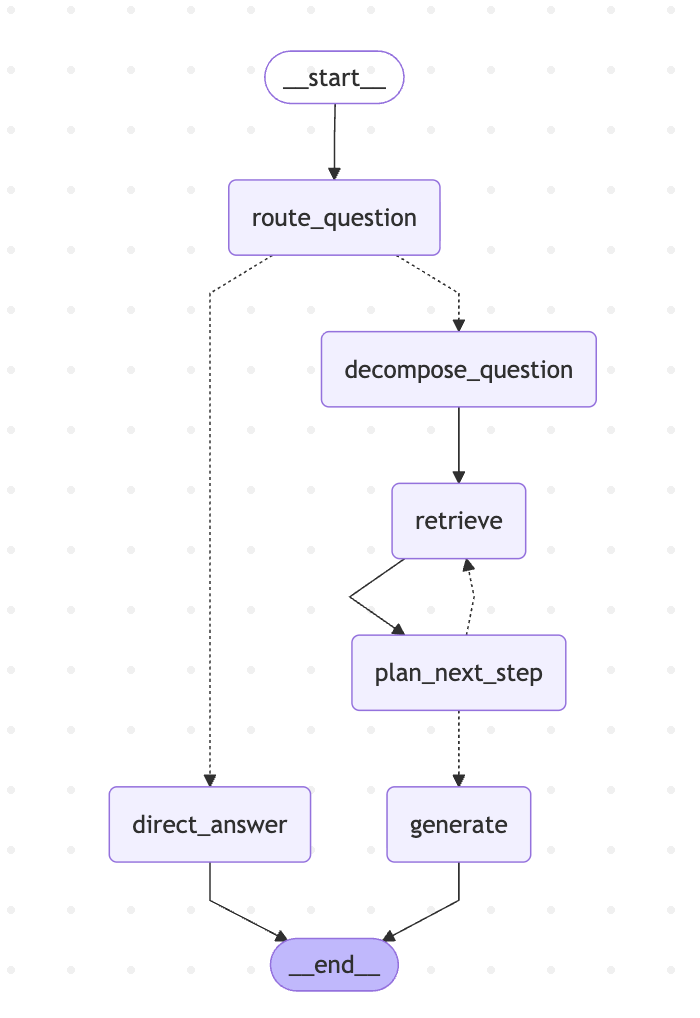
下面加上网络搜索来兜底,把搜索结果放到 Prompt 中来参考生成答案:
rag-webfallback.js
import "dotenv/config";
import {z} from "zod";
import {ChatOpenAI, OpenAIEmbeddings} from "@langchain/openai";
import {Annotation, END, START, StateGraph} from "@langchain/langgraph";
import {Milvus} from "@langchain/community/vectorstores/milvus";

const llm = new ChatOpenAI({
    temperature: 0,
    model: "qwen-plus",
    configuration: {baseURL: process.env.OPENAI_BASE_URL},
    apiKey: process.env.OPENAI_API_KEY,
});

const embeddings = new OpenAIEmbeddings({
    model: "text-embedding-v3",
    dimensions: 1024,
    configuration: {baseURL: process.env.OPENAI_BASE_URL},
    apiKey: process.env.OPENAI_API_KEY,
});

const GraphState = Annotation.Root({
    question: Annotation,
    k: Annotation,
    strategy: Annotation,
    routeReason: Annotation,
    retrievedDocs: Annotation,
    localContext: Annotation,
    webContext: Annotation,
    evaluation: Annotation,
    generation: Annotation,
});

let vectorStore;

async function retrieveRelevantContent(query, k) {
    try {
        const docsWithScores = await vectorStore.similaritySearchWithScore(query, k);
        return docsWithScores.map(([doc, score]) => ({
            score,
            content: doc.pageContent,
            id: doc.metadata?.id ?? "unknown",
            book_id: doc.metadata?.book_id ?? "未知",
            chapter_num: doc.metadata?.chapter_num ?? "未知",
            index: doc.metadata?.index ?? "未知",
        }));
    } catch (error) {
        console.error("检索内容时出错:", error.message);
        return [];
    }
}

const RouteSchema = z.object({
    strategy: z.enum(["simple", "complex"]),
    reason: z.string(),
});

const routeQuestionNode = async (state) => {
    console.log("---ROUTE_QUESTION---");
    const router = llm.withStructuredOutput(RouteSchema);
    const route = await router.invoke(`
你是问答路由器。请判断用户问题是否需要外部检索。

规则:
- simple: 常识问答、简短定义、无需特定小说细节即可回答。
- complex: 需要《天龙八部》具体情节、人物关系、章节事实、原文细节或证据支持。

用户问题:${state.question}
`);
    console.log(`路由策略: ${route.strategy} (${route.reason})`);
    return {
        strategy: route.strategy,
        routeReason: route.reason,
        retrievedDocs: [],
        localContext: "",
        webContext: "",
        evaluation: "",
        generation: "",
    };
};

const directAnswerNode = async (state) => {
    console.log("---DIRECT_ANSWER---");
    process.stdout.write("\n【AI 回答(流式)】\n");
    let generation = "";
    const stream = await llm.stream(`你是一个中文问答助手,请直接简洁回答问题。

问题:${state.question}
`);
    for await(const chunk of stream) {
        const text = typeof chunk.content === "string" ? chunk.content : "";
        if (!text) continue;
        generation += text;
        process.stdout.write(text);
    }
    process.stdout.write("\n");
    return {generation};
};

const retrieveLocalNode = async (state) => {
    console.log("---LOCAL_RETRIEVE---");
    const retrievedDocs = await retrieveRelevantContent(state.question, state.k);
    console.log(`本地检索命中: ${retrievedDocs.length} 条`);
    const localContext = (retrievedDocs ?? []).map((d) => d.content).join("\n\n");
    return {
        retrievedDocs,
        localContext,
    };
};

const EvaluateSchema = z.object({
    enough: z.boolean(),
    missing: z.array(z.string()).max(6),
    reason: z.string(),
    web_query: z.string().optional(),
});

const evaluateNode = async (state) => {
    const hasWeb = Boolean(state.webContext && String(state.webContext).trim());
    console.log(hasWeb ? "---EVALUATE_CONTEXT_WITH_WEB---" : "---EVALUATE_LOCAL_CONTEXT---");
    const evaluator = llm.withStructuredOutput(EvaluateSchema);
    const out = await evaluator.invoke(`你是信息充分性评估器。判断当前上下文是否足以回答用户问题。

用户问题:${state.question}

已检索上下文(来自本地知识库):
${state.localContext || "(空)"}

${hasWeb ? `联网搜索结果:\n${state.webContext || "(空)"}\n` : ""}

输出字段:
- enough: 是否足够回答(true/false)
- missing: 若不够,列出缺失信息点(最多 6 条)
- reason: 简短原因
${hasWeb ? "" : "- web_query: 若不够,给出一个适合联网搜索的中文查询句(完整句,不用代词;为空也可)"}
`);

    console.log(`${hasWeb ? "二次评估" : "评估"}: enough=${out.enough} (${out.reason})`);
    if (!out.enough && out.missing?.length) {
        out.missing.forEach((m, i) => console.log(`  缺失${i + 1}: ${m}`));
    }
    return {
        evaluation: JSON.stringify(out),
    };
};

/**
 * Call Bocha Web Search API
 */
async function bochaWebSearch(query, count) {
    const apiKey = process.env.BOCHA_API_KEY;
    if (!apiKey) {
        throw new Error("Bocha Web Search 的 API Key 未配置(环境变量 BOCHA_API_KEY)。");
    }
    const url = "https://api.bocha.cn/v1/web-search";
    const body = {
        query,
        freshness: "noLimit",
        summary: true,
        count: count ?? 10,
    };

    let response;
    try {
        response = await fetch(url, {
            method: "POST",
            headers: {
                Authorization: `Bearer ${apiKey}`,
                "Content-Type": "application/json",
            },
            body: JSON.stringify(body),
        });
    } catch (error) {
        throw new Error(`搜索 API 请求失败(网络错误):${error.message}`);
    }

    if (!response.ok) {
        const errorText = await response.text().catch(() => "");
        throw new Error(`搜索 API 请求失败,状态码: ${response.status}, 错误信息: ${errorText}`);
    }

    let json;
    try {
        json = await response.json();
    } catch (error) {
        throw new Error(`搜索结果解析失败:${error.message}`);
    }

    if (json?.code !== 200 || !json?.data) {
        throw new Error(`搜索 API 返回失败:${json?.msg ?? "未知错误"}`);
    }

    const webpages = json.data.webPages?.value ?? [];
    if (!webpages.length) {
        return "未找到相关结果。";
    }

    return webpages
        .map(
            (page, idx) => `引用: ${idx + 1}
标题: ${page.name}
URL: ${page.url}
摘要: ${page.summary}
网站名称: ${page.siteName}
网站图标: ${page.siteIcon}
发布时间: ${page.dateLastCrawled}`,
        )
        .join("\n\n");
}

const webSearchNode = async (state) => {
    console.log("---WEB_SEARCH---");
    const parsed = (() => {
        try {
            return JSON.parse(state.evaluation || "{}");
        } catch {
            return {};
        }
    })();
    const query = (parsed.web_query ?? "").trim() || state.question;
    console.log(`联网查询: ${query}`);
    const webContext = await bochaWebSearch(query, 8);
    console.log(`联网结果长度: ${webContext.length}`);
    return {webContext};
};

const generateNode = async (state) => {
    console.log("---GENERATE---");
    const context = [state.localContext, state.webContext].filter(Boolean).join("\n\n===== 联网补充 =====\n\n");
    process.stdout.write("\n【AI 回答(流式)】\n");
    let generation = "";
    const stream = await llm.stream(`你是一个严谨的中文问答助手。优先依据上下文作答,不要编造。

上下文(本地知识库 + 可选联网补充):
${context || "(空)"}

用户问题:${state.question}

回答要求:
1. 如果上下文足够,给出清晰、可核对的回答;需要时引用“引用: n / URL”或小说片段来支撑。
2. 如果上下文仍不足以确定关键事实,明确说明“不确定/无法从上下文确认”,并说明缺失点。
3. 不要输出表情符号。

回答:`);
    for await (const chunk of stream) {
        const text = typeof chunk.content === "string" ? chunk.content : "";
        if (!text) continue;
        generation += text;
        process.stdout.write(text);
    }
    process.stdout.write("\n");
    return {generation};
};

function afterRoute(state) {
    return state.strategy === "simple" ? "direct_answer" : "local_retrieve";
}

function afterEvaluateLocal(state) {
    if (state.webContext && String(state.webContext).trim()) {
        return "generate";
    }
    const parsed = (() => {
        try {
            return JSON.parse(state.evaluation || "{}");
        } catch {
            return {};
        }
    })();
    return parsed.enough === true ? "generate" : "web_search";
}

const graph = new StateGraph(GraphState)
    .addNode("route_question", routeQuestionNode)
    .addNode("direct_answer", directAnswerNode)
    .addNode("local_retrieve", retrieveLocalNode)
    .addNode("evaluate_local", evaluateNode)
    .addNode("web_search", webSearchNode)
    .addNode("generate", generateNode)
    .addEdge(START, "route_question")
    .addConditionalEdges("route_question", afterRoute, {
        direct_answer: "direct_answer",
        local_retrieve: "local_retrieve",
    })
    .addEdge("local_retrieve", "evaluate_local")
    .addConditionalEdges("evaluate_local", afterEvaluateLocal, {
        generate: "generate",
        web_search: "web_search",
    })
    .addEdge("web_search", "evaluate_local")
    .addEdge("direct_answer", END)
    .addEdge("generate", END)
    .compile();

async function main() {
    const question =
        "请回答《天龙八部》小说里“雁门关事件”的主谋是谁,并说明其儿子的最终结局;另外请补充:在《天龙八部》2013 版电视剧中,这段“雁门关事件”主要出现在哪几集?请给出可核对的来源链接。";
    const k = 8;

    const drawable = await graph.getGraphAsync();
    console.log(drawable.drawMermaid({withStyles: true}));

    console.log("连接到 Milvus...");
    vectorStore = await Milvus.fromExistingCollection(embeddings, {
        collectionName: "ebook_collection",
        url: "localhost:19530",
        textField: "content",
        primaryField: "id",
        vectorField: "vector",
        indexCreateOptions: {
            metric_type: "COSINE",
            index_type: "HNSW",
            params: {M: 16, efConstruction: 200},
            search_params: {ef: 64},
        },
    });
    vectorStore.indexSearchParams = {metric_type: "COSINE", params: JSON.stringify({ef: 64})};
    console.log("✓ 已连接\n");

    try {
        await vectorStore.client.loadCollection({collection_name: "ebook_collection"});
        console.log("✓ 集合 ebook_collection 已加载\n");
    } catch (error) {
        if (!error.message.includes("already loaded")) throw error;
        console.log("✓ 集合 ebook_collection 已处于加载状态\n");
    }

    console.log("=".repeat(80));
    console.log(`问题: ${question}`);
    console.log("=".repeat(80));

    const result = await graph.invoke({
        question,
        k,
        strategy: "",
        routeReason: "",
        retrievedDocs: [],
        localContext: "",
        webContext: "",
        evaluation: "",
        generation: "",
    });

    console.log(`\n最终策略: ${result.strategy}`);
    if (!result.generation?.trim()) {
        console.log("模型未返回内容。");
    }
}

main()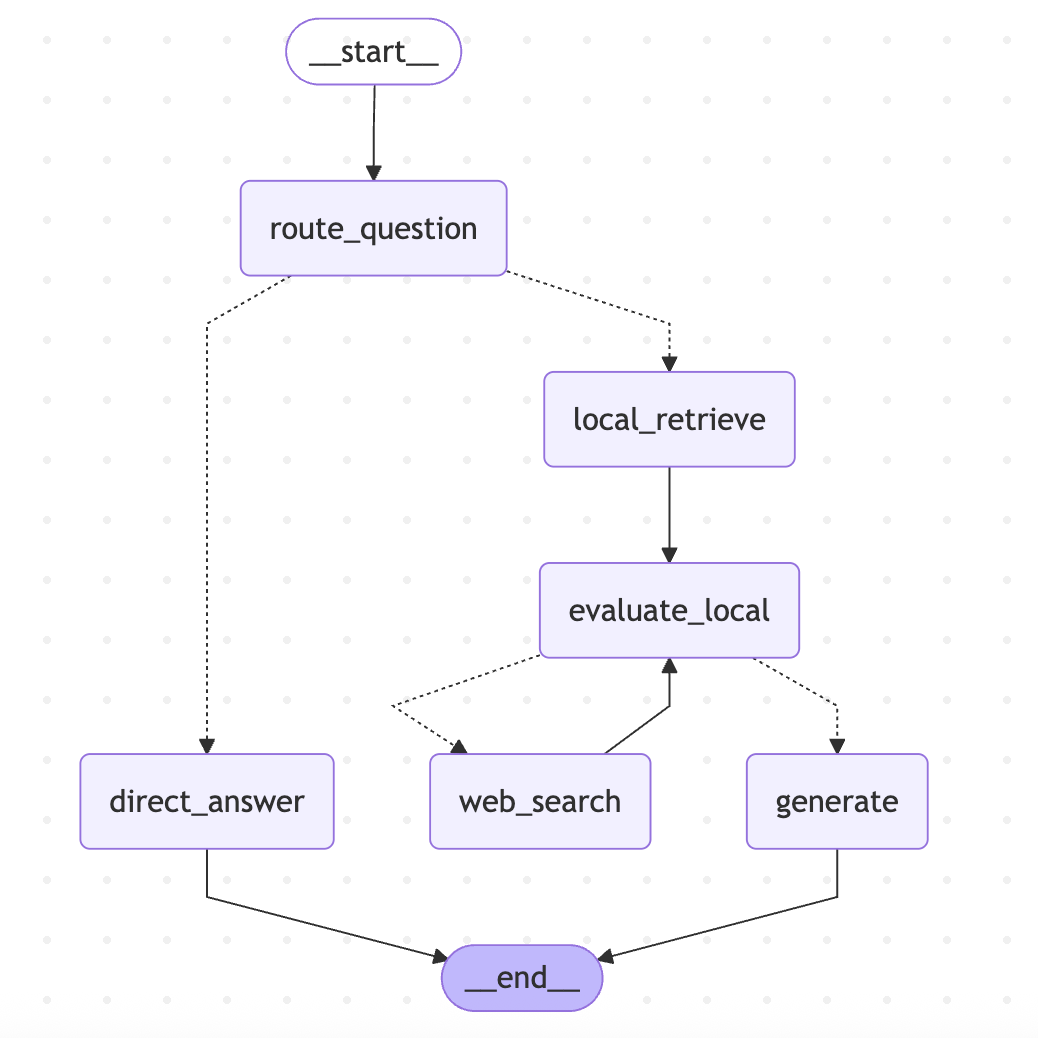
混合检索 RAG
先把一段 query 基于向量相似度检索出一些文档,分词后基于关键词检索出一些文档,然后把这些给到大模型来生成回答
但是在给到大模型之前,需要先做一次筛选,先把混合召回的文档做一次重排序(rerank),把最相关、最有用、最能支撑回答的文档筛选出来,再给大模型生成最终答案
为什么要重排序:
-
混合召回(向量+关键词)会带来大量冗余信息
-
大模型上下文窗口有限,不能把所有文档都塞进去
-
噪声太多会让模型答非所问、逻辑混乱、幻觉增加
-
先过滤、再精简,才能让回答更精简
所以现在流程就会变成:
-
用户输入 query
-
多路召回
-
向量检索(语义相似)
-
关键词检索(分词匹配)
-
结果合并 -> 去重
-
重排序/相关性打分(Rerank)
-
把最相关的排在最前面
-
只保留前 N 条最有用的文档
-
把高质量文档送入大模型
-
大模型基于干净上下文生成最终回答
嵌入模型是把文本转成向量,重排模型是输入用户问题+一段文档,输出一个相关度分数
https://github.com/QuarkGluonPlasma/ai-agent-course-code/tree/main/es-test
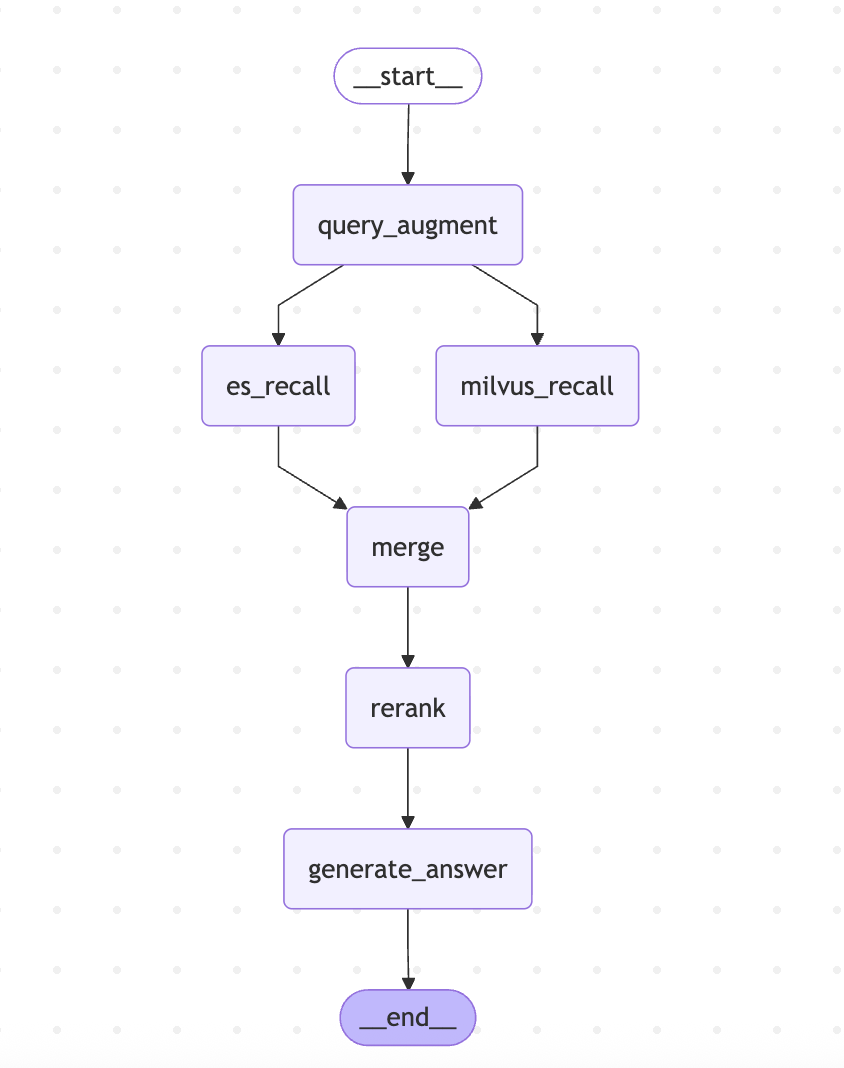
Neo4j 知识图谱和 Graph RAG
使用 Milvus 和 ES 做检索固然可以兼顾关键词和语义检索,但无法捕捉数据之间的关联关系,只能实现“单点式”搜索,应对不了需要挖掘数据内在逻辑、关联链路的场景
可以使用 Neo4j 这种图数据库实现关联检索,是 GraphRAG 的核心
GraphRAG 会先将非结构化数据中的实体、关系提取出来,用 Neo4j 这种图数据库构建知识图谱,再结合向量检索的语义有时,实现“图谱关联+语义匹配”的双重检索,既能找到语义相近的内容,又能顺着知识图谱的关联链路,完成跨文档、多步骤的复杂推理,让 RAG 生成的答案更精准、更具可解释性
grapharg.js
import "dotenv/config"
import {Neo4jGraph} from "@langchain/community/graphs/neo4j_graph";
import {ChatOpenAI} from "@langchain/openai";
import {HumanMessage} from "@langchain/core/messages";
import {END, START, StateGraph} from "@langchain/langgraph";

const graph = new Neo4jGraph({
    url: 'bolt://localhost:7687',
    username: 'neo4j',
    password: '12345678'
})

const llm = new ChatOpenAI({
    model: process.env.MODEL_NAME,
    temperature: 0,
    configuration: {
        baseURL: process.env.OPENAI_BASE_URL
    }
})

const state = {
    messages: {
        value: (left, right) => left.concat(Array.isArray(right) ? right : [right]),
        default: () => [],
    },
    query: null,
    cypher: null,
    context: null,
    answer: null,
}

// 解析问题
function userQuery(state) {
    const last = state.messages[state.messages.length - 1]
    return last.content
}

// 生成 Cypher
async function generateCypher(state) {
    const prompt = `
      你是一个专业的 Neo4j Cypher 生成器。
      严格按照下面的结构生成正确语句,只返回纯 Cypher 代码,不要任何解释、不要标点、不要 markdown。

      节点:
      - Product: 奶茶产品
      - Ingredient: 配料
      - Type: 奶茶类型
      - Method: 制作工艺
      - People: 适合人群

      关系方向(必须严格遵守):
      - (Product)-[:属于]->(Type)
      - (Product)-[:包含]->(Ingredient)
      - (Product)-[:适合]->(People)
      - (Ingredient)-[:使用]->(Method)

      规则:
      1. 关系方向绝对不能反
      2. 多跳查询请使用多个 MATCH,不要连错路径
      3. 只返回最终可运行的 Cypher 语句

      用户问题:${userQuery(state)}
    `

    const res = await llm.invoke([new HumanMessage(prompt)])
    return {cypher: res.content}
}

// 执行图查询
async function executeGraphQuery(state) {
    try {
        const res = await graph.query(state.cypher);
        return {context: JSON.stringify(res)}
    } catch (e) {
        return {context: '未查询到相关知识'}
    }
}

// 生成答案
async function generateAnswer(state) {
    const prompt = `
    你是奶茶专家,根据下方「检索结果」回答用户问题;检索结果为空或不足时简要说明无法从图谱得到答案,不要编造。
    回答要求:
    - 直接列出事实,不要推断图谱里未出现的配料(如水、冰、添加剂等)。

    检索结果:${state.context}
    用户问题:${userQuery(state)}
  `
    const res = await llm.invoke([new HumanMessage(prompt)])
    return {answer: res.content}
}

const workflow = new StateGraph({channels: state})
    .addNode('generateCypher', generateCypher)
    .addNode('executeGraph', executeGraphQuery)
    .addNode('generateAnswer', generateAnswer)
    .addEdge(START, 'generateCypher')
    .addEdge('generateCypher', 'executeGraph')
    .addEdge('executeGraph', 'generateAnswer')
    .addEdge('generateAnswer', END)

const app = workflow.compile()

async function printWorkflowMermaid() {
    const drawable = await app.getGraphAsync()
    const mermaid = drawable.drawMermaid({withStyles: true})
    console.log('--- LangGraph 工作流 (Mermaid) ---')
    console.log(mermaid)
    console.log('-----------------------------------------------------------')
}

async function runGraphRAG(question) {
    const res = await app.invoke({
        messages: [new HumanMessage(question)],
    })

    console.log('======================================')
    console.log('用户问题:', question)
    console.log('生成 Cypher:', res.cypher)
    console.log('检索结果:', res.context)
    console.log('最终回答:', res.answer)
    console.log('======================================')
}

// ======================
// 测试
// ======================
;(async () => {
    await printWorkflowMermaid()
    await Promise.all([
        runGraphRAG('我们这款珍珠奶茶有哪些配料?'),
        runGraphRAG('台式奶茶的饮品都有哪些配料?'),
        runGraphRAG('珍珠奶茶适合哪些人群饮用?'),
    ])
})().catch(console.error)LangSmith 全链路观测
使用 LangSmith 可以把 Agent 中的很多步骤都变得可观测、可量化
RAG 的 Agent 跑通后,一般都会做 RAG 的评估:整理一批问题和对应的标准答案,挨个拿去提问 Agent,对比实际回答和标准回答的差距,一次来完成打分评判
使用 LangSmith 中的 dataset 专门管理测评数据集,统一存放各类问题与标准答案,再通过 evaluation 配置好各类评估指标与打分规则,就能自动批量测试,对照实际输出和标准答案,按照不同维度自动完成评分,完成整套 RAG 效果评估
https://github.com/QuarkGluonPlasma/ai-agent-course-code/tree/main/langsmith-test
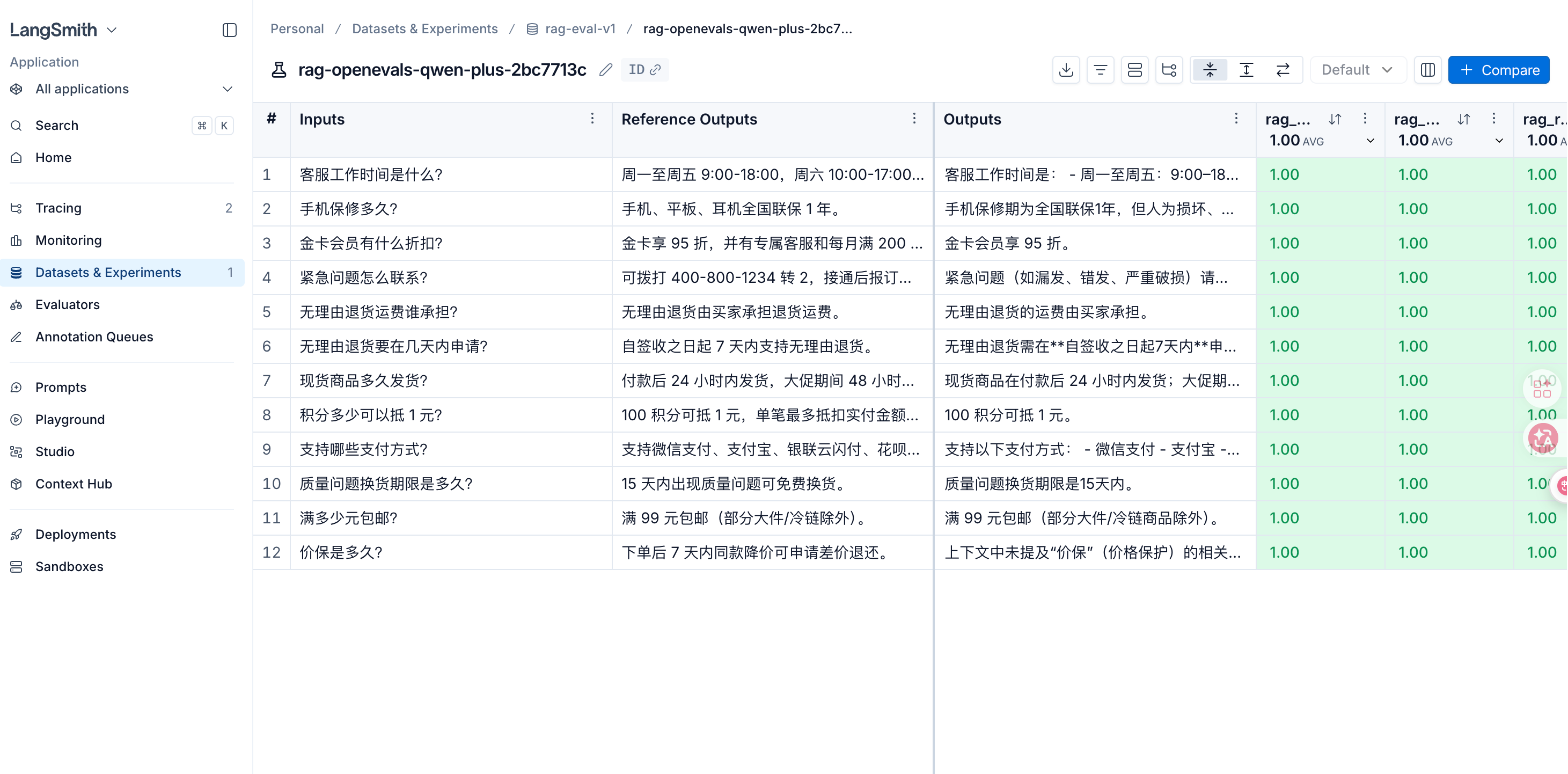
DeepAgents
DeepAgent 底层依赖 LangGraph 的状态管理(state)、循环路由、持久化执行能力(checkpointer),上层直接内置了任务规划、长期记忆、子 Agent 额度、上下文压缩等能力,大幅度降低了复杂 Agent 的开发门槛
DeepAgent 适合快速落地复杂 Agent 应用,比如深度调研、代码开发、多步骤业务执行、多智能体协作等场景
使用 middleware,再 Agent 运行前后、model 调用前后加一些逻辑,以及控制 model 要不要调用,可以提前结束流程
middleware.js
import "dotenv/config"
import {z} from "zod"
import {AIMessage, createAgent, createMiddleware, HumanMessage} from "langchain";
import {ChatOpenAI} from "@langchain/openai";

// 自定义 Middleware
// 日志 + 模型调用次数统计
const loggingMiddleware = createMiddleware({
    name: 'LoggingMiddleware',
    stateSchema: z.object({
        modelCallCount: z.number().default(0)
    }),
    beforeAgent: (state) => {
        console.log("\n[Logging] agent 开始,消息数: ", state.messages.length)
    },
    beforeModel: (state) => {
        console.log(`[Logging] 即将调用模型,当前消息数: ${state.messages.length},已调用: ${state.modelCallCount} 次`);
    },
    afterModel: (state) => {
        const last = state.messages.at(-1)
        const preview = typeof last?.content === 'string' ? last.content.slice(0, 80) : JSON.stringify(last?.content)?.slice(0, 80);
        console.log(`[Logging] 模型返回: ${preview}...`)
        return {modelCallCount: state.modelCallCount + 1}
    },
    afterAgent: (state) => {
        console.log(
            `[Logging] agent 结束,累计模型调用: ${state.modelCallCount} 次\n`
        );
    },
})

/** 在每次模型调用前追加 system 上下文 */
const addContextMiddleware = createMiddleware({
    name: "AddContextMiddleware",
    wrapModelCall: async (request, handler) => {
        console.log("[AddContext] 注入额外 system 上下文");
        return handler({
            ...request,
            systemMessage: request.systemMessage.concat(
                "\n\n 请用一句话简洁回答。"
            ),
        });
    },
});

/** 拦截敏感词,直接结束 agent */
const blockedContentMiddleware = createMiddleware({
    name: "BlockedContentMiddleware",
    beforeModel: {
        canJumpTo: ["end"],
        hook: (state) => {
            const last = state.messages.at(-1);
            const text =
                typeof last?.content === "string" ? last.content : String(last?.content ?? "");
            if (text.includes("BLOCKED")) {
                console.log("[Blocked] 检测到 BLOCKED,短路结束");
                return {
                    messages: [new AIMessage("该请求已被 middleware 拦截,无法处理。")],
                    jumpTo: "end",
                };
            }
        },
    },
});

// --- Agent ---

const model = new ChatOpenAI({
    model: process.env.MODEL_NAME,
    apiKey: process.env.OPENAI_API_KEY,
    configuration: {
        baseURL: process.env.OPENAI_BASE_URL,
    },
    temperature: 0,
});

const agent = createAgent({
    model,
    tools: [],
    systemPrompt: "你是一个助手。",
    middleware: [
        loggingMiddleware,
        addContextMiddleware,
        blockedContentMiddleware,
    ],
});

for (const text of [
    "用中文说:middleware 是什么?",
    "这句话包含 BLOCKED 关键词",
]) {
    console.log("\n用户:", text);
    const {messages, modelCallCount} = await agent.invoke({
        messages: [new HumanMessage(text)],
    });
    console.log("回复:", messages.at(-1)?.content);
    console.log("modelCallCount:", modelCallCount);
}此外,中间件还可以扩展 tool,以及 wrapToolCall
middleware-test-2.js
import "dotenv/config";
import {Command} from "@langchain/langgraph";
import {z} from "zod";
import {ChatOpenAI} from "@langchain/openai";
import {
    createAgent,
    createMiddleware,
    HumanMessage,
    ToolMessage,
    tool,
} from "langchain";

const getCurrentTime = tool(() => new Date().toISOString(), {
    name: "get_current_time",
    description: "返回当前 UTC 时间的 ISO 8601 字符串",
    schema: z.object({}),
});

/** 通过 middleware 注册工具,并用 wrapToolCall 包装执行 */
const extendedToolsMiddleware = createMiddleware({
    name: "ExtendedToolsMiddleware",
    stateSchema: z.object({
        toolInvocationCount: z.number().default(0),
    }),
    tools: [getCurrentTime],
    wrapToolCall: async (request, handler) => {
        const toolName = request.tool?.name ?? request.toolCall.name;
        console.log(
            `[Tools] 即将执行: ${toolName}`,
            "args:",
            request.toolCall.args ?? {}
        );
        const result = await handler(request);
        if (!ToolMessage.isInstance(result)) return result;

        const wrapped = new ToolMessage({
            content: `${result.content}\n[wrapToolCall] 已由 ExtendedToolsMiddleware 包装`,
            tool_call_id: result.tool_call_id,
            name: result.name,
        });
        console.log(
            `[Tools] 执行完成: ${toolName}`,
            typeof wrapped.content === "string"
                ? wrapped.content.slice(0, 120)
                : wrapped
        );
        return new Command({
            update: {
                toolInvocationCount: request.state.toolInvocationCount + 1,
                messages: [wrapped],
            },
        });
    },
    afterAgent: (state) => {
        console.log(
            `[Tools] agent 结束,middleware 统计工具调用: ${state.toolInvocationCount} 次`
        );
    },
});

const model = new ChatOpenAI({
    model: process.env.MODEL_NAME,
    apiKey: process.env.OPENAI_API_KEY,
    configuration: {
        baseURL: process.env.OPENAI_BASE_URL,
    },
    temperature: 0,
});

const agent = createAgent({
    model,
    tools: [],
    systemPrompt:
        "你是一个助手。",
    middleware: [extendedToolsMiddleware],
});

for (const text of [
    "给我当前时间",
]) {
    console.log("\n用户:", text);
    const {messages, toolInvocationCount} = await agent.invoke({
        messages: [new HumanMessage(text)],
    });
    console.log("回复:", messages.at(-1)?.content);
    console.log("toolInvocationCount:", toolInvocationCount);
}官方中间件:
https://github.com/QuarkGluonPlasma/ai-agent-course-code/tree/main/deepagents-test/src/deepagents
多 Agent 架构的深度调研助手
主 Agent:整个系统的编排中心,负责把用户输入的调研主题拆解成可执行流程,并协调各子 Agent 分工完成。它不亲自包揽所有调研细节,而是按「规划 → 调研 → 分析 → 起草 → 审阅 → 定稿」推进任务:先用待办列表明确步骤,再按需委派子 Agent,最后由自己整合材料、撰写报告并根据编辑反馈修订定稿
调研员子 Agent(researcher):每次只负责一个聚焦的子主题。通过联网搜索收集资料,将关键事实与来源 URL 整理成结构化摘要,写入 findings_*.md。多个调研员可并行工作,适合把大主题拆成若干子方向同时推进
分析师子 Agent(analyst):当调研涉及数字对比、排名、增长率等计算时启用。在 QuickJS REPL 中执行 JavaScript 完成数值分析,禁止凭猜测给出数字。结果写入 analysis_*.md,供主 Agent 写报告时引用
编辑子 Agent(editor):在报告草稿完成后介入,从准确性、结构完整性、来源引用、语言表述等维度审阅,返回具体修改建议。编辑不直接改写报告,审阅与修订分离,便于主 Agent 在保持整体思路的前提下做针对性修改。
https://github.com/QuarkGluonPlasma/ai-agent-course-code/tree/main/deep-research-assistant
Redis: 实现 Agent 短期记忆存储
用户的对话历史、摘要属于热数据,对于一个成熟产品来说,后端服务实例肯定会做负载均衡,但单实例内存是无法共享会话数据的,同时对话数据高频读写的热数据,对响应延迟要求较高,还需要实现会话闲置自动失效
所以,在业务场景的要求下,用户最近几轮对话、动态加段、历史摘要,这些运行时上下文必须放在 Redis 中;依靠 Redis 低延迟读写、天然支持 TTL 过期、多实例数据共享的独特性,支撑短期会话的需求
注意,Redis 只负责承载运行时的短期记忆,不会长期保存数据;用户的每一条消息最终都会异步写入 PostgreSQL 保存,作为聊天记录和可语义检索的长期记忆
所以写消息流程是:
-
用户发消息
-
写入 Redis(更新短期记忆)
-
异步写入 PostgreSQL(落库永久保存)
-
阶段、摘要都在 Redis 中做
-
长期记忆检索从 PostgreSQL+向量查
agent-with-redis-memory.js
import "dotenv/config"
import Redis from 'ioredis'
import * as readline from "node:readline/promises"
import {stdin, stdout} from "node:process"
import {ChatOpenAI} from "@langchain/openai"
import {mapChatMessagesToStoredMessages, mapStoredMessagesToChatMessages} from "@langchain/core/messages"
import {createAgent, HumanMessage, summarizationMiddleware} from "langchain";

/**
 * 基于 Redis 的 Agent 短期记忆
 *
 * 模式:
 * - invoke 钱:从 Redis 读取该会话的 messages
 * - invoke 后:把 Agent 返回的 messages 写会 Redis(带 TTL)
 * - 压缩:由 langchain summarizationMiddleware 在 Agent 内部完成
 */
const REDIS_HOST = process.env.REDIS_HOST ?? "localhost";
const REDIS_PORT = Number(process.env.REDIS_PORT ?? 6379);
const REDIS_DB = Number(process.env.REDIS_DB ?? 0);
const MEMORY_TTL = Number(process.env.MEMORY_TTL_SECONDS ?? 1800);
const KEY_PREFIX = process.env.MEMORY_KEY_PREFIX ?? "agent:short_memory";
const SESSION_ID = process.env.MEMORY_SESSION_ID ?? "demo_user_001";

const summaryPrompt = `你是对话摘要助手。请用中文总结以下对话,包含:
1. 讨论的主要话题
2. 用户提到的重要事实(姓名、偏好、日期等,务必保留原文信息)
3. 继续对话所需的关键上下文

保持简洁,不要编造,不要一流用户明确说过的信息。

待摘要的对话:
{messages}

摘要:`

class RedisMessageStore {
    constructor({redis, keyPrefix, ttlSeconds}) {
        this.redis = redis;
        this.keyPrefix = keyPrefix;
        this.ttlSeconds = ttlSeconds;
    }

    messagesKey(sessionId) {
        return `${this.keyPrefix}:${sessionId}:messages`
    }

    async loadMessages(sessionId) {
        const raw = await this.redis.get(this.messagesKey(sessionId))
        if(!raw) return []
        return mapStoredMessagesToChatMessages(JSON.parse(raw))
    }

    async saveMessages(sessionId, messages) {
        const payload = JSON.stringify(mapChatMessagesToStoredMessages(messages))
        await this.redis.set(this.messagesKey(sessionId), payload, "EX", this.ttlSeconds)
    }

    async clear(sessionId) {
        await this.redis.del(this.messagesKey(sessionId))
    }

    async ttl(sessionId) {
        return this.redis.ttl(this.messagesKey(sessionId))
    }

}


async function invokeWithMemory(agent, store, sessionId, userText) {
    const history = await store.loadMessages(sessionId)

    console.log(`从 Redis 加载 ${history.length} 条历史`)

    const result = await agent.invoke(
        {messages: [...history, new HumanMessage(userText)]},
        {recursionLimit: 30}
    )

    await store.saveMessages(sessionId, result.messages)
    const ttl = await store.ttl(sessionId)
    console.log(`写会 Redis ${result.messages.length} 条 (TTL ${ttl}s)`)

    return result
}

const redis = new Redis({host: REDIS_HOST, port: REDIS_PORT, db: REDIS_DB})

redis.on('connect', () => console.log("Redis 已连接"))
redis.on('error', (err) => console.log("Redis 错误:", err.message))

const store = new RedisMessageStore({
    redis,
    keyPrefix: KEY_PREFIX,
    ttlSeconds: MEMORY_TTL,
})

const model = new ChatOpenAI({
    model: process.env.MODEL_NAME,
    apiKey: process.env.OPENAI_API_KEY,
    configuration: { baseURL: process.env.OPENAI_BASE_URL },
    temperature: 0,
})

const agent = createAgent({
    model,
    tools: [],
    systemPrompt: "你是会话助手。记住用户提到的关键事实,中文简短回答。若消息中有对话摘要,请据此继续对话。",
    middleware: [
        summarizationMiddleware({
            model,
            summaryPrompt,
            trigger: {messages: 8},
            keep: {messages: 4}
        })
    ]
})

console.log("输入 exit / quit / :q 退出,:clear 清空记忆\n");

const rl = readline.createInterface({input: stdin, output: stdout})
let prevCount = (await store.loadMessages(SESSION_ID)).length

try {
    while (true) {
        const userText = (await rl.question("你: ")).trim()
        if(!userText) continue

        if(['exit', 'quit', ':q'].includes(userText.toLowerCase())) break;

        if(userText === ':clear') {
            await store.clear(SESSION_ID)
            prevCount = 0
            console.log("已清空当前会话记忆\n")
            continue
        }

        const {messages} = await invokeWithMemory(agent, store, SESSION_ID, userText)
        console.log("\n助手: ", messages.at(-1)?.content)
        console.log(`当前消息数: ${messages.length}`)
        if(messages.length < prevCount + 2) {
            console.log("已触发压缩")
        }
        prevCount = messages.length;
        console.log()
    }
} finally {
    rl.close()
}Mem0:分层记忆+三路召回的长期记忆方案
现在只有 Redis 短期记忆和语义检索还不够,一个成熟的记忆方案包括:
-
语义检索:基于向量数据库实现语义相似度匹配,支持模糊意图、同义表述的历史记忆召回
-
关键词检索:构建倒排索引,针对实体、专有名词、关键参数等内容做精准检索补充
-
知识图谱推理检索:通过抽取实体与实体间关系,事件多条关联检索和逻辑推理,强化记忆的关联挖掘能力
三类检索能力系统工作,三路融合召回,以提升长期记忆召回的准确率与有效性
Mem0 以及提供现成的实现方案:
mem0-test.js
import "dotenv/config"
import {MemoryClient} from "mem0ai"

const USER_ID = "demo-user"

function log(title, data) {
    console.log(`\n===${title}===`)
    console.log(typeof data === 'string' ? data : JSON.stringify(data, null, 2))
}

async function main() {
    const client = new MemoryClient({apiKey: process.env.MEM0_API_KEY})

    // const conversation = [
    //     {role: 'user', content: '我是素食主义者,而且对坚果过敏'},
    //     {role: 'assistant', content: '好的,我会记住你的饮食偏好'},
    //     {role: 'user', content: '我住在北京,平时喜欢跑步'},
    //     {role: 'assistant', content: '已记录:北京、爱好跑步'},
    // ]
    //
    // const added = await client.add(conversation, {userId: USER_ID})
    // log('添加记忆', added)

    const searchResult = await client.search('用户的饮食限制是什么?中文回答', {
        filters: {user_id: USER_ID},
        topK: 5
    })
    log('搜索记忆', searchResult)

    const allMemories = await client.getAll({
        filters: {user_id: USER_ID},
        pageSize: 10
    })
    log('列出全部记忆', allMemories)

    const firstMemory = allMemories.results?.[0] ?? searchResult.results?.[0]
    if (firstMemory?.id) {
        const memory = await client.get(firstMemory.id)
        log('获取单条记忆', memory)

        const updated = await client.update(firstMemory.id, {
            text: `${memory.memory ?? firstMemory.memory}(已通过实例脚本更新)`
        })
        log('变更记忆', updated)

        const history = await client.history(firstMemory.id)
        log('记忆变更历史', history)
    }

    if (process.argv.includes('--cleanup')) {
        const deleted = await client.deleteAll({userId: USER_ID})
        log('清理测试数据', deleted)
    } else {
        console.log('\n提示: 运行 `node src/mem0-test.mjs --cleanup` 可删除本次测试用户的全部记忆');
    }
}

main().catch((error) => {
    console.error('\n执行失败:', error.message ?? error)
    if (error.suggestion) {
        console.error('建议:', error.suggestion);
    }
    process.exit(1);
})mem0 有三种记忆的作用范围:
-
用户记忆(User Memory):绑定 userId,存储和用户相关的长期信息,如姓名、城市、偏好等,就算切换对话、Agent 还是能读到,时和个性化和跨场景复用
-
会话记忆(Session Memory):绑定 userId+runId,存储当前对话中的任务上下文:这次要做什么、讨论到哪一步、临时目标等;会话结束后可以清理,不会和别的 thread 混在一起
-
Agent 记忆(Agent Memory):绑定 agentId,存储某个 Agent 自己的设定:觉得、预期、回答方式、专业领域等;同一个用户换不同的 Agent,各自保持独立人格和风格
分别存取一下:
mem0-scoped-memory-test.js
/**
 * Mem0 三种记忆 scope 的 API 测试
 *
 * add / search 分开调用,自行决定何时 search(add 为异步处理)
 *
 */
import "dotenv/config";
import { MemoryClient } from "mem0ai";

const USER_ID = "mem0_test_user";
const RUN_ID = "mem0_test_session";
const AGENT_ID = "mem0_test_agent";

function log(title, data) {
    console.log(`\n=== ${title} ===`);
    console.log(typeof data === "string" ? data : JSON.stringify(data, null, 2));
}

async function addUserMemory(client) {
    const messages = [
        { role: "user", content: "我叫小明,住在杭州,平时喜欢骑行和摄影。" },
        { role: "assistant", content: "好的,已记住你的姓名、城市和爱好。" },
    ];
    const added = await client.add(messages, { userId: USER_ID });
    log("用户记忆 — add", added);
}

async function searchUserMemory(client) {
    const searched = await client.search("用户住在哪里,有什么爱好", {
        filters: { user_id: USER_ID },
        topK: 5,
    });
    log("用户记忆 — search", searched.results?.map((m) => m.memory) ?? []);

    const listed = await client.getAll({ filters: { user_id: USER_ID }, pageSize: 5 });
    log("用户记忆 — getAll", listed.results?.map((m) => m.memory) ?? []);
}

async function addSessionMemory(client) {
    const messages = [
        { role: "user", content: "这次聊天先帮我把季度总结的大纲列出来,重点写 Q1 的项目复盘。" },
        { role: "assistant", content: "明白,我们先围绕 Q1 项目复盘整理季度总结大纲。" },
    ];
    const added = await client.add(messages, { userId: USER_ID, runId: RUN_ID });
    log("会话记忆 — add", added);
}

async function searchSessionMemory(client) {
    const searched = await client.search("这次对话要先做什么", {
        filters: { AND: [{ user_id: USER_ID }, { run_id: RUN_ID }] },
        topK: 5,
    });
    log("会话记忆 — search", searched.results?.map((m) => m.memory) ?? []);

    const listed = await client.getAll({
        filters: { AND: [{ user_id: USER_ID }, { run_id: RUN_ID }] },
        pageSize: 5,
    });
    log("会话记忆 — getAll", listed.results?.map((m) => m.memory) ?? []);
}

async function addAgentMemory(client) {
    const messages = [
        { role: "user", content: "你现在是旅行规划助手,回答时多给具体建议和备选方案。" },
        { role: "assistant", content: "好的,我会以旅行规划助手的身份,提供具体建议和备选方案。" },
    ];
    const added = await client.add(messages, { agentId: AGENT_ID });
    log("Agent 记忆 — add", added);
}

async function searchAgentMemory(client) {
    const searched = await client.search("这个 Agent 的角色和回答方式", {
        filters: { agent_id: AGENT_ID },
        topK: 5,
    });
    log("Agent 记忆 — search", searched.results?.map((m) => m.memory) ?? []);

    const listed = await client.getAll({ filters: { agent_id: AGENT_ID }, pageSize: 5 });
    log("Agent 记忆 — getAll", listed.results?.map((m) => m.memory) ?? []);
}

async function main() {
    if (!process.env.MEM0_API_KEY) {
        console.error("缺少 MEM0_API_KEY");
        process.exit(1);
    }

    const client = new MemoryClient({
        apiKey: process.env.MEM0_API_KEY
    });
    const action = process.argv[2] ?? "add";

    if (process.argv.includes("--cleanup")) {
        await client.deleteAll({ userId: USER_ID });
        await client.deleteAll({ userId: USER_ID, runId: RUN_ID });
        await client.deleteAll({ agentId: AGENT_ID });
        log("清理完成", { USER_ID, RUN_ID, AGENT_ID });
        return;
    }

    if (action === "add") {
        await addUserMemory(client);
        await addSessionMemory(client);
        await addAgentMemory(client);
        console.log("\nadd 已提交(异步处理),稍后再运行: pnpm scoped-memory search");
        return;
    }

    if (action === "search") {
        await searchUserMemory(client);
        await searchSessionMemory(client);
        await searchAgentMemory(client);
        return;
    }

    console.error(`未知命令: ${action},可用: add | search | --cleanup`);
    process.exit(1);
}

main().catch((error) => {
    console.error("\n执行失败:", error.message ?? error);
    if (error.suggestion) console.error("建议:", error.suggestion);
    process.exit(1);
});下面把 Redis 短期记忆和 mem0 长期记忆结合起来:
mem0-redis-mem0-agent.js
import "dotenv/config"
import Redis from "ioredis"
import * as readline from 'node:readline/promises'
import {stdin, stdout} from "node:process"
import {z} from "zod"
import {MemoryClient} from "mem0ai"
import {ChatOpenAI} from "@langchain/openai"
import {
    SystemMessage,
    SystemMessageChunk,
    HumanMessage,
    mapChatMessagesToStoredMessages,
    mapStoredMessagesToChatMessages
} from '@langchain/core/messages'
import {createAgent, dynamicSystemPromptMiddleware, summarizationMiddleware} from "langchain"

/**
 * Redis 记住这轮聊天,Mem0 负责长期记忆
 * 用户层 = 换天聊还认得你;会话层 = 只管当前这个聊天窗口
 */
const REDIS_HOST = process.env.REDIS_HOST ?? "localhost";
const REDIS_PORT = Number(process.env.REDIS_PORT ?? 6379);
const REDIS_DB = Number(process.env.REDIS_DB ?? 0);
const MEMORY_TTL = Number(process.env.MEMORY_TTL_SECONDS ?? 1800);
const KEY_PREFIX = process.env.MEMORY_KEY_PREFIX ?? "agent:short_memory";

const USER_ID = process.env.MEM0_USER_ID ?? "demo_user_001";
const SESSION_ID = "session_002";
const MEM0_TOP_K = Number(process.env.MEM0_TOP_K ?? 5);

const memorySchema = z.object({
    write_user: z.boolean()
        .describe("写入用户层:换一个新会话仍应保留的长期事实(身份、居住地、长期爱好、饮食禁忌、持久偏好)。不含本轮任务"),
    write_session: z.boolean()
        .describe("写入会话层:仅当前会话/thread 有效的任务、大纲、进度、待办、临时决策(如「这次先写...」「数据部分明天补...」)"),
    reason: z.string().describe('分类理由,一句话')
})

const CLASSIFIER_PROMPT = `你是记忆分层分类器。判断本轮对话是否有「新事实」需写入 Mem0,并分类到正确层级。
只根据用户本轮输入判断新事实;助手回复只能作为上下文,不得把助手生成、确认或承诺的内容当成用户事实。
## user 层(跨会话长期)
- 用户身份与画像:姓名、职业、居住地、长期爱好
- 长期偏好与约束:饮食过敏、回答风格、常用技术栈
- 持续数周以上的个人北京(非本次任务)

## session 层(仅当前会话)
- 当前正在做的任务、目标、文档大纲、方案草稿
- 本会话内的进度、决策、待办、临时约定
- 用户明确用「这次」「本轮」「当前会话」描述的工作上下文

## 均不写入
- 寒暄、致谢、纯确认
- 助手生成的通用内容(攻略、示例代码、建议清单),用户未明确采纳为新事实
- 无信息增量的复述

## 决策原则
1. 「这次我们先写 Q1 总结」「当前在排查 XX」 -> 优先 session,不要标成 user
2. user 与 session 可同时为 true(如同时说职业+当前任务),但勿把纯会话任务只标 user
3. 一次性请求(如「帮我做旅行攻略」)且未产生需跨轮记住的约定 -> 均为 false`

const summaryPrompt = `你是对话摘要助手。用中文简洁总结:话题、会话内进度/报错/待办。
用户级长期偏好由外部记忆维护,摘要勿重复对其。不要编造。

待摘要的对话:
{messages}

摘要:`

const BASE_SYSTEM_PROMPT =
    "你是会话助手。结合系统消息中的长期/会话记忆回答,中文简短。有对话摘要则据此继续。"

// Memo 注入的 SystemMessage 不写回 Redis
function messagesForRedis(messages) {
    return messages.filter((m) => !SystemMessage.isInstance(m) && !SystemMessageChunk.isInstance(m))
}

class RedisMessageStore {
    constructor({redis, keyPrefix, ttlSeconds}) {
        this.redis = redis;
        this.keyPrefix = keyPrefix;
        this.ttlSeconds = ttlSeconds;
    }

    messagesKey(sessionId) {
        return `${this.keyPrefix}:${sessionId}:messages`
    }

    async loadMessages(sessionId) {
        const raw = await this.redis.get(this.messagesKey(sessionId))
        if (!raw) return []
        return mapStoredMessagesToChatMessages(JSON.parse(raw))
    }

    async saveMessages(sessionId, messages) {
        const payload = JSON.stringify(mapChatMessagesToStoredMessages(messages));
        await this.redis.set(this.messagesKey(sessionId), payload, "EX", this.ttlSeconds);
    }

    async clear(sessionId) {
        await this.redis.del(this.messagesKey(sessionId))
    }

    async ttl(sessionId) {
        return this.redis.ttl(this.messagesKey(sessionId))
    }
}

class Mem0MemoryStore {
    constructor({client, userId, sessionId, topK, classifier}) {
        this.client = client
        this.userId = userId
        this.sessionId = sessionId
        this.topK = topK
        this.classifier = classifier
    }

    async search(query) {
        const [userRes, sessionsRes] = await Promise.all([
            this.client.search(query, {
                filters: {user_id: this.userId},
                topK: this.topK,
            }),
            this.client.search(query, {
                filters: {
                    AND: [{user_id: this.userId}, {run_id: this.sessionId}]
                },
                topK: this.topK,
            })
        ]);
        return {
            user: userRes.results ?? [],
            session: sessionsRes.results ?? [],
        }
    }

    buildMemoryPrompt({user, session}) {
        const blocks = []
        if (user.length) {
            blocks.push(`【用户长期记忆】\n${user.map((m) => `${m.memory}`).join('\n')}`)
        }
        if (session.length) {
            blocks.push(`【当前会话记忆】\n${session.map((m) => `- ${m.memory}`).join("\n")}`)
        }
        if (!blocks.length) return null
        return `${blocks.join("\n\n")}\n\n请结合以上记忆回答,勿编造。`
    }

    async classifyAndPersist(userText, assistantText) {
        const turn = [
            {role: 'user', content: userText},
            {role: 'assistant', content: assistantText}
        ]

        const {write_user, write_session, reason} = await this.classifier.invoke([
            new SystemMessage(CLASSIFIER_PROMPT),
            new HumanMessage(`用户本轮输入: ${userText}\n助手回复仅供参考,不可作为新事实: ${assistantText}`)
        ])

        const written = []
        if (write_user) {
            await this.client.add(turn, {userId: this.userId})
            written.push('user')
        }
        if (write_session) {
            await this.client.add(turn, {userId: this.userId, runId: this.sessionId})
            written.push('session')
        }

        return {written, reason}
    }

    async clear() {
        await this.client.deleteAll({userId: this.userId})
        await this.client.deleteAll({userId: this.userId, runId: this.sessionId})
    }
}

async function invokeWithMemory(agent, redisStore, mem0Store, sessionId, userText) {
    const history = await redisStore.loadMessages(sessionId)
    console.log(`Redis 加载 ${history.length} 条历史`)

    const mem = await mem0Store.search(userText)
    if(mem.user.length) console.log(`Mem0 用户层 ${mem.user.length} 条`)
    if(mem.session.length) console.log(`Mem0 会话层 ${mem.session.length} 条`)

    const memoryPrompt = mem0Store.buildMemoryPrompt(mem)
    const invokeMessages = [
        ...history,
        new HumanMessage(userText)
    ]

    const result = await agent.invoke(
        {messages: invokeMessages},
        {
            recursionLimit: 30,
            context: {mem0MemoryPrompt: memoryPrompt ?? ""},
        }
    )

    const redisMessages = messagesForRedis(result.messages)
    const dropped = result.messages.length - redisMessages.length
    await redisStore.saveMessages(sessionId, redisMessages)
    const ttl = await redisStore.ttl(sessionId)
    console.log(`Redis 写回 ${redisMessages.length} 条` + (dropped ? `过滤 ${dropped} 条 SystemMessage` : '') + `(TTL ${ttl}s)`)

    const assistantText = String(result.messages.at(-1)?.content ?? '')
    const {written, reason} = await  mem0Store.classifyAndPersist(userText, assistantText)
    console.log(`分类: ${reason}`)
    console.log(written.length ? `Mem0 写入:${written.join(", ")}` : "Mem0 未写入")

    return {messages: result.messages, redisMessages, assistantText}
}

if (!process.env.MEM0_API_KEY || !process.env.OPENAI_API_KEY) {
    console.error("需要 MEM0_API_KEY 与 OPENAI_API_KEY");
    process.exit(1);
}

const redis = new Redis({ host: REDIS_HOST, port: REDIS_PORT, db: REDIS_DB });
const mem0 = new MemoryClient({ apiKey: process.env.MEM0_API_KEY });

redis.on("connect", () => console.log("✅ Redis 已连接"));
redis.on("error", (err) => console.error("❌ Redis 错误:", err.message));

try {
    await redis.ping();
} catch {
    console.error("Redis 未连接,请先执行: docker compose up -d redis");
    process.exit(1);
}

const redisStore = new RedisMessageStore({
    redis,
    keyPrefix: KEY_PREFIX,
    ttlSeconds: MEMORY_TTL,
});

const llmOpts = {
    apiKey: process.env.OPENAI_API_KEY,
    configuration: { baseURL: process.env.OPENAI_BASE_URL },
    temperature: 0,
};

const model = new ChatOpenAI({ model: process.env.MODEL_NAME, ...llmOpts });

const classifier = new ChatOpenAI({
    model: process.env.MODEL_NAME,
    ...llmOpts,
}).withStructuredOutput(memorySchema);

const mem0Store = new Mem0MemoryStore({
    client: mem0,
    userId: USER_ID,
    sessionId: SESSION_ID,
    topK: MEM0_TOP_K,
    classifier,
});

const agent = createAgent({
    model,
    tools: [],
    systemPrompt: BASE_SYSTEM_PROMPT,
    middleware: [
        summarizationMiddleware({
            model,
            summaryPrompt,
            trigger: { messages: 8 },
            keep: { messages: 4 },
        }),
        dynamicSystemPromptMiddleware((_state, runtime) => {
            const memoryPrompt = runtime.context?.mem0MemoryPrompt
            if (!memoryPrompt) return BASE_SYSTEM_PROMPT
            return `${BASE_SYSTEM_PROMPT}\n\n${memoryPrompt}`
        }),
    ],
});

console.log(`用户 ${USER_ID} | 会话 ${SESSION_ID}`);
console.log("输入 exit / quit / :q 退出;:clear 清空 Redis;:clear-mem0 清空 Mem0\n");

const rl = readline.createInterface({ input: stdin, output: stdout });
let prevCount = (await redisStore.loadMessages(SESSION_ID)).length;

try {
    while (true) {
        let userText
        try {
            userText = (await rl.question("你: ")).trim();
        } catch (error) {
            if (error?.code === "ABORT_ERR" || error?.code === "ERR_USE_AFTER_CLOSE") break
            throw error
        }
        if (!userText) continue;

        if (["exit", "quit", ":q"].includes(userText.toLowerCase())) break;

        if (userText === ":clear") {
            await redisStore.clear(SESSION_ID);
            prevCount = 0;
            console.log("已清空 Redis 短期记忆\n");
            continue;
        }

        if (userText === ":clear-mem0") {
            await mem0Store.clear();
            console.log("已清空 Mem0 用户层与当前会话层\n");
            continue;
        }

        const { redisMessages, assistantText } = await invokeWithMemory(
            agent,
            redisStore,
            mem0Store,
            SESSION_ID,
            userText,
        );

        console.log("\n助手:", assistantText);
        console.log(`Redis 消息数: ${redisMessages.length}`);
        if (redisMessages.length < prevCount + 2) {
            console.log("  ⚡ 已触发压缩");
        }
        prevCount = redisMessages.length;
        console.log();
    }
} finally {
    rl.close();
}

await redis.quit();